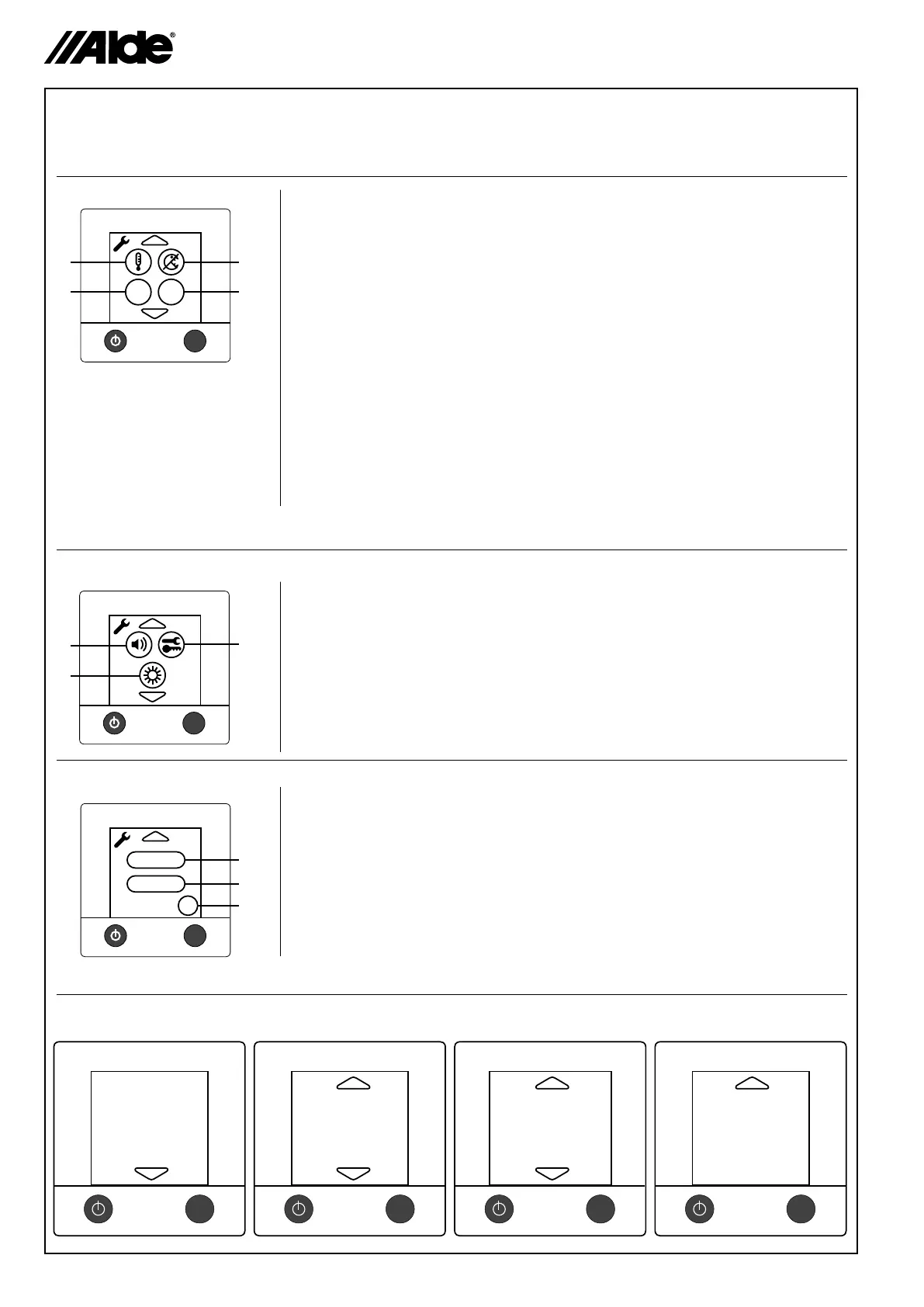
9. The tool menu (functions)
When you are in the tool menu (see section 8), you can use the tools described below. Step between the various
tool elds by pressing the up or down arrow symbols. You can always leave the tool menu with the MENU button.
9.6 Service menus
1. Offset (temperature adjustment)
Using this function, you can calibrate the temperature on the panel if you
notice that the temperature (the stabilised room temperature) is not the
same as the temperature shown on the panel. This also applies to outdoor
temperature.
2. Automatic temperature increase (legionella)
At 02.00 at night (if the clock is set) the boiler starts and works according to
“Warm Water” (see section 5). This is in order to reduce the risk of legionella.
The function is disconnected in the factory setting.
3. Language
This function is used to reset the screen between different languages.
Available languages are: English, French and German. On the other hand,
the service menu is only in English (see section 9.6).
4. External start
This function is used when starting the boiler from the outside, for example,
with GSM. When external start has been activated, the panel’s On/Off button
is switched off (see the assembly setting manual for external start). To use
this function, an external start installation is required (see vehicle, boat or
building manual).
1. Button sound
With this function, you can connect or disconnect the button sound.
The button sound is connected in the factory setting.
2. Tools / Key
Under Tools / Key you can lock or unlock access to the tool menu.
3. Luminance
The luminance can be adjusted between 1-10. The factory setting is 2.
1. Service
With this function, you can see certain values of the boiler on the screen.
The values are updated once a second
2. Resetting the system
Using this function, the boiler can be reset to the factory setting. After resetting,
the panel is set as follows: the boiler in Off mode, electrical operation 1kw, LPG
heating in On mode and indoor temperature 22°C.
Other functions are disconnected.
3. OK
To leave the tool menu, press OK.
MENU
Activated
Functions
MENU
Heater temp:
Sanitary temp:
MENU
Soft Rev.
Heater:
Panel:
CI Version:
MENU
Fan rotation: RPM
Current: A
Current:
Overheat: deact/act
Window switch:deact/act
Extern start: deact/act
MENU
Ex t
1
2
3
4
Lan
MENU
1
2
3
3
MENU
Reset
Service
OK
1
2
9.3
9.4
9.5


 To Next Page