EasyManua.ls Logo

Alde 3010 613 - User Manual

Alde 3010 613
76 pages
Go to English
Print Icon
To Next Page IconTo Next Page
Loading...
Bruksanvisning & monteringsanvisning – Manöverpanel 3010 613
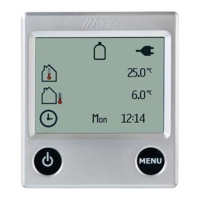
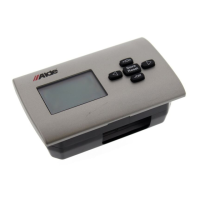
Operating & installation instructions – Control panel 3010 613
Bedienungsanleitung & Montageanleitung – Bedieneinheit 3010 613
Instructions d’utilisation & de montage – Panneau de commande 3010 613
Bruksanvisning og monteringsanvisning – Betjeningspanel 3010 613
Käyttö- ja asennusohjeet – Ohjauspaneeli 3010 613
Gebruiksaanwijzing & montagevoorschriften – Bedieningspaneel 3010 613
Navodila za uporabo in montažo – Upravljalna enota 3010 613
Istruzioni per l’uso e per il montaggio – Pannello di comando 3010 613
3010
Question and Answer IconNeed help?

Do you have a question about the Alde 3010 613 and is the answer not in the manual?

Summary

Starting the Boiler

Control Panel Standby Mode

Navigating to Setting Menu

Setting the Required Temperature

Hot Water Boost

Heating Operation Modes

Heating with Electricity

Activating heating using electrical power, with power step selection.

Heating with Gas

Activating heating using gas, with priority given to electricity.

Unlocking the Tool Menu

Tool Menu Functions

Time-Based Functions

Features related to clock, night-time mode, and automatic start.

Pump and Power Management

Controls for pump operation, speed, and power source selection.

Fuel and System Status

Monitoring LPG status and controlling specific system components.

Navigation and UI Settings

Arrow symbols for navigation and basic UI adjustments.

Advanced Tool Menu Functions

Safety and Health Functions

Functions for automatic anti-bacterial mode and 230V connection.

Temperature Calibration and Load Monitoring

Calibrating temperature, monitoring load, and managing external start.

Interface and Language Settings

Adjusting screen brightness, button sound, and display language.

Service and System Resetting

Service Values

Viewing current boiler values updated in real-time.

System Reset to Factory Settings

Restoring the control panel to its original factory configuration.

External Main Panel Translator

Enabling an external main panel to operate the boiler.

Fault Messages

Emergency Start Procedure

Control Panel Installation

Location and Mounting Guidelines

Recommendations for optimal placement and physical installation of the panel.

Cable Connection Diagram

Diagram illustrating connections between the control panel and boiler.

Summary

Starting the Boiler

Control Panel Standby Mode

Navigating to Setting Menu

Setting the Required Temperature

Hot Water Boost

Heating Operation Modes

Heating with Electricity

Activating heating using electrical power, with power step selection.

Heating with Gas

Activating heating using gas, with priority given to electricity.

Unlocking the Tool Menu

Tool Menu Functions

Time-Based Functions

Features related to clock, night-time mode, and automatic start.

Pump and Power Management

Controls for pump operation, speed, and power source selection.

Fuel and System Status

Monitoring LPG status and controlling specific system components.

Navigation and UI Settings

Arrow symbols for navigation and basic UI adjustments.

Advanced Tool Menu Functions

Safety and Health Functions

Functions for automatic anti-bacterial mode and 230V connection.

Temperature Calibration and Load Monitoring

Calibrating temperature, monitoring load, and managing external start.

Interface and Language Settings

Adjusting screen brightness, button sound, and display language.

Service and System Resetting

Service Values

Viewing current boiler values updated in real-time.

System Reset to Factory Settings

Restoring the control panel to its original factory configuration.

External Main Panel Translator

Enabling an external main panel to operate the boiler.

Fault Messages

Emergency Start Procedure

Control Panel Installation

Location and Mounting Guidelines

Recommendations for optimal placement and physical installation of the panel.

Cable Connection Diagram

Diagram illustrating connections between the control panel and boiler.

Alde 3010 613 Specifications

General IconGeneral
BrandAlde
Model3010 613
CategoryControl Panel
LanguageEnglish

Related product manuals