67
5.7.1 Wind Chill, Dew Point and Heat Index Display
Press the [TEMP] button to switch between Outdoor Temperature, Wind Chill,
Dew Point, Heat Index.
The device supports up to 8 additional thermo-hygrometer sensors. If you
have the extra sensors, press the [TEMP +] button to switch between Outdoor
Temperature, Wind Chill, Dew Point, Heat Index, 8 channel temperature and
humidity, Circle Mode
5.8 Alarms
5.8.1 Viewing High and Low Alarms
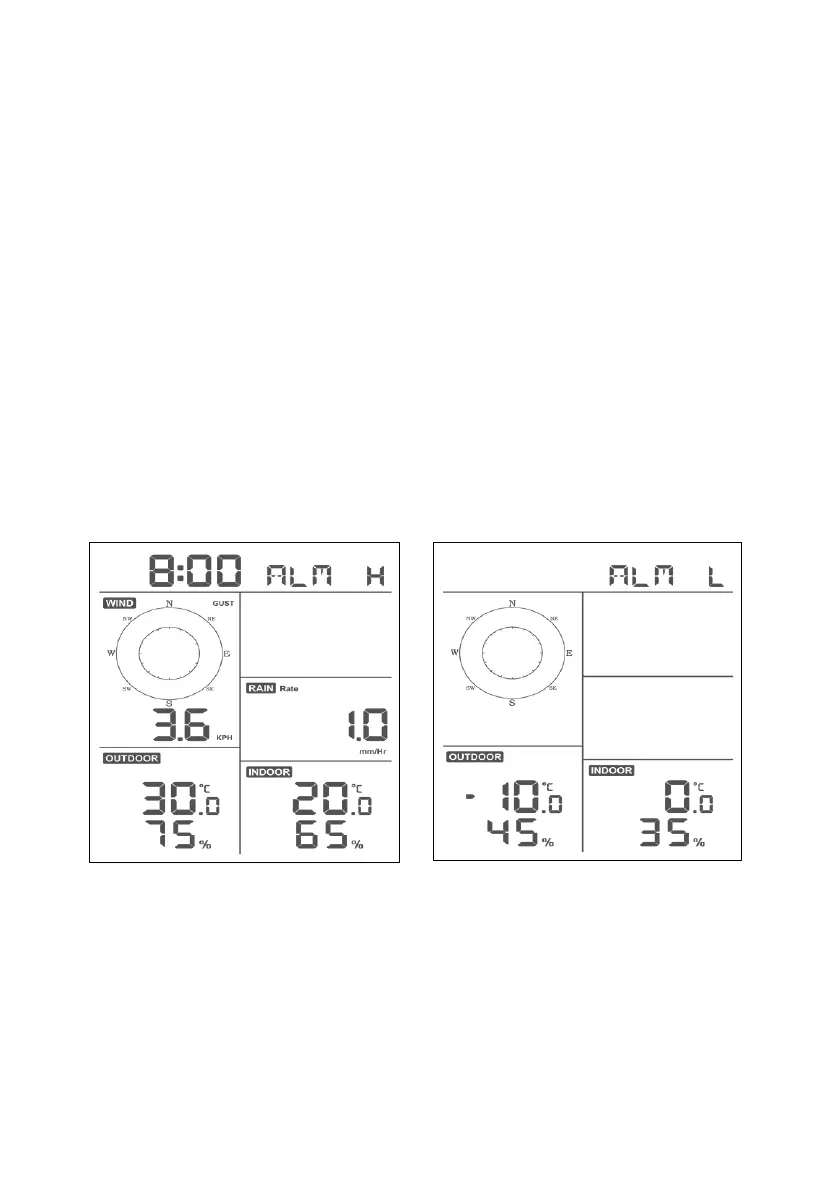
To view the high alarm settings, press MODE button a third time, and the high
alarms will be displayed, as shown in Figure 19 (a).
To view the low alarm settings, press the MODE button a fourth time, and the
low alarms will be displayed, as shown in Figure 19 (b).
To return to normal mode, press the LIGHT button again.
Figure 19
5.8.2 Setting High and Low Alarms
While the High Alarm is displayed (reference Section 5.8.1), press and hold
the MODE button for 2 seconds to enter the High Alarm Set Mode.
While the Low Alarm is displayed (reference Section 5.8.1), press and hold
the MODE button for 2 seconds to enter the Low Alarm Set Mode.


 To Next Page