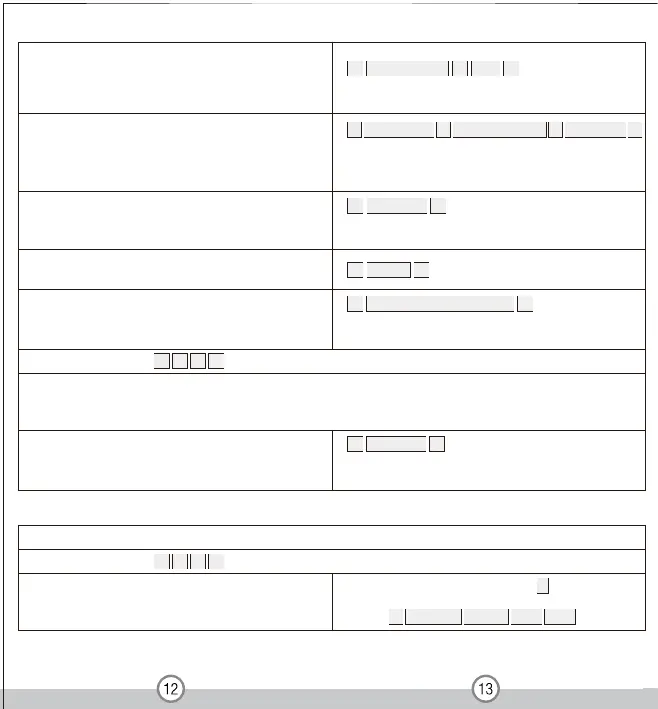
To delete Card users by user ID
This option can be used when a user has lost their card
To delete Card users by card number
Cards can be deleted continuously without exiting
from programming mode
To add Card Users (Method 1) Auto-generated ID numbers
To add a series cards users-Block Enrollment
The card number must be consecutive (This operation is only
for Zone 1)
To delete card users by cards
Note: Users can be deleted continuously without exiting
programming mode
1 User ID number # Card #
The ID number can be any number between 1-1100
To add a card user (Method 2)
This is the alternative way to enter cards using user ID
allocation. In this method a user ID is allocated to a card.
Only one user ID can be allocated to a single card
Card quantity is between 1-1100 Of the 8 digits card number,
it is the last 8 digits onthe card Maximum 1100 cards can be
enrolled at a stretch within 1
minute
5 User ID number # 8 digits Card number # Card quantity #
The device can automatically identify the card of
Zone 1 or Zone 2
2 Read Card #
2 User ID #
To set user for Zone 2 ( )
3
2 2 #
To set PIN user for Zone 2 is the same as Zone 1, only the ID number is 1101-1200 for Zone 2.
To set Card user for Zone 2 is the same as Zone 1, with the exception of adding Card users with auto-generated ID numbers
(Method 1) as below
Card can be added continuously without
exiting programming mode
5 Read card #
9 Input 8 d igits card number #
Car d a nd PIN M ode
To set user for Zone 1 ( )
3
1 1 #
To add a card and PIN user
(The PIN is any 4-8 digits between 0000-99999999 with
the exception of 1234 which is reserved)
Add the card as for a card user Press * to exit from the
programming mode Then allocate the card a PIN as
follows: * Read card 1234 # PIN # PIN #


 To Next Page
 Loading...