25
10) Bring up the Bass Guitar Channel Fader. Set so that the meters read "-6".
11) Mute the Bass
12) Raise the Channel Faders with the Motion instruments. Set so that the
meters read "-10 " unless percussion instruments such as cowbell, triangle,
or shaker are involved in, which case the meters should read "-15".
13) Mute the Motion instruments.
14) Raise the Channel Faders with the Pad instruments. Set so the meters
read "-30".
15) Mute the Pad instruments.
16) Raise the Channel Faders with the Melody and solo instruments. Set so the
meters read "-8".
17) Mute the Melody instruments.
18) Raise the Channel Faders with the Fill instruments. Set so the meters read
"-10".
19) Unmute all channels and make balance adjustments as necessary.
The above can be done very fast once you get the hang of it. Usually, it is done at least twice
when "getting up" a mix. The first time is without effects or EQ to see what, if anything the mix
needs, then a second time after all of the effects and EQ have been added.
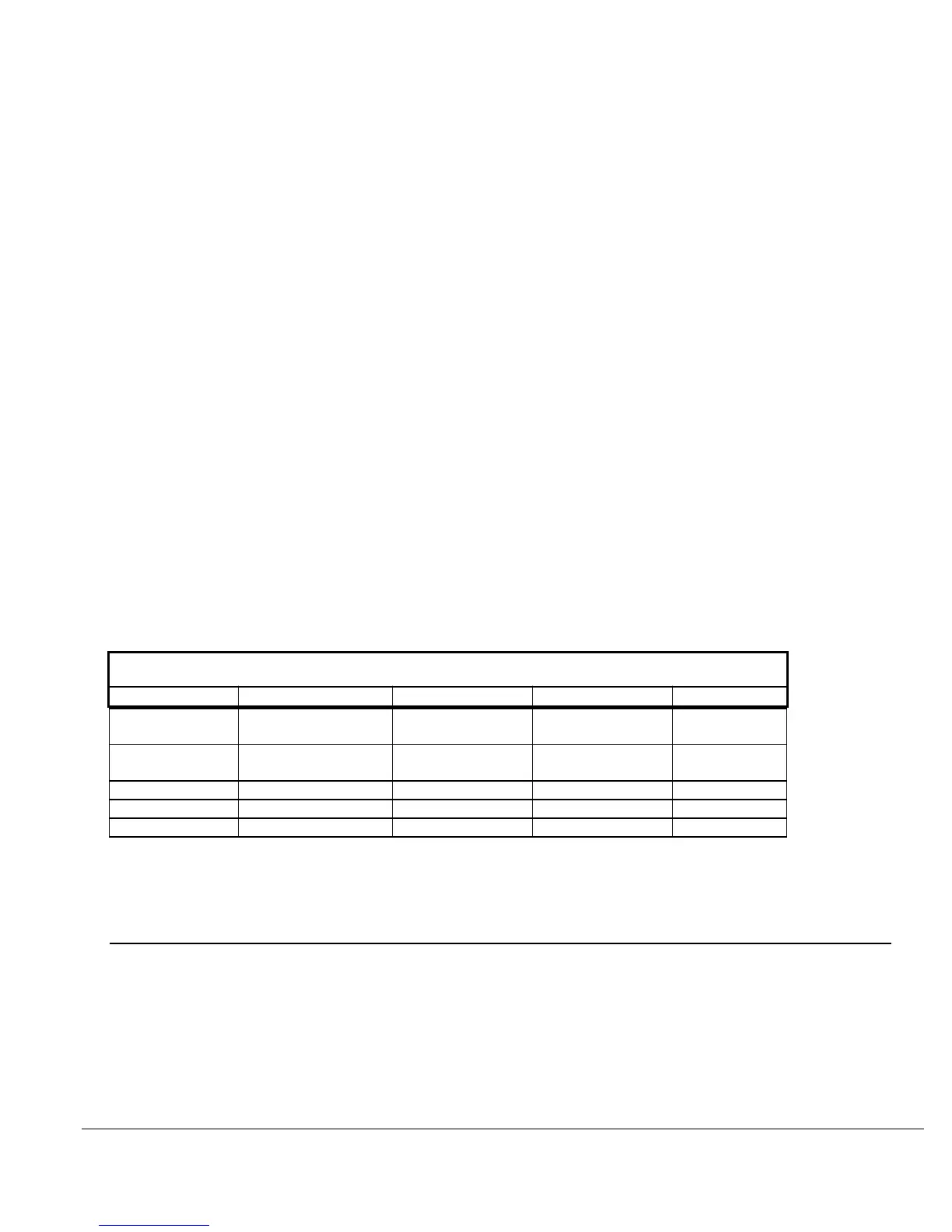
FIGURE 12
MIX LEVEL REFERENCE CHART
RELATIVE MIX LEVELS
RHYTHM MOTION PAD MELODY FILLS
Snare 0 VU Rhythm Gtr -10 VU Keys -30 VU Lead Vocal -8 VU All Inst.-10
VU
Kick -2 VU Perc Keys -10 VU Strings -30 VU Solos -8 VU Toms 0
VU
Hat -15 VU Percussion -15 VU
Cymbals -15 VU
Bass Gtr -6 VU
Once again, THIS IS ONLY A STARTING POINT. Each song is unique as are your mixing
preferences. Blending the levels, EQ, and effects is the fine art of mixing. We hope that this
section will help you achieve dependable mixes that sound good no matter where you play them
or what equipment you play them back on.
HOW TO GROUP SEVERAL CHANNELS TOGETHER WHEN MIXING
A SUB MASTERcan be very useful in controlling several channels with the movement of only
one fader. For example, if you wish to control your rhythm section via a SUB MASTERand the
instruments were located on tracks 1 through 4 (raise the Channel Faders used as Tape Returns
, faders 9 through 12 to monitor), do the following: See Section 2, INTERFACING WITH A
MULTITRACK TAPE RECORDER
1) Raise the SUB MASTER Fader to the 0 position.
2) Now assign the SUB MASTER by switching the "SUB MASTER TO
MASTER" assign switch to the "On" position.




 To Next Page