32
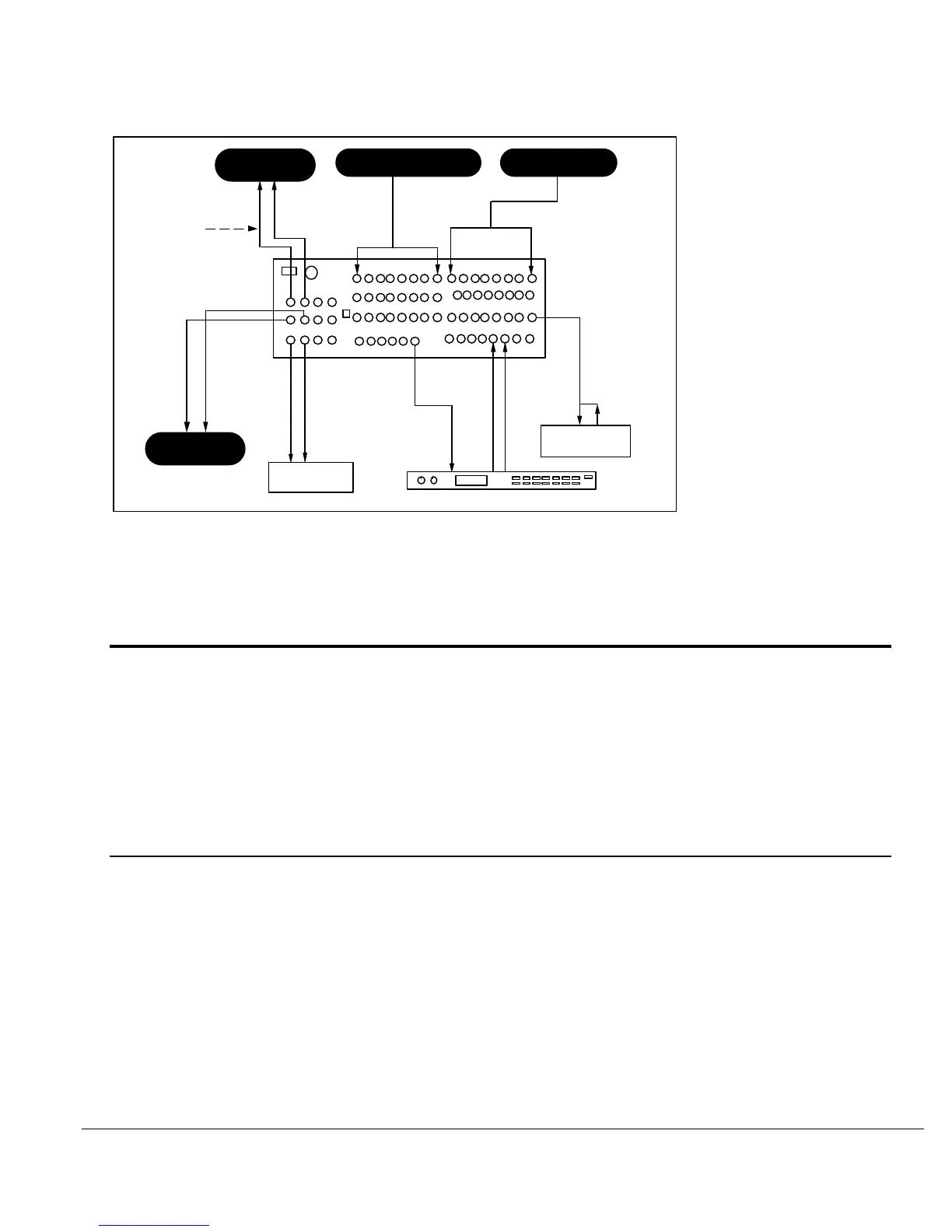
FIGURE 17
USING THE 1622 MIXER FOR A MIX MINUS OUTPUT
LINE INPUTS
MIC
DIRECT OUTPUT
CHANNEL INSERTS
SENDS
RETURNS
MAIN OUT
TAPEMON
SUB OUT
IN
IN
IN
OUT
OUT
OUT
EFFECTS UNIT
MONITOR
SPKR AMP
CART MACHINES
VTR'S
VTR
IN
IN IN
MIX-MINUS
OUTOUT
MICRO LIMITER
VTR
IN
SECTION 4
TROUBLESHOOTING
NO SOUND
NO SOUND WHEN CHANNEL IS SOLOED
1) Plug is inserted into LINE input, which has priority over MIC input.
2) Open circuit in the INSERT signal path. Remove plug from INSERT jack.
NO SOUND WHEN MONITOR LEVEL TURNED UP
1) MONITOR MUTE is engaged. Switch to "Off" position.
2) SOLO is activated. If SOLO LED is lit, find the channel soloed and switch to "Off" position.
3) TAPE/MON Switch in the wrong position. Swith to MON position to hear the console signal.
Switch to TAPE position to hear the mixdown tape deck.
OVERLOAD PROBLEMS
DISTORTION HEARD WHEN INPUT CHANNEL IS SOLOED
1) Input too hot. Decrease TRIM level.
2) Excessive use of EQ. Decrease TRIM level or EQ levels.
3) Cable fault. Check the cable from the mic or instrument.
4) Trouble at the source. Try a different mic or instrument.
DISTORTION IS BEING RECORDED ONTO TAPE, BUT DISTORTION NOT HEARD WHEN INPUT
CHANNEL IS SOLOED
1) SUB MASTER is overloaded. Decrease the fader levels of the channels assigned to the
SUB MASTER.




 To Next Page