SECTION 2
SECTION 2
DESCRIPTION OF CONTROLS
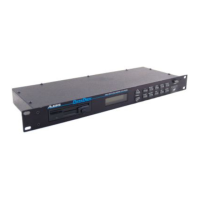
FRONT PANEL
3 1/2" DISK
DRIVE
The disk drive accepts standard double sided, double density (DD)
3 1/2" floppy diskettes, the same as those used in many syn-
thesizers, samplers, and computers. Each disk will store up to 53
MIDI data files as long as the total size of file data does not exceed
a maximum of 800K.
LCD DISPLAY
The LCD Display shows the current DATADISK operating status and
allows you to view files stored on the diskette. The display
features 2 lines of up to 16 characters each.
SCROLL
The SCROLL buttons are used to view either the files of a diskette,
select a file, digit, or character, or abort an operation.
NAME
The NAME button is used to enter the character editing mode and
allows you to name or rename a file.
RECEIVE
The RECEIVE button is used to enter the Receive MIDI Data mode.
In this mode, the DATADISK is able to receive either a single MIDI
system exclusive file, multiple system exclusive files (up to the limit
of available diskette space), or a MIDI Sample Dump.
SEND
The SEND button is used to send data stored on a diskette to either
a sequencer, synthesizer, or sampler, through MIDI. Either a
single or multiple files can be sent.
DELETE
The DELETE button is used to erase an unwanted file or files from a
diskette.
CAUTION: Once a file is deleted, it is lost forever!


 To Next Page