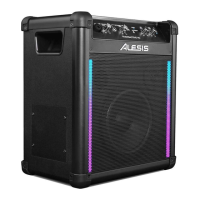
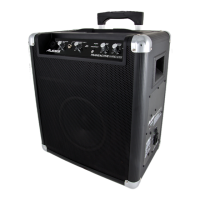
The Alesis TransActive Wireless is a portable, battery-powered sound system designed for various audio applications, including live performances, presentations, and events. It features a robust design and multiple input options, making it versatile for different users and scenarios.
Function Description:
The primary function of the TransActive Wireless is to amplify audio from various sources, including microphones, musical instruments, and auxiliary devices, and to stream audio wirelessly via Bluetooth. It is equipped with a rechargeable lead-acid battery, allowing for portable operation without the need for a constant power outlet. The unit includes a built-in device cradle for holding smartphones or tablets, and a USB charging port to keep these devices powered.
Usage Features:
- Input Versatility: The TransActive Wireless offers multiple input options. It has a Microphone Input with Volume Control (XLR-1/4"), which is a mono input suitable for microphones or other musical instruments. Additionally, there is an Instrument/Microphone Input with Volume Control (1/4" TS), specifically designed for high-impedance instruments like guitars. For connecting other audio sources, a stereo 1/8" Auxiliary Input with Volume Control is available, compatible with CD players, MP3 players, or other auxiliary devices.
- Bluetooth Connectivity: The device supports Bluetooth wireless audio streaming. Users can pair their Bluetooth-enabled devices (like smartphones or tablets) to the TransActive Wireless to play music or other audio content. A "Paired" LED indicates when a device is successfully connected. A "Disconnect" button allows users to break current Bluetooth connections and reset the Bluetooth module, facilitating pairing with new devices.
- Volume Controls: Individual volume controls are provided for each input: Microphone Input, Instrument/Microphone Input, and Auxiliary Input (which also controls Bluetooth volume). A Master Volume Control adjusts the overall mix volume of all inputs, including the tuner and Bluetooth audio, allowing users to balance the sound output.
- Power Management: The unit can run on its internal rechargeable battery or be powered directly via the included IEC power cable. The Power LED indicates whether the unit is on or off. A Battery Level Indicator, consisting of four lights, shows the remaining battery charge when the unit is powered on. The device can charge its internal battery even when the unit is powered off, as long as it is connected to a power source.
- Device Charging: A dedicated Device Charge port (USB) is available to charge external devices like smartphones or tablets. This USB charging function is active only when the TransActive Wireless unit is powered on. Users with iPad (3rd generation) might experience slower charging and are advised to charge with the screen locked for optimal performance.
- Portability and Design: The TransActive Wireless features a device cradle on its top panel, designed to securely hold iPads, iPod touches, iPhones, Android devices, or other similar devices during use. This integrated design enhances convenience for users who rely on their smart devices for audio playback or control.
- Troubleshooting Guidance: The manual provides clear instructions for common issues. For distorted sound, users are advised to lower the volume of the sound source or the overall volume of the TransActive Wireless. If there's too much bass, adjusting the tone or EQ control on the sound source is recommended. High-pitched whistling noises with microphones are typically feedback, and users should point microphones away from the speaker. If the microphone volume is too low compared to music, turning down the music volume from the source is suggested.
- Pairing a Bluetooth Device: The pairing process is straightforward: turn on the Bluetooth device, power on the TransActive Wireless (which automatically enters pairing mode), and then navigate to the Bluetooth device's setup screen to find and connect to "Alesis TransAct." If a pairing code is requested, "0000" should be entered. The "Paired" LED will illuminate solid once connected. Users experiencing pairing issues are advised to update their device's operating system. The "Disconnect" button can be used to unpair devices.
Maintenance Features:
- Battery Care: The TransActive Wireless uses rechargeable lead-acid batteries, similar to those found in automobiles. Proper care is crucial for maximizing battery lifespan.
- Initial Charge: It is essential to fully charge the battery before its first use to ensure maximum battery life.
- Post-Use Charging: The battery should be completely recharged after each use.
- Avoid Deep Discharge: Users should avoid completely draining the battery, as this can reduce its lifespan.
- Continuous Power: The unit can remain plugged in for up to two weeks without harm.
- Monthly Drain: For optimal life, it is recommended to drain the battery by approximately 80% once a month.
- Storage Recommendations:
- Temperature and Humidity: Avoid storing the unit in high temperatures or moist places.
- Long-Term Storage: For extended storage periods, the battery should be periodically recharged. If the battery is not charged for six months, it may lose its ability to charge.
- Repair and Disposal:
- Battery Replacement: If the battery begins to lose its ability to recharge, indicating it's nearing the end of its life, users should contact technical support at www.alesis.com/supporthome for assistance.
- Environmental Responsibility: The unit and its battery should be brought to a recycling center or disposed of in accordance with local ordinances, promoting environmentally responsible practices.

 Need help?
 General









 To Next Page