Need help?
Do you have a question about the Alesis Vortex Wireless 2 and is the answer not in the manual?
Procedures for loading presets from the device or computer.
Steps to save current editor settings as a .vw2 file.
Process to transfer presets from editor to the keyboard.
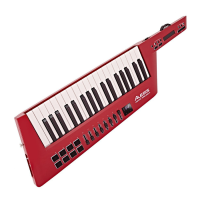
Set MIDI assignments and colors for the pads.
Set MIDI assignments for the faders.
 General
| Product color | Black, White |
|---|---|
| Volume control | Touch |
| Knobs color | Black |
| Control type | Buttons, Sensor |
| Number of pads | 8 |
| Backlight color | Multicolor |
| Backlight buttons | Yes |
| MIDI-keyboard number of keys | 37 keys |
| Interface | USB |
| Bundled software | Hybrid 3, Loom 2, Vacuum Pro & Xpand! 2 from AIR Music Tech, TimewARP 2600 from Way Out Ware & Ableton Live Lite |
| Battery type | AA |
| Number of batteries supported | 4 |
| Minimum RAM | 4000 MB |
| Minimum processor | Dual Core 2GHz, Intel Core i5/i7 |
| Mac operating systems supported | Mac OS X 10.5 Leopard, Mac OS X 10.8 Mountain Lion |
| Windows operating systems supported | Windows 7 |

 To Next Page