Need help?
Do you have a question about the Alfa Network R36 and is the answer not in the manual?
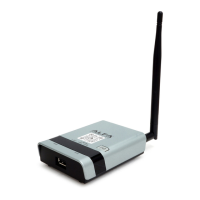
Describes the main hardware features of the 3G Mobile Wireless Router.
Outlines the functionalities and features supported by the 3G Mobile Wireless Router.
Details how to connect a PC to the router's LAN port and access the management interface.
Configures the WAN connection using a USB Wireless Adapter with Static IP mode.
Specifies the security mode for the SSID, allowing selection of various security methods.
Provides MAC address filtering to allow or reject specific station MAC addresses.
Configures the WAN connection using a USB Wireless Card with DHCP mode.
Specifies the host name of the DHCP client.
Sets the IP address of the Primary Domain Name Server for network name resolution.
Sets the IP address of the Secondary Domain Name Server.
Configures the WAN connection using a USB Wireless Card with PPPoE mode.
Sets the PPPoE user name for the WAN port.
Sets the PPPoE password for the WAN port.
Prompts the user to re-enter the chosen password for verification.
Configures keep alive time and on-demand idle time for the connection.
Enables support for a USB 3G modem as a WAN connection.
Encrypts access to the 3G modem connection using a PIN code.
The dialled access code that connects the USB device to the service provider.
The access point name (APN) that uniquely identifies the 3G or 3.5G service provider.
The user name for the 3G or 3.5G service provider account.
The password for the 3G or 3.5G service provider account.
Enables monthly limits on time or total data for the 3G connection.
Specifies budget limits by time or data, including Time and Data Budget settings.
Defines actions to take when budget limits are reached, like dropping connections.
Specifies the user name for the SMTP server account.
Specifies the password for the SMTP server account.
Specifies the URL of the SMTP mail server for alert messages.
Specifies the sender's email address for alert messages.
Specifies the recipient's email address for alert messages.
Sets the day of the month to reset time/data budget counters.
Configures ADSL Modem connection using PPPoE mode for Internet access.
Allows changing the router's MAC address to match the ISP's registered MAC address.
Enables 3G USB as a backup WAN connection when DSL is not functioning.
Selects PPTP for the WAN port connection from the drop-down list.
Allows changing the router's MAC address to match the ISP's registered MAC address.
Enables WAN connection using a USB 3G modem or USB Wireless Card.
Sets the PPTP server IP address.
Sets the PPTP user name for the WAN port.
Sets the PPTP password for the WAN port.
Prompts for re-entry of the chosen password.
Sets the PPTP network mode.
Sets the static IP address, available when PPTP Network Mode is static IP.
Sets the static IP subnet mask, available when PPTP Network Mode is static IP.
The IP address of the router for destination IP addresses not on the local subnet.
Enables and configures the keep alive time.
Sets the IP address of the Primary Domain Name Server.
Selects L2TP for the WAN port connection from the drop-down list.
Allows changing the router's MAC address to match the ISP's registered MAC address.
Enables WAN connection using a USB 3G Modem and USB Wireless Card.
Sets the L2TP server IP Address.
Sets the L2TP user name for the WAN port.
Sets the L2TP password for the WAN port.
Prompts for re-entry of the chosen password.
Sets the L2TP network mode.
Sets the static IP address, available when L2TP Network Mode is static IP.
Sets the static IP subnet mask, available when L2TP Network Mode is static IP.
The IP address of the router for destination IP addresses not on the local subnet.
Enables and configures the keep alive time.
Sets the IP address of the Primary Domain Name Server.
Configures radio signal characteristics, wireless security features, and virtual access points (VAPs).
Enables or disables the wireless radio.
Defines the radio operating mode, e.g., 11b/g/n mixed, 11n only.
The name of the wireless network service provided by the router.
An additional VAP interface supported on the device for a second network name.
Controls whether the SSID is broadcast in the beacon signal.
Isolates communication between clients to protect them, typically for hotspots.
Isolates wireless clients from different SSIDs.
The MAC address of the 3G Mobile Wireless Router in the Basic Service Set network.
The radio channel used for communication with wireless clients.
Helps receivers overcome multipath delays by copying signal time to the front.
Determines modulation, coding, and number of spatial channels for data transmission.
Reduces data packet collision by using the reverse direction protocol.
Leverages multiple antennas to improve performance and range.
Provides extra bandwidth when 20/40MHz channel bandwidth is set.
Enables Mac Service Data Unit (MSDU) aggregation.
Selects whether to block ACK during data transferring.
Selects to reject peer BA-Request or not.
Prevents TKIP data encryption when using 802.11n high-throughput rates.
Includes additional radio parameters for wireless settings.
Sets the WMM operational mode, advertising QoS capabilities to clients.
Verifies that clients attempting to connect are authorized users.
Protects data passing between the unit and clients.
Configures the WEP security mode used by clients.
Configures WPA-PSK and WPA2-PSK security modes using a shared key.
Selects the data encryption type to use, TKIP, AES, or TKIP/AES.
Uses Temporal Key Integrity Protocol for encryption, dynamically changing keys.
Uses Advanced Encryption Standard for encryption, providing robust data confidentiality.
Uses either TKIP or AES keys; supports mixed WPA/WPA2 modes.
Configures WPA/WPA2 security modes using 802.1X authentication with a RADIUS server.
Configures 802.1X security mode for clients, requiring a RADIUS server.
Selects WEP keys for data encryption, with keys auto-generated by RADIUS server.
Configures RADIUS server settings, including IP address and port.
Selects the WDS mode: Disable, Lazy, Bridge, Repeater.
Specifies the data encryption used on the WDS link.
Sets the encryption key for the WDS link based on type and length.
The MAC address of the other 3G Mobile Wireless Router in the WDS link.
Operates as a standard bridge forwarding traffic between WDS links.
Operates as a wireless repeater, extending range for remote clients.
Enables WPS, locks security settings, and refreshes WPS configuration information.
Uses an eight-digit PIN code for WPS registrar/enrollee authentication.
Uses the physical WPS button for WPS device activation.
Restricts connection parameters to limit intrusion and defend against hacker attacks.
Defines how packets not matching any rules are handled (Accepted or Dropped).
Specifies the MAC address to block or allow traffic from.
Specifies the destination IP address to block or allow traffic from.
Specifies the source IP address to block or allow traffic from.
Specifies the destination port type, TCP, UDP, or ICMP.
Enables or disables port forwarding for the virtual server.
Specifies the IP address of a server on the local network for external access.
The protocol port number on the local server.
The protocol port number on the router's WAN interface.
Specifies the protocol to forward, TCP, UDP, or TCP&UDP.
Identifies the port forwarding service on the network.
Sets the DMZ status (Enable/Disable).
Specifies an IP address on the local network allowed unblocked access to the WAN.
Filters inbound Uniform Resource Locators (URLs) to block access to specific websites.
Displays the current URL filter list.
Adds a URL filter to the settings.
Configures the current time, time zone, and SNTP server settings.
Sets output power for the R36 and/or wireless adapter.
Configures Dynamic DNS settings for a hostname and provider.
Sets the DDNS user name for the connection.
Sets a DDNS password for the connection.
The host name selected from the DDNS service provider.
 General
| Brand | Alfa Network |
|---|---|
| Model | R36 |
| Category | Wireless Router |
| Language | English |

 To Next Page