P.17
PRODUCT PRESENTATION
INTERFACE DESCRIPTION
DMX
ERROR
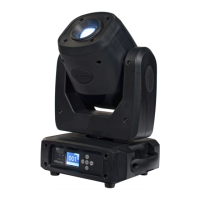
MS100
Led Moving Beam
1 3
2 4
FUNCTION DESCRITPION
1 LED error indicator Flashes to indicate that there is an error message
2 LED DMX indicator Lights ON when the DMX signal is received
3 LCD display Menu and function display
4 Keyboard For menu and sub-menu navigation
5 Mains switch Power switch ON/OFF
6 Protection fuse Electric fuse protection
7 Power OUT connector To connect more xtures . Load max. 960W
8 Power IN connector Power input. Use incuded power lead
9 DMX OUTXLR connector DMX signal output
10
DMX IN XLR connector DMX signal input
001
Set Manu
Sys
Advan
EN
DMX
RDM
180
Use buttons "UP" and "DOWN" to navigate in main menu. Press "ENTER" to conrm your selection.
Reverse displayAdress DMX
Settings Menu
Manual mode
Select language
Advanced system menu
System Menu
510
78
69


 To Next Page