⑬
⑫
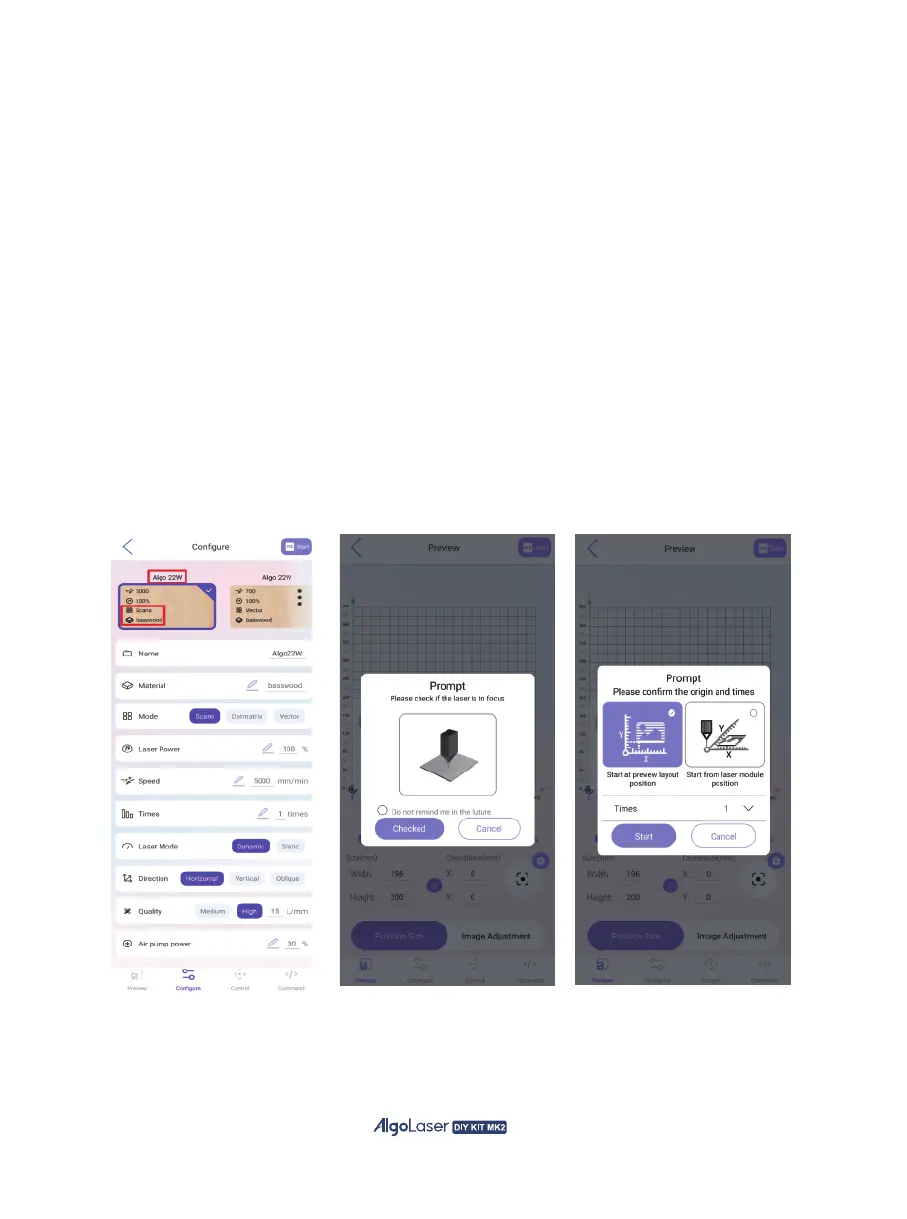
Set the parameters for engraving on the “Configure” page. There are
plenty of pre-set parameters available for the AlgoLaser. Simply locate
the appropriate preset and click to select it.
a. “Algo 22W” boxed in red.
a) Indicates a 22W laser module.
b. “Scans” , “basswood” boxed in red.
a) For engraving, choose the “Scans” mode.
b) “Basswood”, choose the appropriate wood based on the specific situation,
whether it be basswood or other suitable options.
(Note: If there is a discrepancy between the engraving parameters and
the desired effect, adjust the parameters accordingly.)
⑭
Click “Start” in the upper right corner to proceed. Check if the laser module
is focused. If not, refer to the manual for instructions on focusing.
If already in focus, click “Checked” to the next step.
Prompt for selecting the starting point of the laser module engraving:
click “Start” to the next step for the first time.
42


 To Next Page