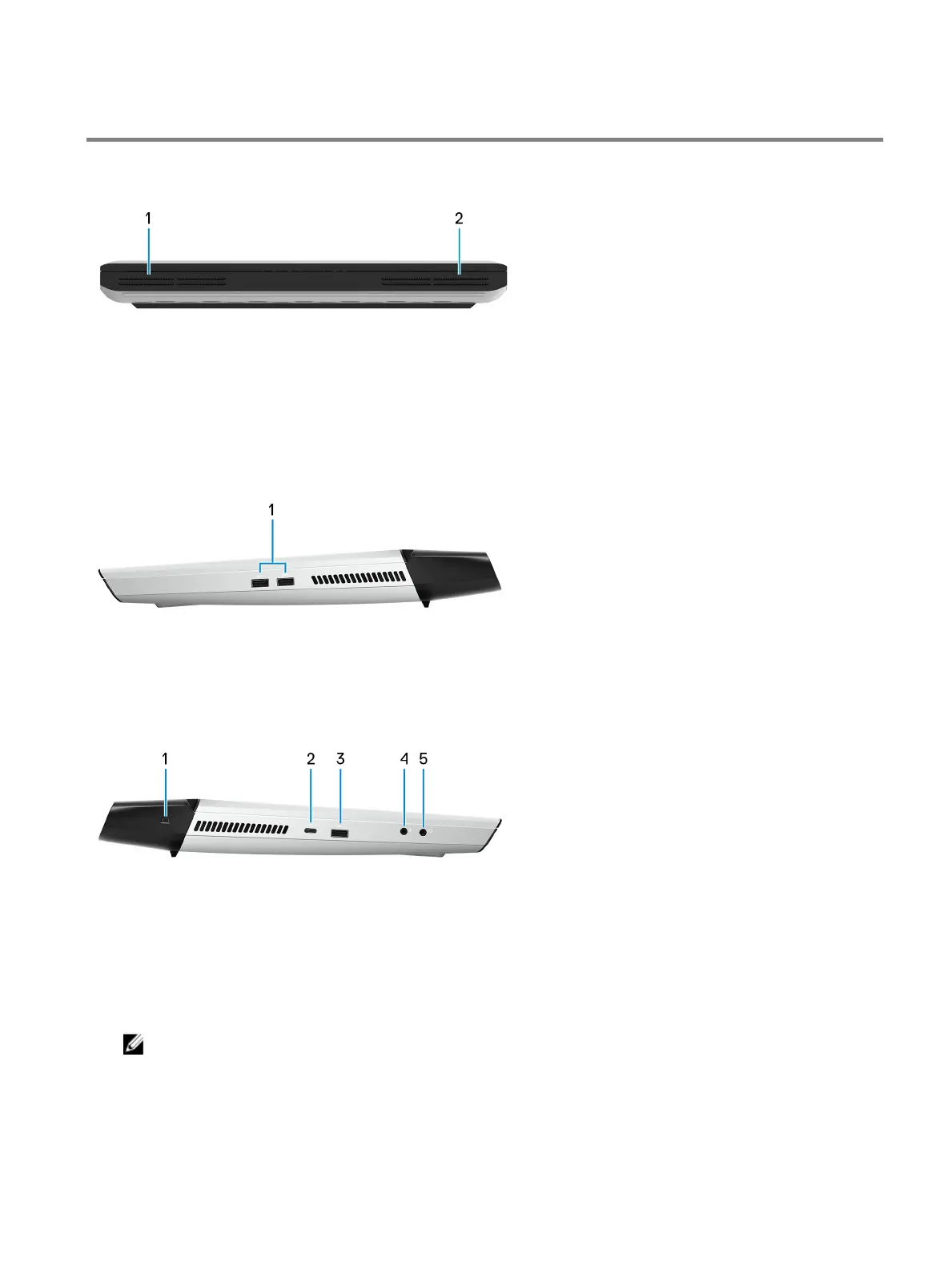
Views of Alienware Area-51m
Front
1 Left speaker
Provides audio output.
2 Right speaker
Provides audio output.
Right
1 USB 3.1 Gen 1 ports (2)
Connect peripherals such as external storage devices and printers. Provides data transfer speeds up to 5 Gbps.
Left
1 Security-cable slot (wedge-shaped)
Connect a security cable to prevent unauthorized movement of your computer.
2 Thunderbolt 3 (USB Type-C) port
Supports USB 3.1 Gen 2, DisplayPort 1.2, Thunderbolt 3 and also enables you to connect to an external display using a
display adapter.
Provides data transfer rates up to 10 Gbps for USB 3.1 Gen 2 and up to 40 Gbps for Thunderbolt 3.
NOTE: A USB Type-C to DisplayPort adapter (sold separately) is required to connect a DisplayPort device.
3 USB 3.1 Gen 1 port with PowerShare
Connect peripherals such as external storage devices and printers.
Provides data transfer speeds up to 5 Gbps. PowerShare enables you to charge your USB devices even when your
computer is turned o.
7















 To Next Page