NOTE: If the charge on your computer’s battery is less than 10 percent, you must connect the power adapter to
charge your computer, and USB devices connected to the PowerShare port.
NOTE: If a USB device is connected to the PowerShare port before the computer is turned o or in hibernate
state, you must disconnect and connect it again to enable charging.
NOTE: Certain USB devices may not charge when the computer is turned o or in sleep state. In such cases,
turn on the computer to charge the device.
4 Microphone/headphone port (congurable)
Connect an external microphone for sound input or headphones for sound output.
5 Headset port
Connect headphones or a headset (headphone and microphone combo).
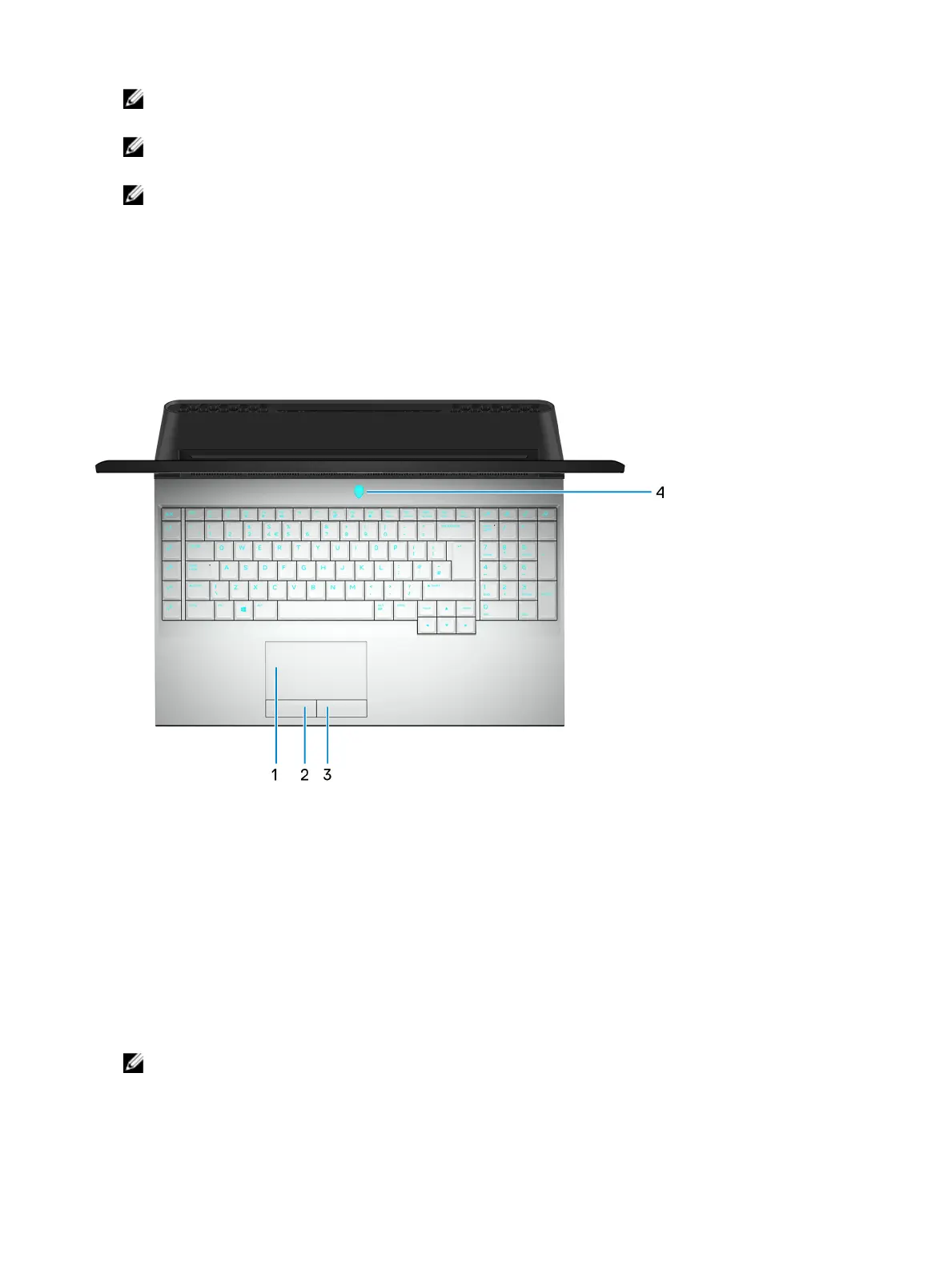
Base
1 Touchpad
Move your nger on the touchpad to move the mouse pointer. Tap to left-click and two nger tap to right-click.
2 Left-click button
Press to left-click.
3 Right-click button
Press to right-click.
4 Power button (Alienhead)
Press to turn on the computer if it is turned o, in sleep state, or in hibernate state.
Press to put the computer in sleep state if it is turned on.
Press and hold for 4 seconds to force shut-down the computer.
NOTE: You can customize the power-button behavior in Power Options.
8















 To Next Page