About your monitor | 15
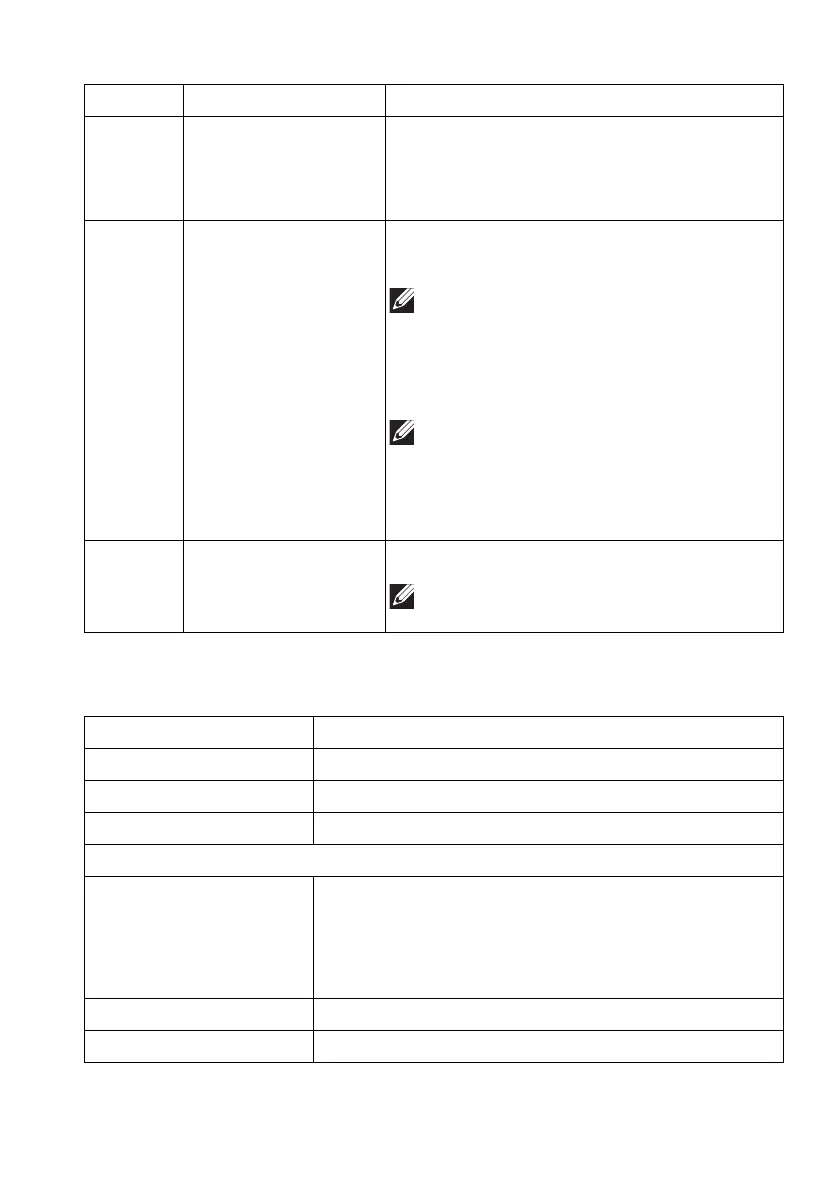
Monitor specifications
11 SuperSpeed USB
5
Gbps (USB 3.2
Gen
1) Type-B
upstream port
Connect the USB cable (shipped with your
monitor) to this port and your computer to
enable the USB ports on your monitor.
12 SuperSpeed USB
5
Gbps (USB 3.2
Gen
1) Type-A
downstream ports (2)
Connect your USB 3.2 Gen 1 (5 Gbps)
device.
NOTE: To use these ports, you must
connect the USB cable (shipped with
your monitor) to the USB-upstream
port on the monitor and to your
computer.
NOTE: To avoid signal interference,
when a wireless USB device is
connected to a USB downstream port,
it is not recommended to connect any
other USB devices to the adjacent port.
13 Line-out port Connect your speakers.
NOTE: This port does not support
headphones.
Description Value
Screen type Active matrix - TFT LCD
Panel technology Fast IPS
Aspect ratio 16:9
Viewable image
Diagonal:
Width (active area)
Height (active area)
Total area
622.00 mm (24.50 in.)
543.74 mm (21.40 in.)
302.62 mm (11.91 in.)
164545.63 mm
2
(255.04 in.
2
)
Pixel pitch 0.2832 mm x 0.2802 mm
Pixel per inch (PPI) 90
Label Description Use















 To Next Page