36 | Setting up the monitor
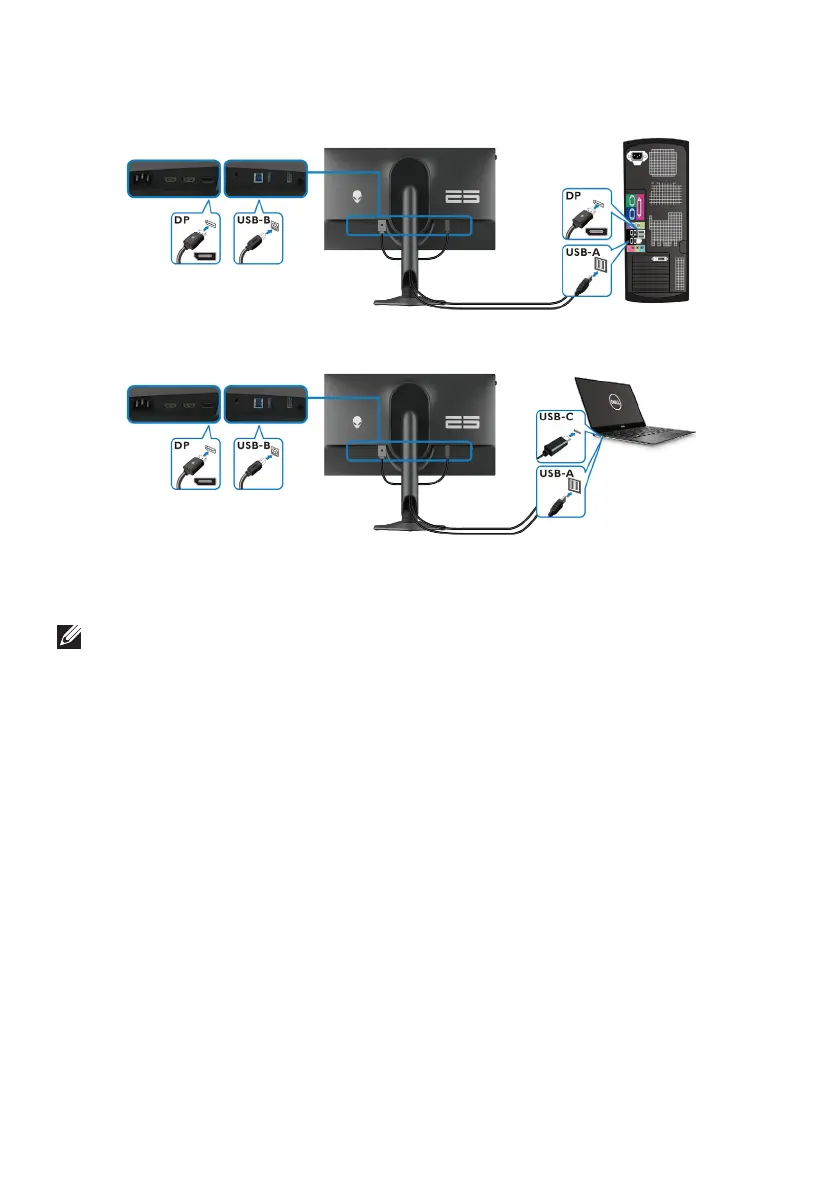
To connect your monitor to the computer:
1. Connect the DisplayPort cable or USB-C to DisplayPort cable from the
monitor to your computer.
NOTE: When using the DisplayPort to USB-C cable, connect the USB-C
end of the cable to the computer.
2. C
onnect the USB Type-B end of the upstream cable to the monitor and the
USB Type-A end of the cable to the computer.
3. C
onnect the USB peripherals to the SuperSpeed USB 5 Gbps (USB 3.2
Gen 1) downstream ports at the bottom of the monitor.
4. Connect
the power cables for your computer and monitor into a wall outlet.
5. T
urn on the monitor and the computer.
If your monitor displays an image, installation is complete. If it does not
disp
lay an image, see Common problems.















 To Next Page