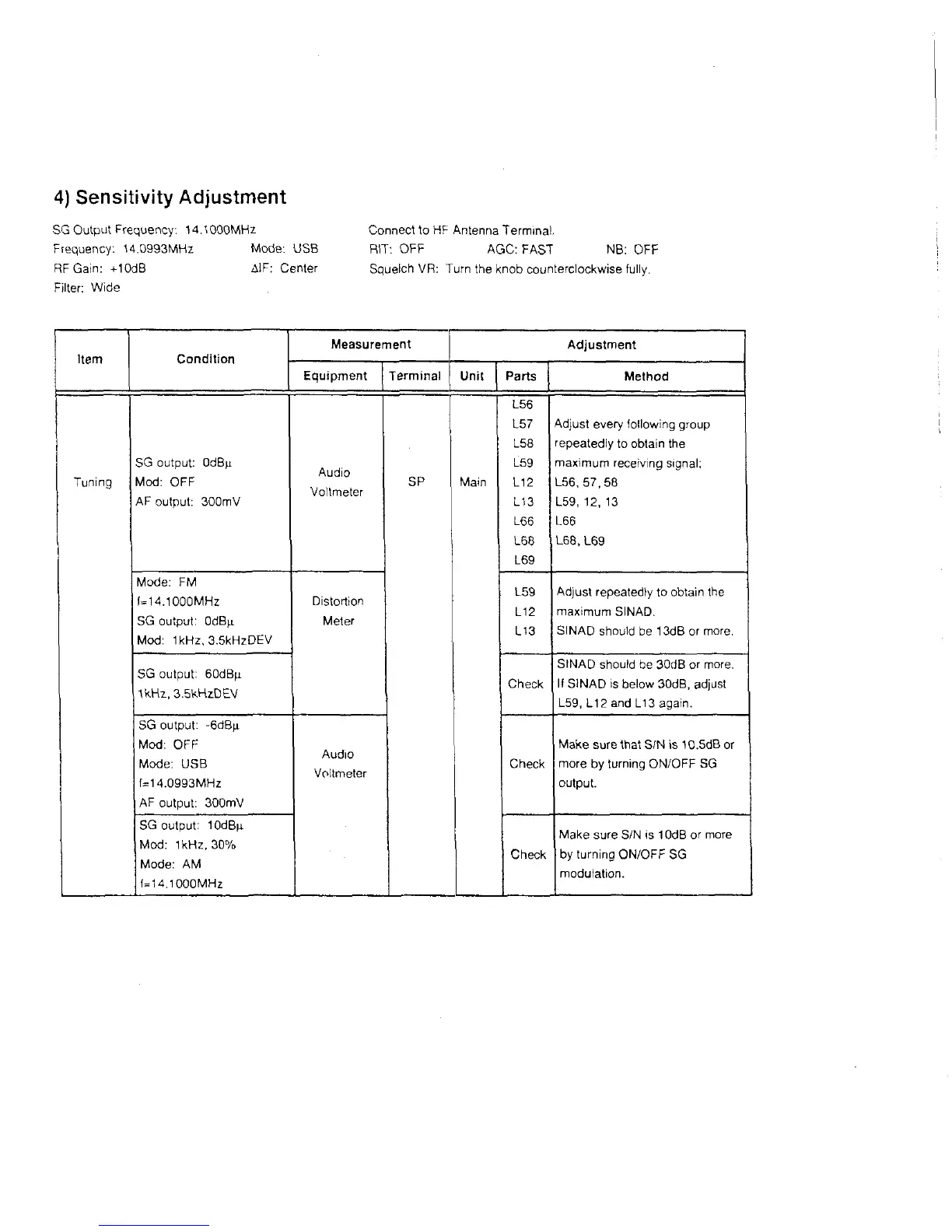
4) Sensitivity Adjustment
SG Output Frequency: 14.1000MHz
Frequency: 14.0993MHz Mode: USB
RF Gain: +10dB AlF: Center
Filter: Wide
Connect to HF Antenna Terminal.
RIT: OFF AGC: FAST NB: OFF
Squelch VR: Turn the knob counterclockwise fully.
Item
Measurement
Adjustment
Equipment Terminal
Unit Parts Method
Tuning
SG output: OdB^i
Mod: OFF
AF output: 300mV
Audio
Voltmeter
SP
Main
L56
L57
L58
L59
L12
L13
L66
L68
L69
Adjust every following group
repeatedly to obtain the
maximum receiving signal;
L56, 57,58
L59, 12, 13
L66
L68, L69
Mode: FM
(=14.1000MHz
SG output: OdBji
Mod: 1kHz, 3.5kHzDEV
Distortion
Meter
L59
L12
L13
Adjust repeatedly to obtain the
maximum SINAD.
SINAD should be 13dB or more.
SG output: 60dBfj-
1kHz,3.5kHzDEV
Check
SINAD should be 30dB or more.
If SINAD is below 30dB, adjust
L59, L12 and Li3 again.
SG output: -6dB[i
Mod: OFF
Mode: USB
f=14.0993MHz
AF output: 300mV
Audio
Voltmeter
Check
Make sure that S/N is 10.5dB or
more by turning ON/OFF SG
output.
SG output: 10dB|i
Mod: 1kHz, 30%
Mode: AM
f=14.1000MHz
Check
Make sure S/N is 10dB or more
by turning ON/OFF SG
modulation.



 To Next Page