■Ê»
O)
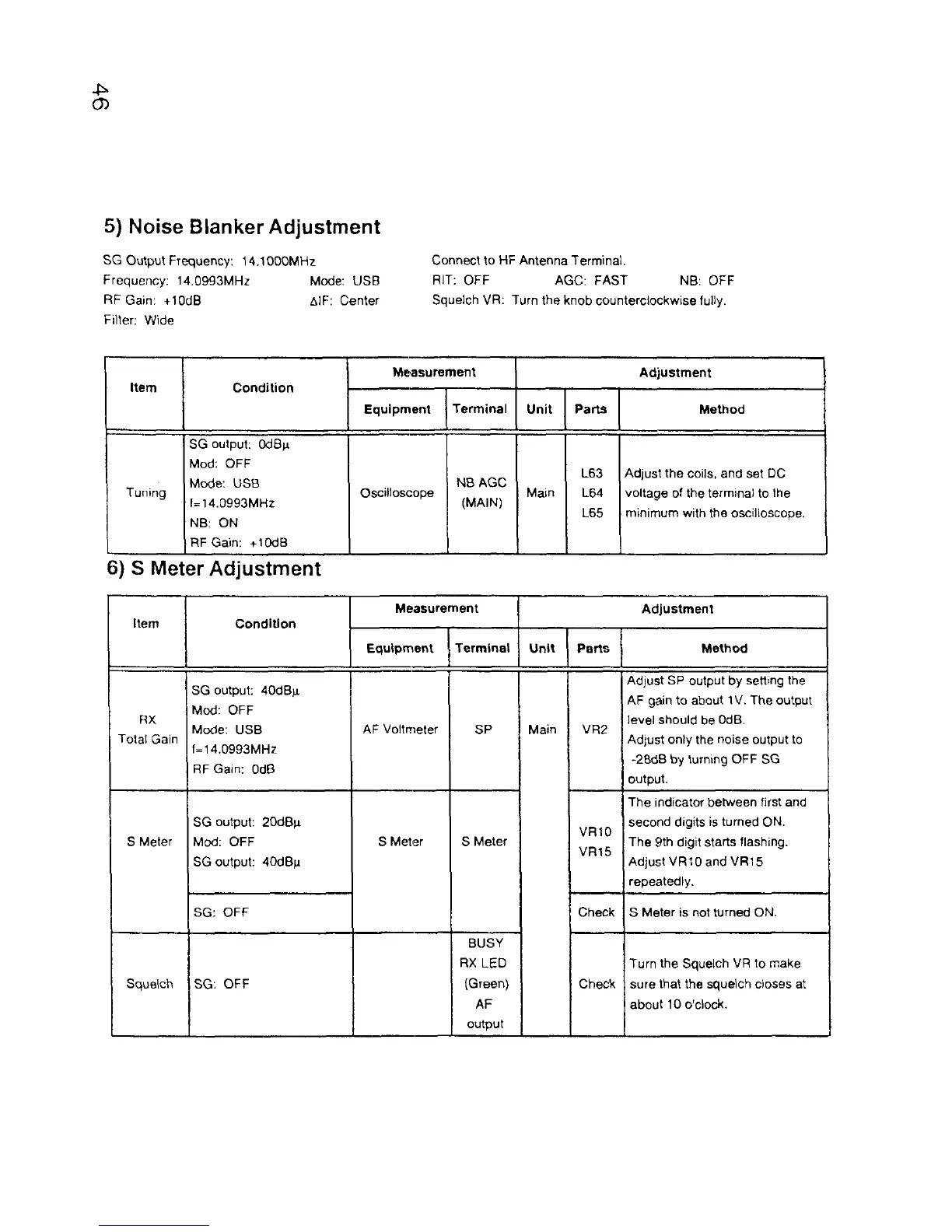
5) Noise B lanker A djustm ent
SG Output Frequency: 14.1000MHz
Frequency: 14.0993MHz Mode: USB
RF Gain: +10dB AlF: Center
Filter: Wide
Connect to HF Antenna Terminal.
RIT: OFF AGC: FAST NB: OFF
Squelch VR: Turn the knob counterclockwise fully.
Item
Condition
Measurement
Adjustment
Equipment
Terminal
Unit
Parts
Method
Tuning
SG output: OdBn
Mod: OFF
Mode: USB
1=14.0993MHz
NB: ON
RF Gain: +10dB
Oscilloscope
NB AGC
(MAIN)
Main
L63
L64
L65
Adjust the coils, and set DC
voltage of the terminal to the
minimum with the oscilloscope.
6) S M eter Adjustm ent
Item Condition
Measurement
Adjustment
Equipment
Terminal
Unit
Parts
Method
RX
Total Gain
SG output: 40dB^i
Mod: OFF
Mode: USB
f=14.0993MHz
RF Gain: OdB
AF Voltmeter
SP
Main
VR2
Adjust SP output by setting the
AF gain to about 1V. The output
level should be OdB.
Adjust only the noise output to
-2BdB by turning OFF SG
output.
S Meter
SG output: 20dBp.
Mod: OFF
SG output: 40dBn
S Meter S Meter
VR10
VR15
The indicator between first and
second digits is turned ON.
The 9th digit starts flashing.
AdjustVRtOand VR15
repeatedly.
SG: OFF
Check S Meter is not turned ON.
Squelch
SG: OFF
BUSY
RX LED
(Green)
AF
output
Check
Turn the Squelch VR to make
sure that the squelch closes at
about 10 o'clock.



 To Next Page