A recessed switch lets you reset the network settings to factory default. To reset,
turn the MixRack off, insert a pointed object to press and hold the switch whilst turning
the MixRack back on. Hold the switch in for at least 30 seconds.
gigaACE link – MixRack to Surface link over Gigabit Ethernet (IEEE 802.3
Layer 2 compliant). A single Cat5e (or higher) cable carries bidirectional 96kHz audio
and control. Use two cables for redundancy – the system will seamlessly switch cable
in case of failures, without any audio dropout.
DX links – Dual redundant EtherCon ports for connection of up to 2 DX32 /
4 DX168 expanders over Fast Ethernet (IEEE 802.3 Layer 2 compliant). A single Cat5e
(or higher) cable carries 32x32 channels of 96kHz audio and control. Connect the first
expander to DX1 & DX2, the second expander to DX3 & DX4.
Use the I/O screen to patch signals from or to the DX expanders.
ME - Dedicated EtherCon port for the Allen & Heath ME personal mixing
system. A single Cat5e (or higher) carries 40 channels of 48kHz audio, channel names
and stereo links. Connect a ME-1 mixer for daisy chaining or ME-U hub for power and
audio distribution.
Use the I/O screen to patch signals to the ME system.
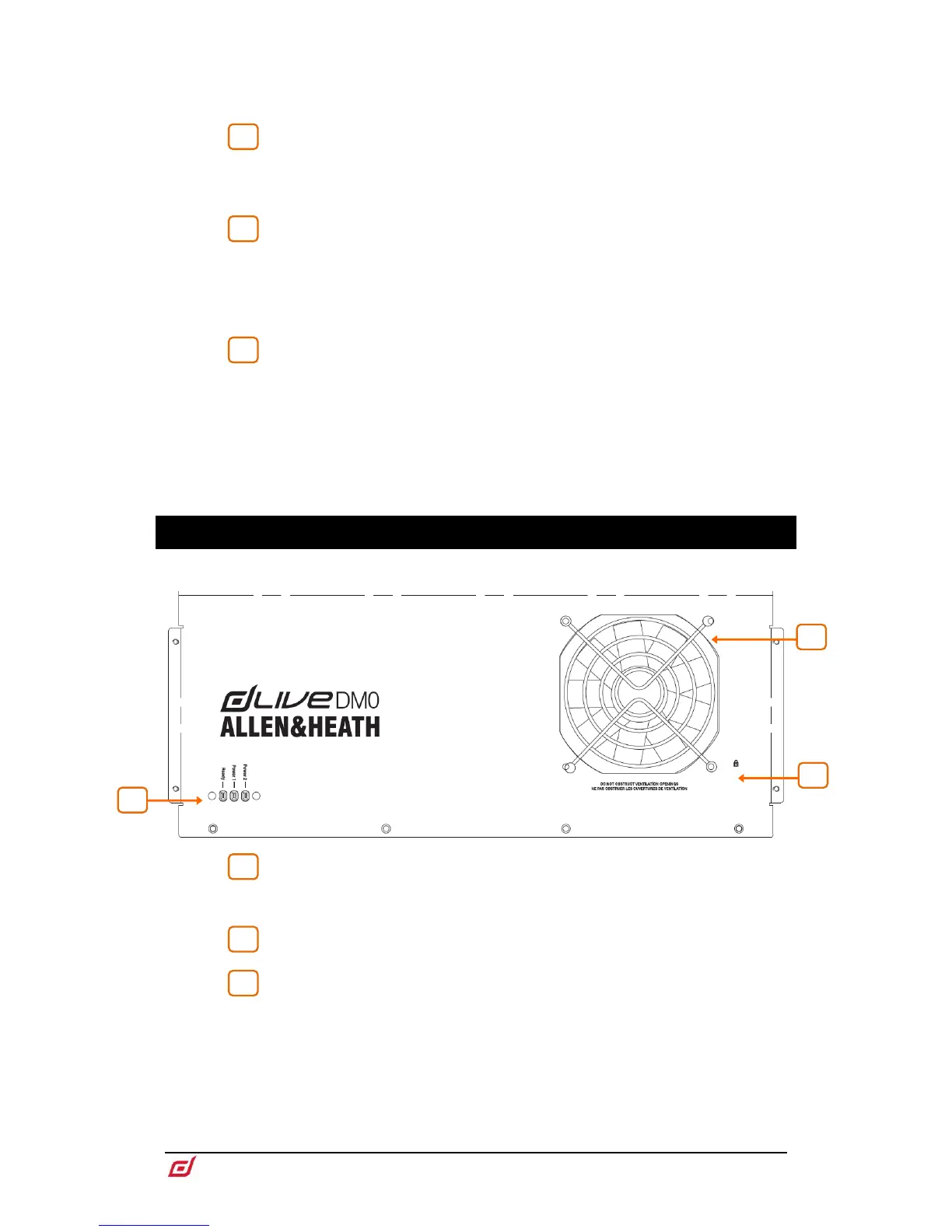
4. Front Panel
Status indicators – Power ON indicators for the 2 power supplies. The
Ready indicator lights up when the output sockets are ready to pass audio after power
up.
Fan – Ultra-quiet fan. Make sure the ventilation opening is not obstructed.
Kensington Lock - A slot for fitting standard Kensington anti-theft security
devices.


 To Next Page
 Loading...