13
Bluetooth
®
management
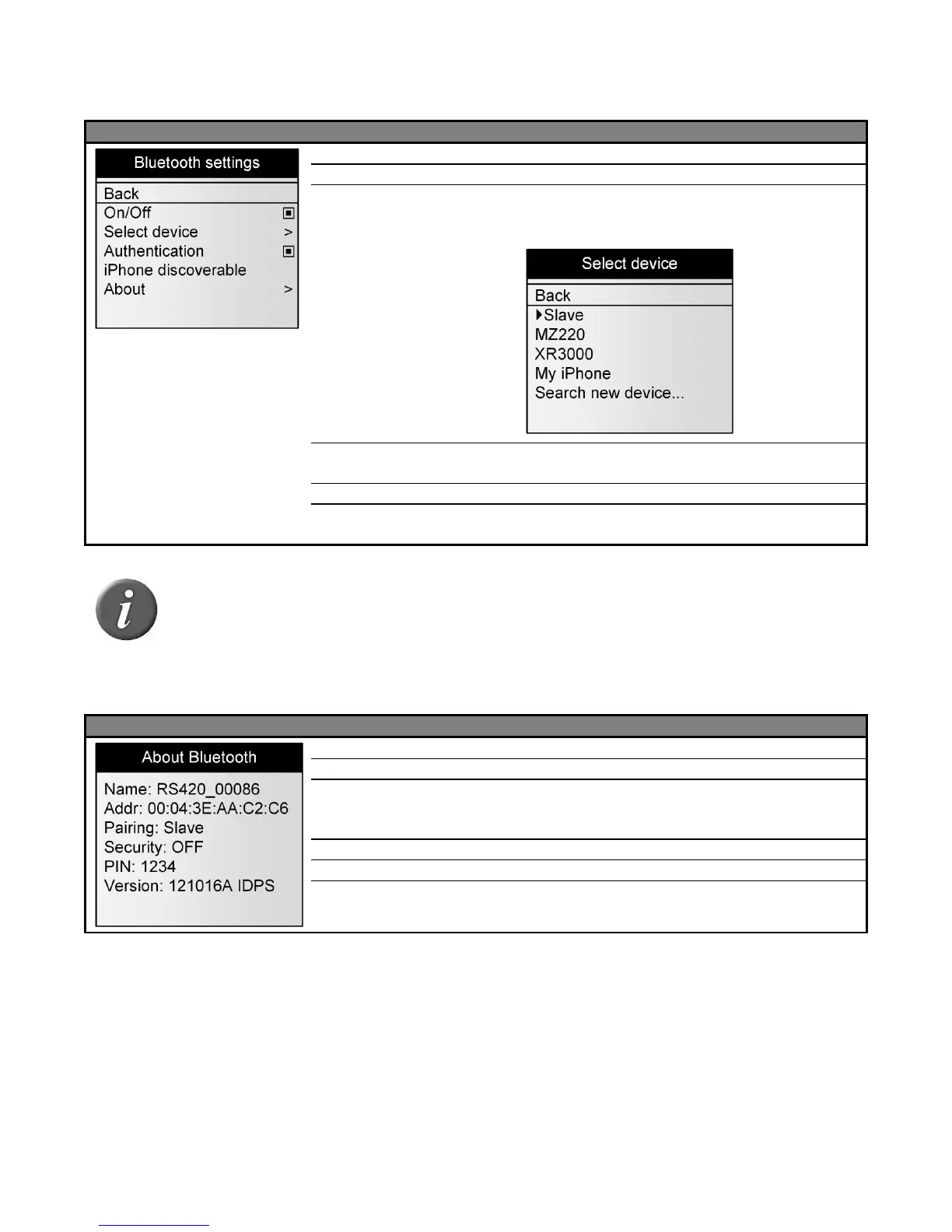
Menu 6 - Menu “Bluetooth
®
”
Return to the previous screen
Enable / Disable the Bluetooth® module.
Configure the reader in SLAVE mode or scan and
list all Bluetooth® devices in the reader vicinity to
configure the reader in MASTER mode.
Enable / disable the security feature of the
Bluetooth®
Make the reader discoverable by iPhone®, iPad®.
Provide information about the Bluetooth® features
(see Menu 7).
Note 23 – When the reader is discoverable by iPhone or iPad, a message “pairing
finished?” is displayed. Press “Yes” once the iPhone or iPad is paired to the reader.
Menu 7 – Information about Bluetooth
®
Address of the RS420 Bluetooth® module.
Bluetooth® address of the remote device when the reader is
in MASTER mode or term “SLAVE” when the reader is in
SLAVE mode.
On/Off – indicates authentication status
Pin code to be entered if asked
Version of the Bluetooth® firmware.



 To Next Page