Plug the adapter into a power outlet. The battery icon
indicates the battery pack is in charge with the bars flashing
inside the icon. It also gives the battery charge level.
The battery icon will remain in a fix state when charging has
finished. Charging takes approximately 3 hours.
Remove the power cord.
Unplug the adapter from the power outlet, and remove the
data-power cable inserted in the reader.
Power on / off instructions
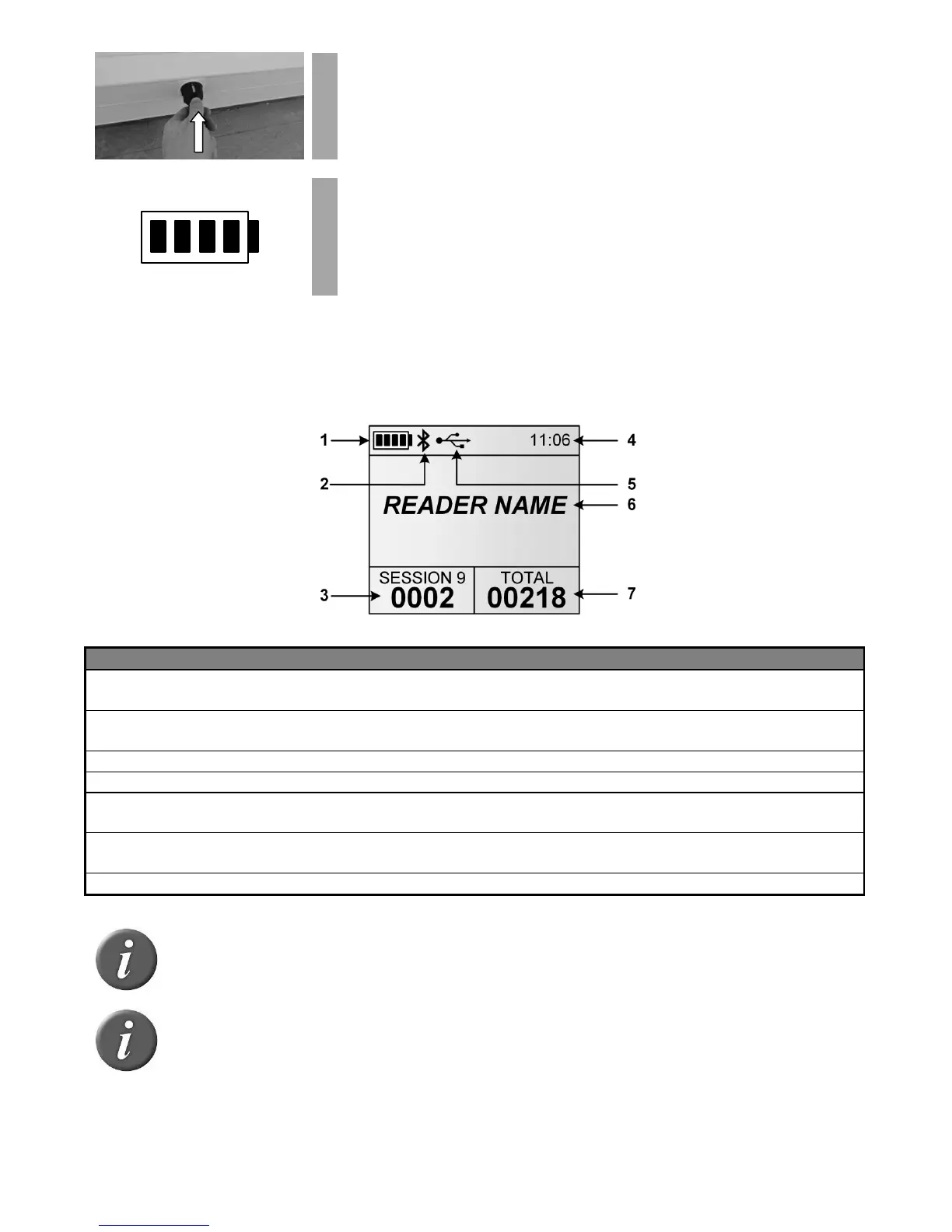
Press the green button on the reader handle to power on the reader. The main screen will
appear on the display:
The battery level shows the fully charged level as well as the charge level
during the charge mode. (see “Power Management” section)
Indicates Bluetooth® connection status (see “Bluetooth
®
management” and
“Using Bluetooth
®
interface” sections for more details).
Current number of ID codes
Number of read and saved ID codes in the current session.
Clock time in 24 hour mode.
Indicates when the reader is connected to a computer via USB port. (See
“Using USB interface” section for more details)
Displays the reader name. It appears only upon power on and until a tag is
read.
Total number of read and saved ID codes in all recorded sessions.
Note 1 - Once activated, the reader will stay on for 5 minutes by default, if it is
powered only by its battery pack.
Note 2 - Depress BOTH buttons for 3 seconds to power off the reader.



 To Next Page