Allworx Verge IP Phone Series User Guide
866.ALLWORX * +1 585 421 3850 Page 35
www.allworx.com
Version: T Revised: February 14, 2019
3.12 Conference Call
Connect up to four parties (4-way conferences) on one conference call. Additionally, the Call Transfer >
Merge Calls soft key connects all callers for a conference call during an attended transfer.
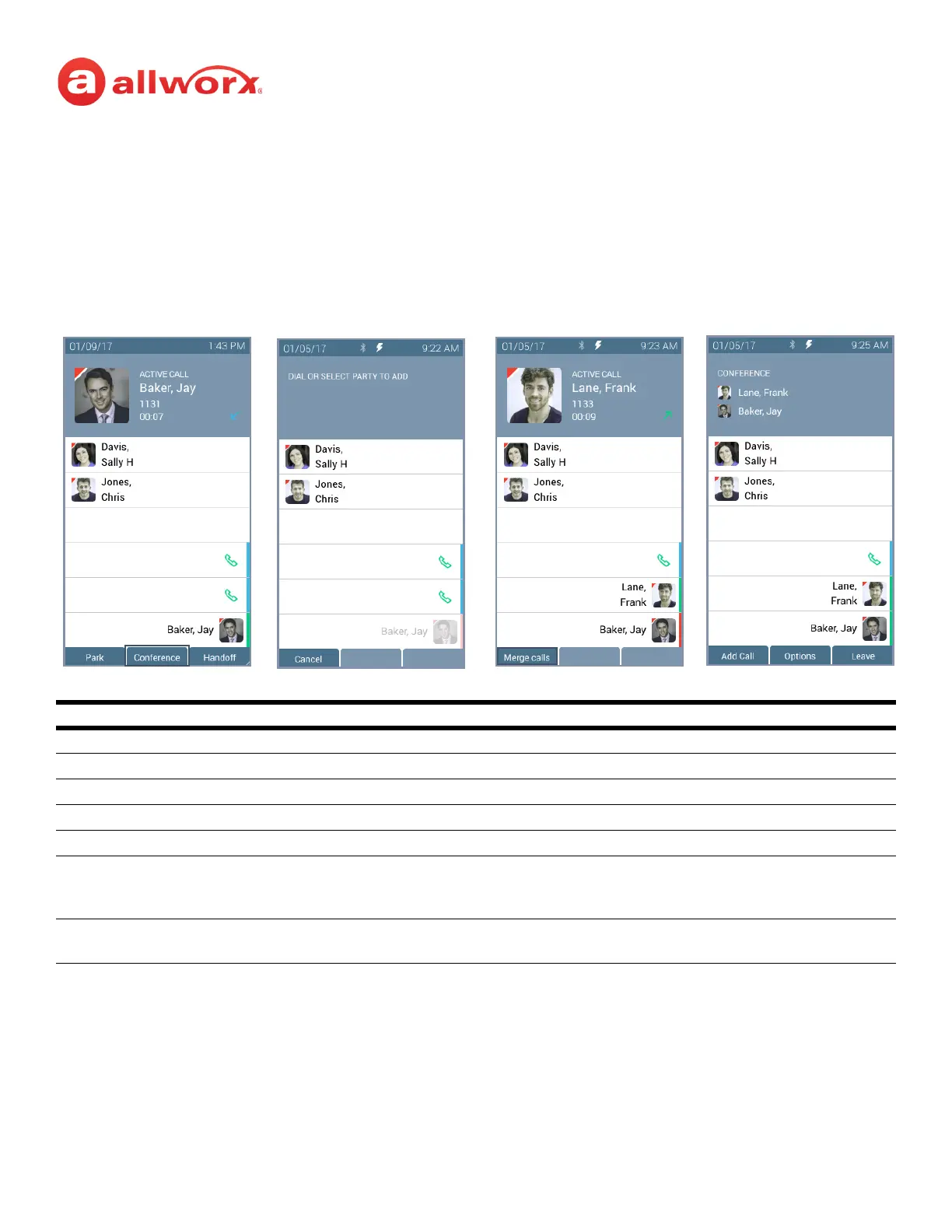
Verge IP phone Conference Call example:
To create a conference call:
1. Answer or place a call. Press the Conference soft key. If the call is already on hold, it is not
necessary to press the Conference soft key.
Soft Keys
Conference* initiate the conference call feature.
Cancel discontinue the current operation and returns to the previous state.
Merge Calls connect all callers to a single conference call.
Add Call add a fourth party to the three-way conference call.
Options select a party to place on hold or to disconnect from the active conference call.
Leave exit the conference call while the other callers continue the conversation. After selecting the Leave
option, the Verge IP phone updates to Left Conference status, and then returns to the idle screen. This
option is only available during a 3-way conference call.
* When dialing additional conference call participants, Allworx users can press the Contacts function button to select the
participants.
Active Call.
Press the Conference
soft key.
Dial recipient’s number.
(Contact matches display).
Second active call.
Press the Merge calls soft
key.
Calls merged. Begin conference
call or press Add Call to add a
fourth participant.



 To Next Page