Allworx Verge IP Phone Series User Guide
866.ALLWORX * +1 585 421 3850 Page 41
www.allworx.com
Version: T Revised: February 14, 2019
3.16 Call Handoff
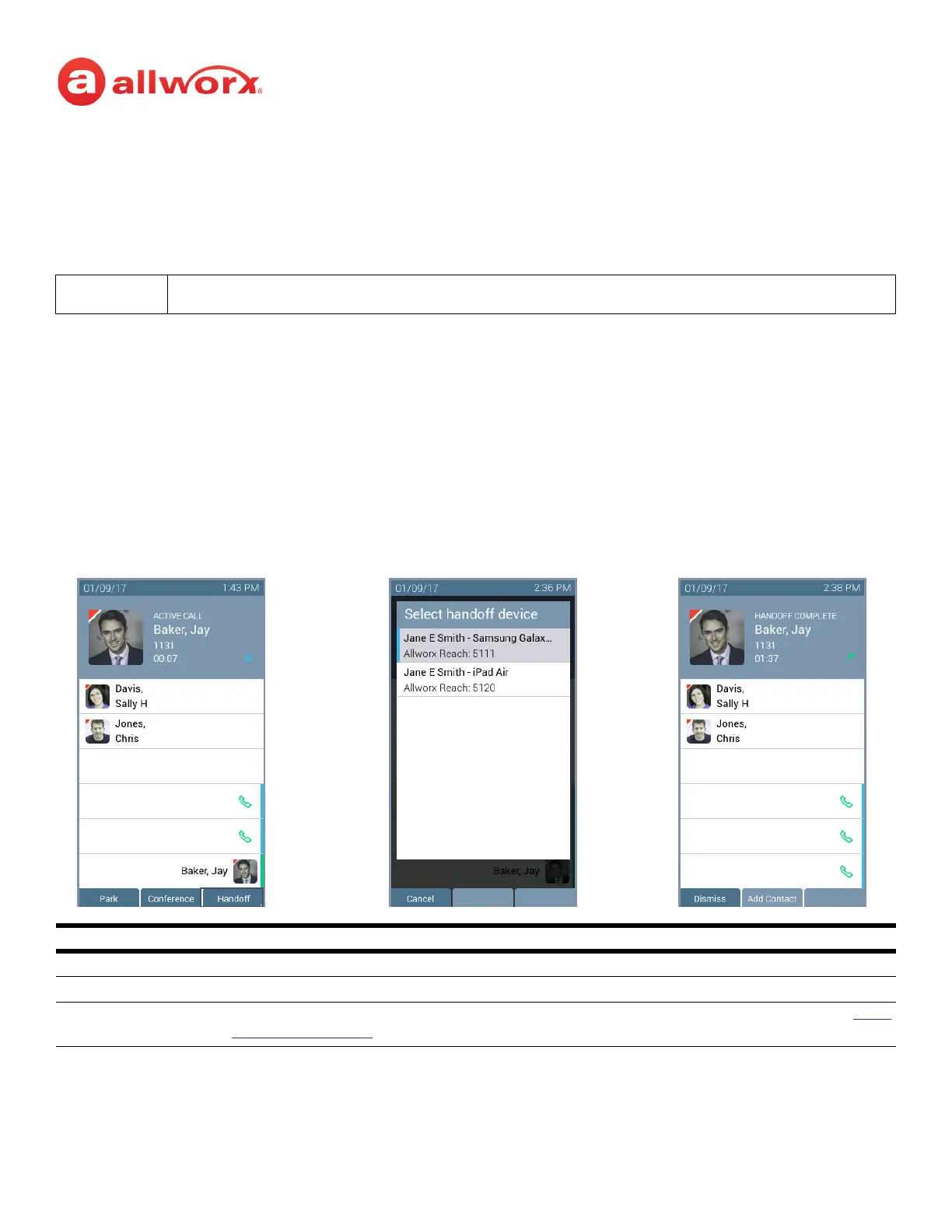
Seamlessly transition a call between the Verge IP phone and a Reach device. Allworx Verge IP phone
users with one or more Reach devices can migrate a call on the Allworx system from the Allworx Verge
IP phone to the Reach device using the Call Handoff soft key, and vice versa using the Reach action
icon, without disruption to the audio.
The Verge 9308/9312 IP phones supports the Call Handoff feature only on Call Appearances (including
Intercom). Allworx users can hand off all calls except for the following:
• Calls being recorded
• Destination devices set to Do Not Disturb
• Calls on hold
• Devices registered on different servers (does not support Multi-Site)
Verge IP phone screen Call Handoff example:
Note:
The Verge 9304 IP phone does not support the Call Handoff feature.
Soft Keys
Cancel dismiss the Call Handoff feature.
Dismiss returns to the Verge IP phone Idle screen when the other party has hung up.
Add Contact opens the phone screen to add a new contact (available for callers not in the Contacts). See “Add
Contact” on page 49 for more information.
Call Handoff Complete
Active Call - Press the
Handoff soft key.
Select handoff device - (optional) if
more than one Reach device is available



 To Next Page