12
ALPHA LITE ┃ USER MANUAL BOOK
Screen Instructions
16
17
18
19
08 12
09 13
10 14
11 15
03
04 05 06
07
01
02
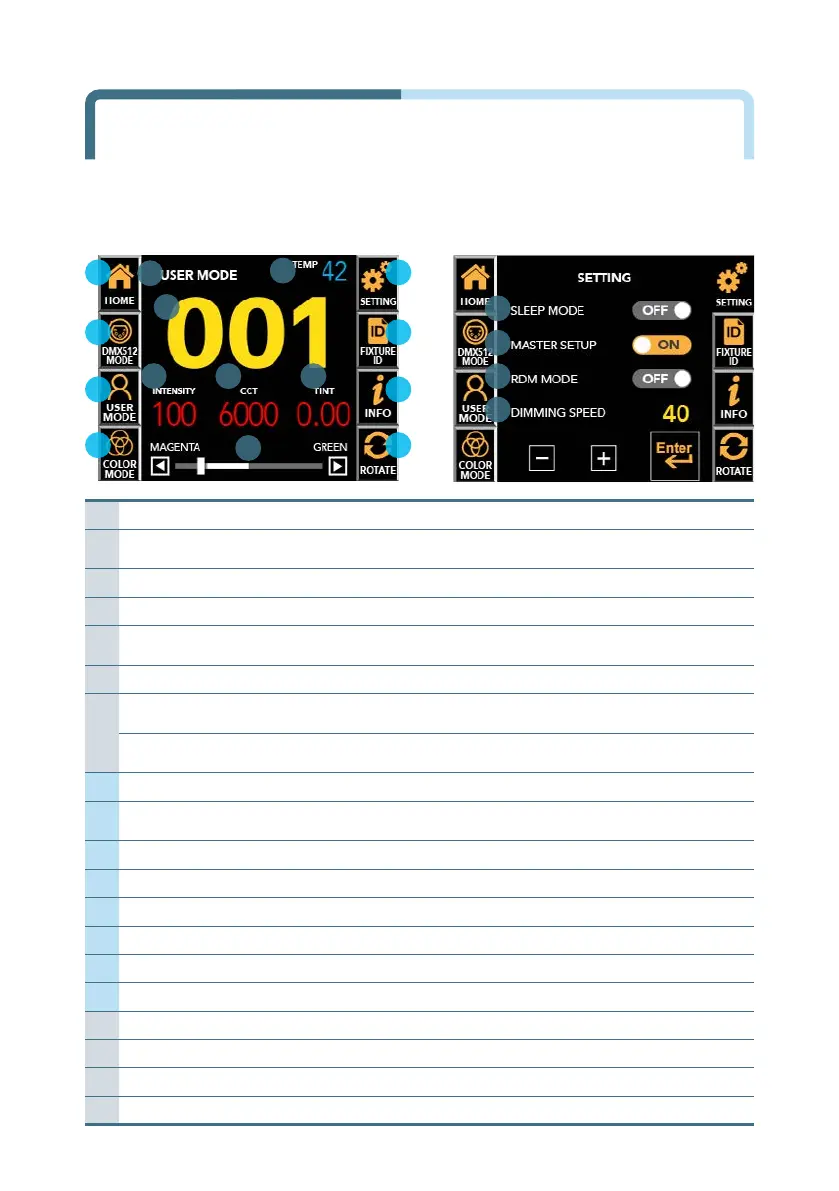
〔 Main Screen (Unlocked) 〕 〔 Setting Screen 〕
01 Current Mode
Display DMX MODE or USER MODE or COLOR MODE.
02 Fixture Current Temperature
The current temperature of the instrument is detected and
displayed in °C.
03 DMX512 Address
Display current DMX512 Address.
04 Brightness (Intensity)
Displays the brightness value(0~100%) of the equipment.
05
CCT (Correlated
Color Temperature)
Displays the color temperature(2000~35000K) of the equipment.
06 Tint(Gamma)
Displays the tint value(-1.00~+1.00) of the equipment.
07
(In USER MODE) Activated
function control bar
Adjust the selected function
among Intensity, Color Temperature and Tint.
(In DMX MODE)
Current channel mode
Display current channel mode.
*Only display on DMX MODE
08 Home
Return to the main screen
09
DMX512 Mode &
Address Setup
Set channel mode and DMX512 address
10 User Mode Setup
Set ‘Intensity’, ‘CCT’ and ‘Tint’ manually.
11 Color Mode Setup
Set ‘RGB’ lighting color, ‘Saturation’, and ‘Intensity’
12 Setting
Setting or changing the function of the equipment.
13 Fixture ID
Displays numbers for equipment management.
14 Equipment Information
Displays the help that describes the screen.
15 Screen Rotation
LCD screen is rotated 180° for each touch.
16 Sleep Mode Setup
Activate and deactivate LCD Auto off function
17 Master Setup
Activate and deactivate Master function
18 RDM Mode Setup
Activate and deactivate RDM function
19 Dimming Speed Setup
Set dimming speed


 To Next Page