14
ALPHA LITE ┃ USER MANUAL BOOK
Each 'MENU'
▶
Touch the 'INFO'
▶
User can check the menu description and functions.
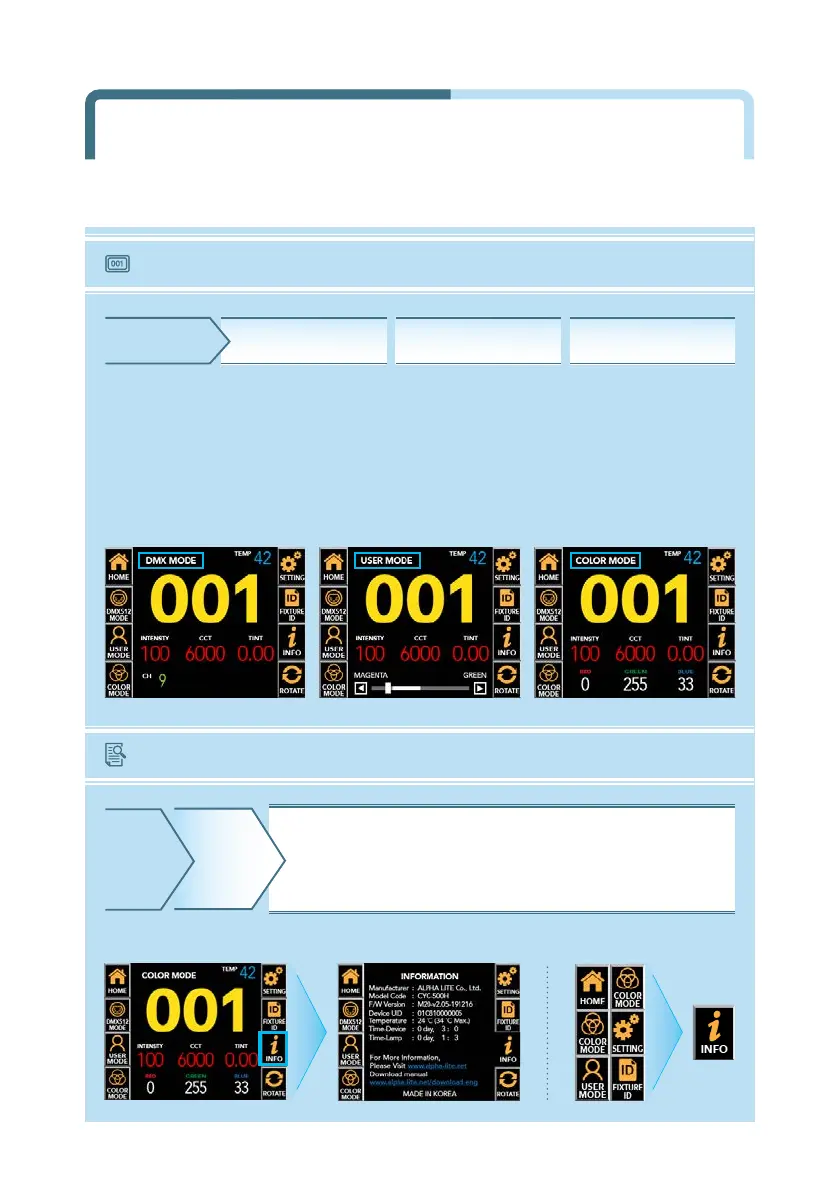
The current mode is displayed in the upper left corner of the main screen among DMX mode,
user mode and color mode, and the DMX address number of the equipment is displayed
in the middle with a yellow number. At the bottom, the current lighting value and fixture
temperature are displayed, and some lighting value can be adjusted on the main screen
by touching the value.
〔 DMX MODE 〕 〔 USER MODE 〕 〔 COLOR MODE 〕
HOME DMX MODE USER MODE COLOR MODE
INFO
Product model name, firmware version, UID number,
current temperature of equipment, usage time of equipment,
LED usage time, website, manual download link, etc.
by clicking the INFO button on the main screen.
HOME
Main Screen by Mode Information
Product Information
Main Screen by Mode &
Product Information


 To Next Page