18
ALPHA LITE ┃ USER MANUAL BOOK
Extra Function
– Sleep Mode / Master / RDM / Dimming Speed
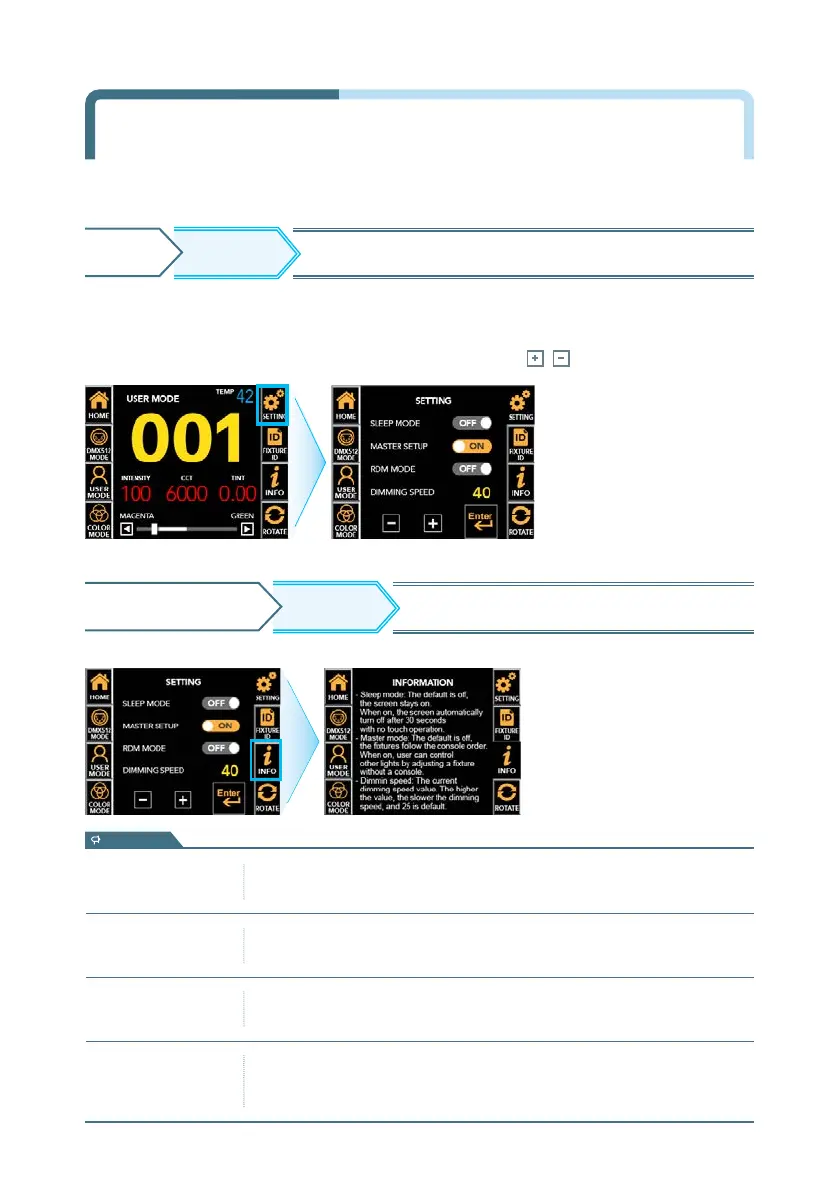
SETTING screen ▶ Touch ON/OFF the function you want to change among SLEEP
MODE, MASTER, and RDM MODE ▶ Active in Orange ▶ Set ON/OFF
- DIMMING SPEED SETUP can be activated by touching, and press , to adjust the value.
※ Press the INFO button again to return to the setting screen.
INFO
SETTING SCREEN Displays description of each function.
SETTING
HOME
Move to additional settings other than the
main icon.
- Sleep mode setup
(Default=Off)
The function to automatically turn off the screen when there is no operation
for 30 seconds. If OFF, it is always on the screen while power is on.
- Master setup
(Default=Off)
The function to synchronize and user control all connected fixtures without
a console connection. If OFF, the DMX signal will follow.
- RDM setup
(Default=On)
The function to enable two-way wireless communication through RDM
equipment. If OFF, it is not detected by RDM equipment.
- Dimming speed
setup
The number indicates the current dimming speed value of the fixture and is
displayed from 0 to 40. The higher the value, the slower the dimming speed,
and ’15’ is default speed
information


 To Next Page