Product name.
15
ALPHA 3000
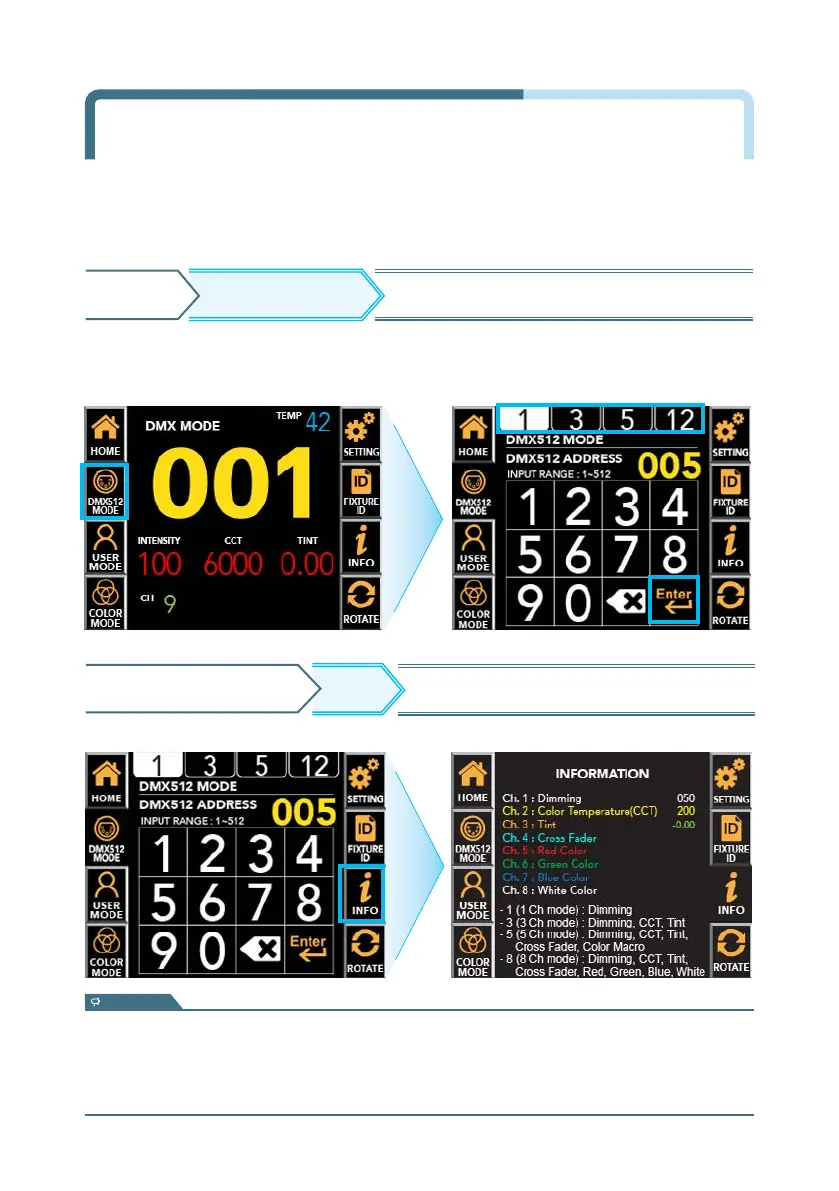
DMX512 MODEHOME Move to the DMX channel change screen.
※ To return to the previous screen, press the 'INFO' button again.
INFO
DMX512 MODE SCREEN
Displays each channel information and value.
- 1 (1 Ch Mode) : Dimming
- 3 (3 Ch Mode) : Dimming, CCT
- 5 (5 Ch Mode) : Dimming, CCT, Tint, Cross Fader, Color Macro
- 12 (12 Ch Mode) : Dimming, CCT, Tint, Cross Fader, Red, Green, Blue, Amber, Lime, Cyan, Color Macro, Strobe
* Support channels and features vary by product.
information
DMX Mode Channel Change &
Address Setup
DMX MODE : It is used to adjust value by DMX512 signal.
In DMX512 MODE screen, user can select DMX channel mode on top tap.
▶ Input DMX512 address by pressing the number pad.


 To Next Page