16
ALPHA LITE ┃ USER MANUAL BOOK
User Mode Setup
& Intensity / CCT / Tint Adjust
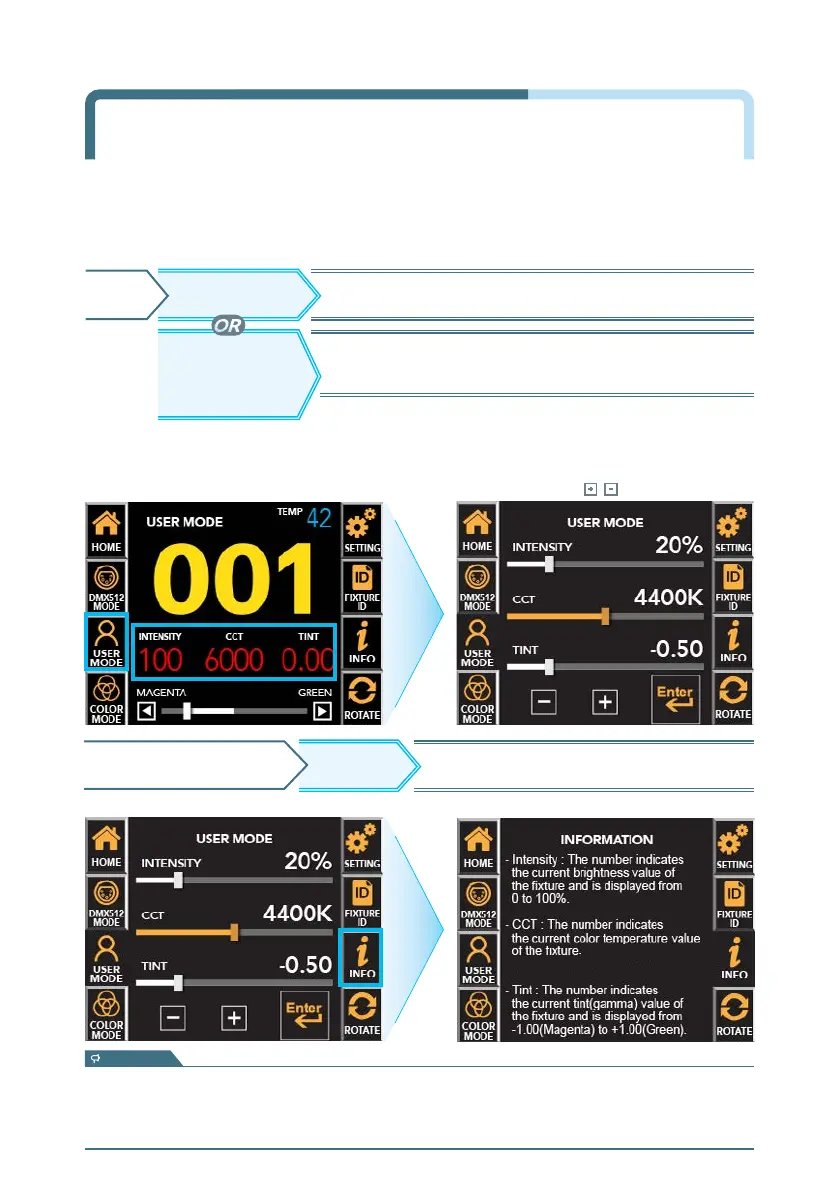
USER MODE screen ▶ Touch the function you want to change ▶ Active in Orange ▶
Adjust the value with touch or drag.
Drag the activated bar close to the desired value,
and then touch
, to set the exact value.
USER MODE : It is used when the user directly manipulates the equipment.
Move to user-operable screen to change Intensity/CCT/Tint.
USER MODEHOME
'Current Intensity'
'Current CCT'
'Current Tint'
OR
※ In DMX mode, even if you press the current value on the main screen,
the bottom bar is not active.
Activate control bar and adjust value directly
according to selected function.
※ To return to the previous screen, press the 'INFO' button again.
- Intensity : The number indicates the current brightness value of the fixture and is displayed from 0 to 100%.
- CCT :
The number indicates the current color temperature value of the fixture and is displayed from 2,000~35,000Kelvin.
- Tint :
The number indicates the current tint(Gamma) value of the fixture and is displayed from -1.00(Magenta) to +1.00(Green).
INFO
USER MODE SCREEN Displays description of each function.
information


 To Next Page