44
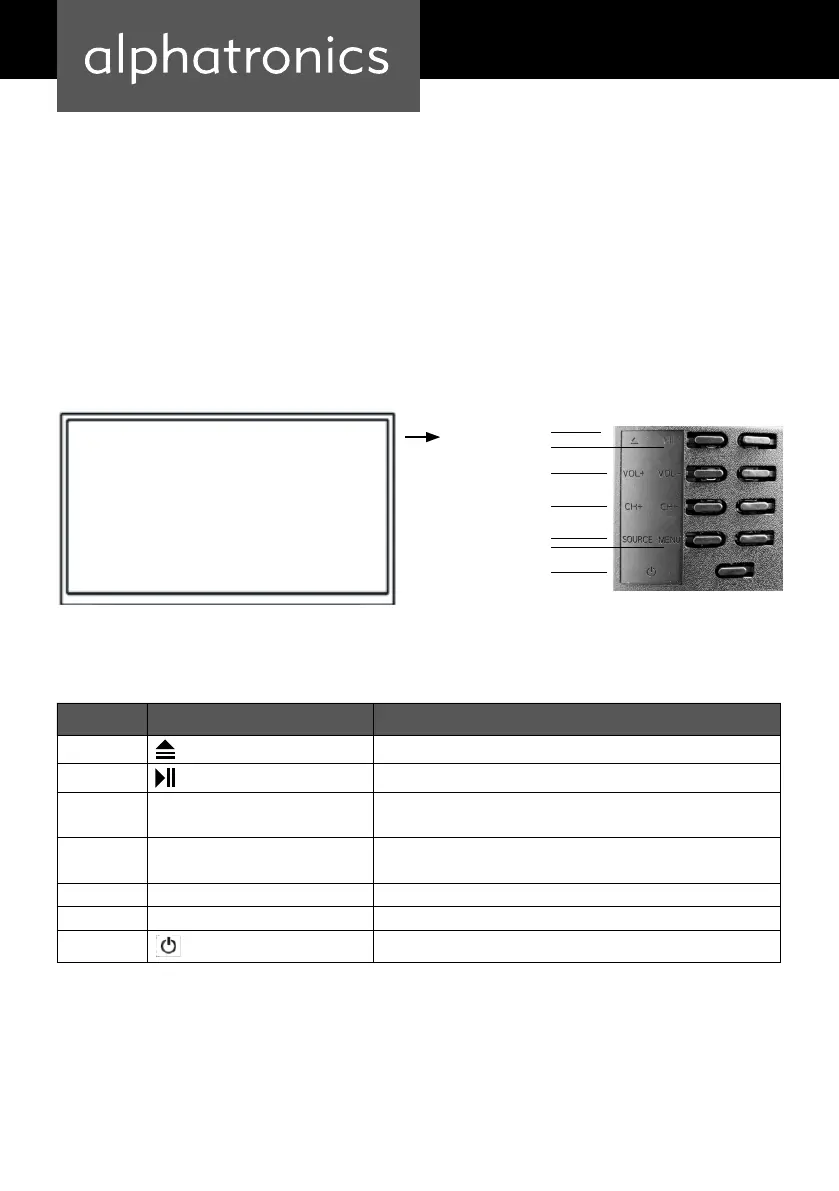
POSITION AND FUNCTION OF THE CONTROL BUTTONS
Item Button Function
1
• Eject
2
• Play /Pause
3 CH+/- • Selection of TV channels, press this button to select the channels
or to select the upper or lower menu in the OSD menu
4 VOL+/- • Increase or decrease the volume
• Adjusting the selected menu items in the OSD menu
5 MENU • Open or exit a menu
6 SOURCE • Selection of the signal input
7
• Power button in standby mode
The on / o switch is located on the lower right of the device.
Note:
Power indicator lights blue in standby and no light when TV is switched on.
SCOPE OF DELIVERY
1. LED TV device 2. DC adapter and power cord 3. remote control
4. Connection cable 5. operation manual 6. External WLAN antenna
Note: Depending on the sales area, your product may contain additional accessories.
Channel faorward / back
Volume up / down
Eject
Play / pause
On / O
Menu
Source


 To Next Page