67
ENGLISHENGLISH
MAIN MENU
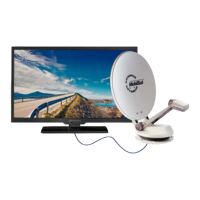
Press the menu button to open the menu shown below. Navigate with the arrow keys
.
Selection with the Enter key.
Picture menu
In the image selection, you can select “User” in addition to the standard settings “Standard,
Mild, Dynamic” and set the brightness, contrast and color yourself. Color temperature and
image format are determined automatically.
Noise reduction
Select the Noise Reduction option. This can be set to O, Low, Medium, High and Automatic.
Color temperature
Select the Color temperature option to adjust the parameters for the color temperature.


 To Next Page