9-EN
EN
FR
ES
DE
IT
SE
NL
RU
PL
ALPINE CDE-205DAB 68-40368Z04-B (EN) 128x182
Getting Started
To cancel the demonstration (DEMO)
display, see page 22.
For the connection/installation, see page
35.
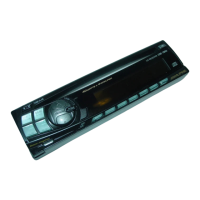
Detaching the Front Panel
You can detach the front panel of this unit to
prevent theft.
1 Press and hold (power) until the
unit turns off, press the front panel
release button
, then pull the panel
towards you to remove.
Caution alarm
If you turn the ignition switch to the OFF position
without detaching the front panel, the caution
alarm will sound for a few seconds. The alarm will
only sound if the built-in amplifier is used.
Attaching the front panel
Resetting the Unit
Before operating the unit for the first time, or
after replacing the car battery or changing
connections, you must reset the unit.
1 Press and Number button 6 for more
than 2 seconds.
Note
Resetting the unit will erase the clock setting and some
stored contents.
Setting the Clock
1 Press and hold /SETUP for at least 2
seconds, rotate the control dial to select
[GENERAL], then press it.
2 Rotate the control dial to select [CLOCK
ADJ], then press it.
The hour indication flashes.
3 Rotate the control dial to adjust the hour
and minute.
To move the digital indication, press
/ .
4 Press ENTER to set the hour and minute.
5 Press (back) twice.
The setup is complete.
To display the clock
Press VIEW.
Android
nly)
m.
n.
tional
sult
smitter
erface
el
uded),
les
ontact


 To Next Page