11-EN
Frequency Search Function
You can search for a radio station by its frequency.
1
Press and hold for at least 2 seconds in Radio
mode to activate Frequency Search mode.
2
Turn the Rotary encoder to select the desired
frequency.
Only when the Radio mode is active
*
* Operation is not required during HD Radio reception.
3
Press MODE to receive the selected frequency.
• Press and hold for at least 2 seconds in the search mode to
cancel. Or the search mode will be canceled when an operation has
not been performed in 10 seconds.
Switching the HD Radio™ signal
HD Radio™ can be received if the HD Radio TUNER MODULE
(TUA-T500HD) is connected. While receiving HD Radio, the unit can
automatically switch between the analog and digital signal. You can
also switch to the analog signal exclusively.
1
When receiving HD Radio, press FUNC. to select on.
The currently received status is displayed.
2
Press preset 1 to switch the receiving signal.
3
Turn off the “ ” indicator by pressing FUNC.
• Select mode will be canceled when an operation has not been
performed in 10 seconds.
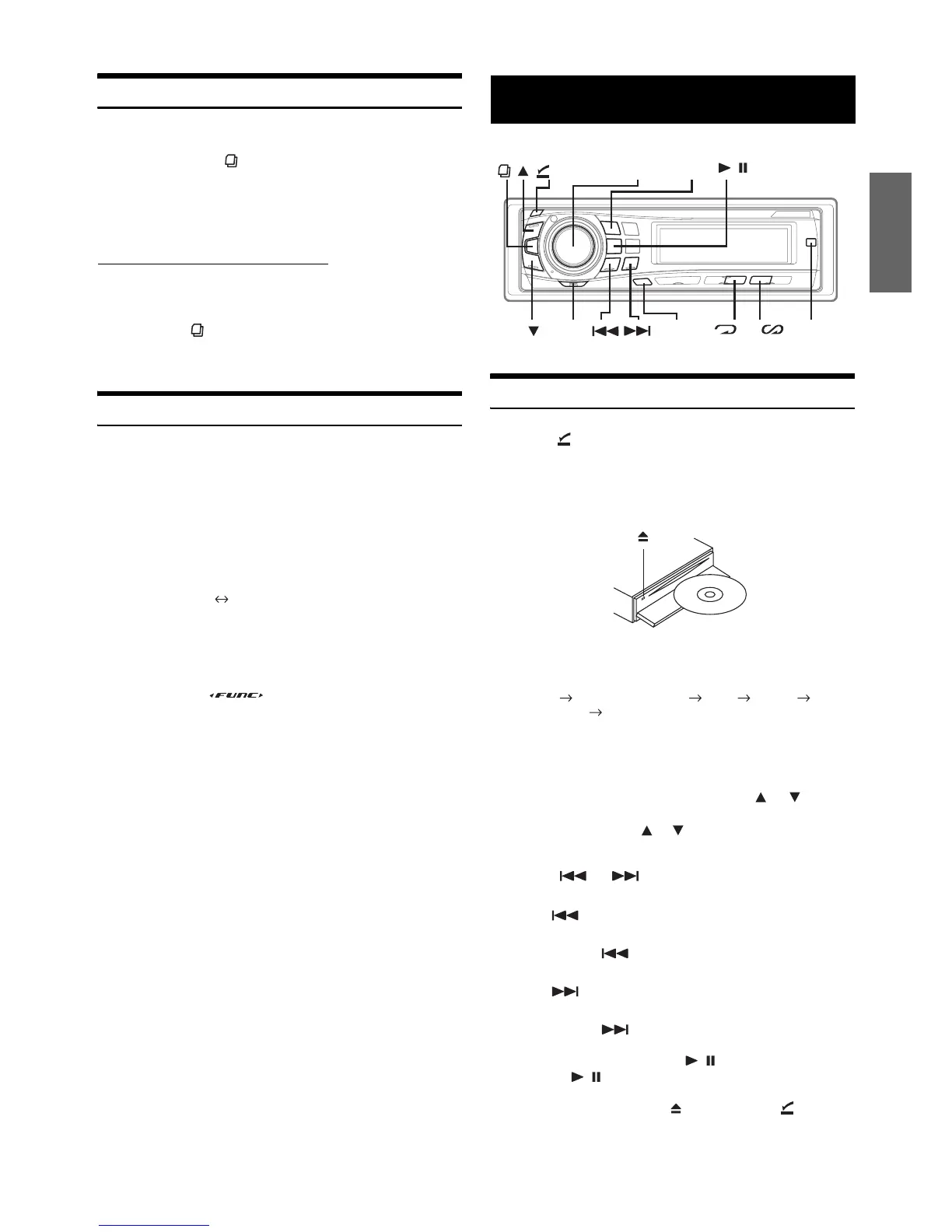
Playback
1
Press (OPEN).
The front panel will open.
2
Insert a disc with the label side facing up.
The disc will be pulled into the unit automatically.
Close the front panel manually.
When a disc is already inserted, press SOURCE/POWER to
switch to the CD mode.
TUNER XM RADIO/SIRIUS*
1
DISC IPOD*
2
CHANGER*
3
TUNER
*
1
Only when XM Radio or Sirius Radio is connected.
*
2
Only when the iPod is connected.
*
3
Only when the CD changer is connected.
3
While playing back MP3/WMA, press or to
select the desired folder.
Pressing and holding or will change folders
continuously.
4
Press or to select the desired track (file).
Returning to the beginning of the current track (file):
Press .
Fast backward:
Press and hold .
Advancing to the beginning of the next track (file):
Press .
Fast forward:
Press and hold .
5
To pause playback, press / .
Pressing / again will resume playback.
6
To eject the disc, press after pressing (OPEN)
to open the front panel.
DIG/ANA MODE ANALOG ONLY
DIG/ANA MODE:Automatically switches between digital and
analog signal
ANALOG ONLY: Receives analog signal only
CD/MP3/WMA
4 5
TITLE
/
(OPEN)
Rotary
encoder
FUNC.
MODE
SOURCE/
POWER



 To Next Page