22-EN
Playing MP3/WMA/AAC/WAV Data
Setting item: CD Play Mode
Setting contents: CD-DA (Initial setting) / Compress
This unit can play back CDs containing both CD and MP3/WMA/AAC/
WAV data (created in Enhanced CD (CD Extra) format).
• Perform this setting before inserting a disc. If a disc has already been
inserted, remove it first.
Setting the Video CD Play Mode
When playing a Playback Control (PBC) enabled video CD, you can
choose to set PBC On or Off.
Setting item: VCD Play Mode
Setting contents: PBC On (Initial setting) / PBC Off
• You can set PBC On or Off directly by pressing MENU.
Displaying the Disc Status Automatically (CD/MP3/WMA/
AAC/WAV Only)
When playing a CD/MP3/WMA/AAC/WAV file, you can choose to
display the Disc Status(track number,etc.) automatically.
Setting item: Auto Display
Setting contents: Off/On (Initial setting)
Setting the Digital Output
Use the following procedure to set the digital audio signal output from
the DVE-5300.
Setting item: Digital Out
Output Modes: Dolby D / DTS
Setting contents: Bitstream / LPCM (Initial setting)
• Pressing RETURN will return to the previous screen.
Digital audio output
Setting the Downmix Mode
This function applies to Dolby Digital, DTS stream sound.
Setting item: Downmix Mode
Setting contents: Stereo (Initial setting) / Surround Encoded
CD Contents Setup
CD-DA:
Only CD data can be played back.
Compress:
Only MP3/WMA/AAC/WAV data can be playedback.
PBC On:
The PBC menu is displayed.
PBC Off:
The PBC menu is not displayed.
On:
The Disc Status is displayed automatically while
playing back.
Off:
Disc Status is not displayed automatically while
playing back.
Audio Setup
Bitstream:
Select “Bitstream” when you want to connect a
digital audio processor to play Dolby Digital or DTS
audio. When “Bitstream” is selected, the HDMI audio
will be muted. The DVE-5300 optical output must be
used for the external processor.
LPCM:
The audio signal recorded on the disc is converted
to 48 kHz/16 bit (for DVDs) or 44.1 kHz (for video
CDs and CDs) linear PCM audio signals for output.
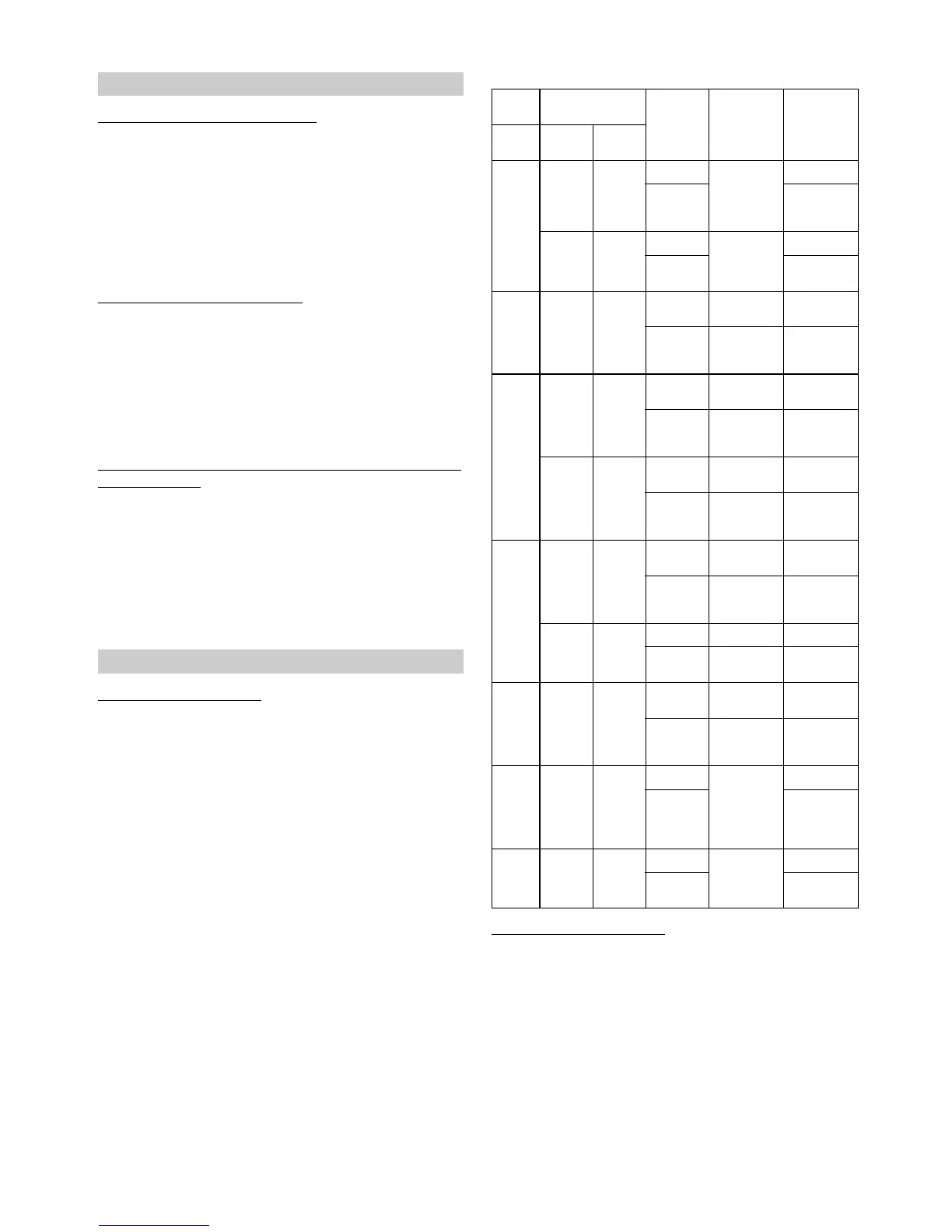
Disc
Audio recording
format Digital
output
setting
Optical digital
audio output
(when a digital
audio processor
is connected)
Digital audio
output (HDMI
output)
Format Fs Q
LPCM
(DVD,
CD)
48/96kHz
16/20/
24bit
Bitstream
LPCM 2ch
Down mix
(48kHz/16bit)
⎯
LPCM
LPCM
2ch Down mix
(48kHz/16bit)
44.1kHz 16bit
Bitstream
LPCM 2ch
(44.1kHz/16bit)
⎯
LPCM
LPCM 2ch
(44.1kHz/16bit)
Dolby
Digital
(DVD)
48kHz
16/18/
20bit
Bitstream
Bit stream
(Max 7.1ch)
⎯
LPCM
Decoded 2ch
Down mix
(48kHz/16bit)
Decoded 2ch
Down mix
(48kHz/16bit)
DTS
(DVD,
CD)
48/96kHz
16/20/
24bit
Bitstream
Bit stream
(Max 6.1ch)
⎯
LPCM
Decoded 2ch
Down mix
(48kHz/16bit)
Decoded 2ch
Down mix
(48kHz/16bit)
44.1kHz
16/20/
24bit
Bitstream
Bit stream
(Max 5.1ch)
⎯
LPCM
Decoded 2ch
Down mix
(44.1kHz/16bit)
Decoded 2ch
Down mix
(44.1kHz/16bit)
MPEG1
(DVD,
Video
CD)
48kHz 16bit
Bitstream
Bit stream
(Max 5.1ch)
⎯
LPCM
Decoded 2ch
Down mix
(48kHz/16bit)
Decoded 2ch
Down mix
(48kHz/16bit)
44.1kHz 16bit
Bitstream Bit stream ⎯
LPCM
Decoded 2ch
(44.1kHz/16bit)
Decoded 2ch
(44.1kHz/16bit)
MPEG2
(DVD)
48kHz 16bit
Bitstream
Bit stream
(Max 5.1ch)
⎯
LPCM
Decoded 2ch
Down mix
(48kHz/16bit)
Decoded 2ch
Down mix
(48kHz/16bit)
MP3/
WMA/
AAC
8/11.025/
12/16/
22.05/24/
32/44.1/
48kHz
16bit
Bitstream
Decoded 2ch
(32kHz,
44.1kHz or
48kHz/16bit)
⎯
LPCM
Decoded 2ch
(32kHz,
44.1kHz or
48kHz/16bit)
WAV 44.1kHz 16bit
Bitstream
Decoded 2ch
(44.1kHz/16bit)
⎯
LPCM
Decoded 2ch
(44.1kHz/16bit)
Stereo:
Stereo Downmix.
Surround Encoded:
Surround compatible Downmix.





 To Next Page