31-EN
1
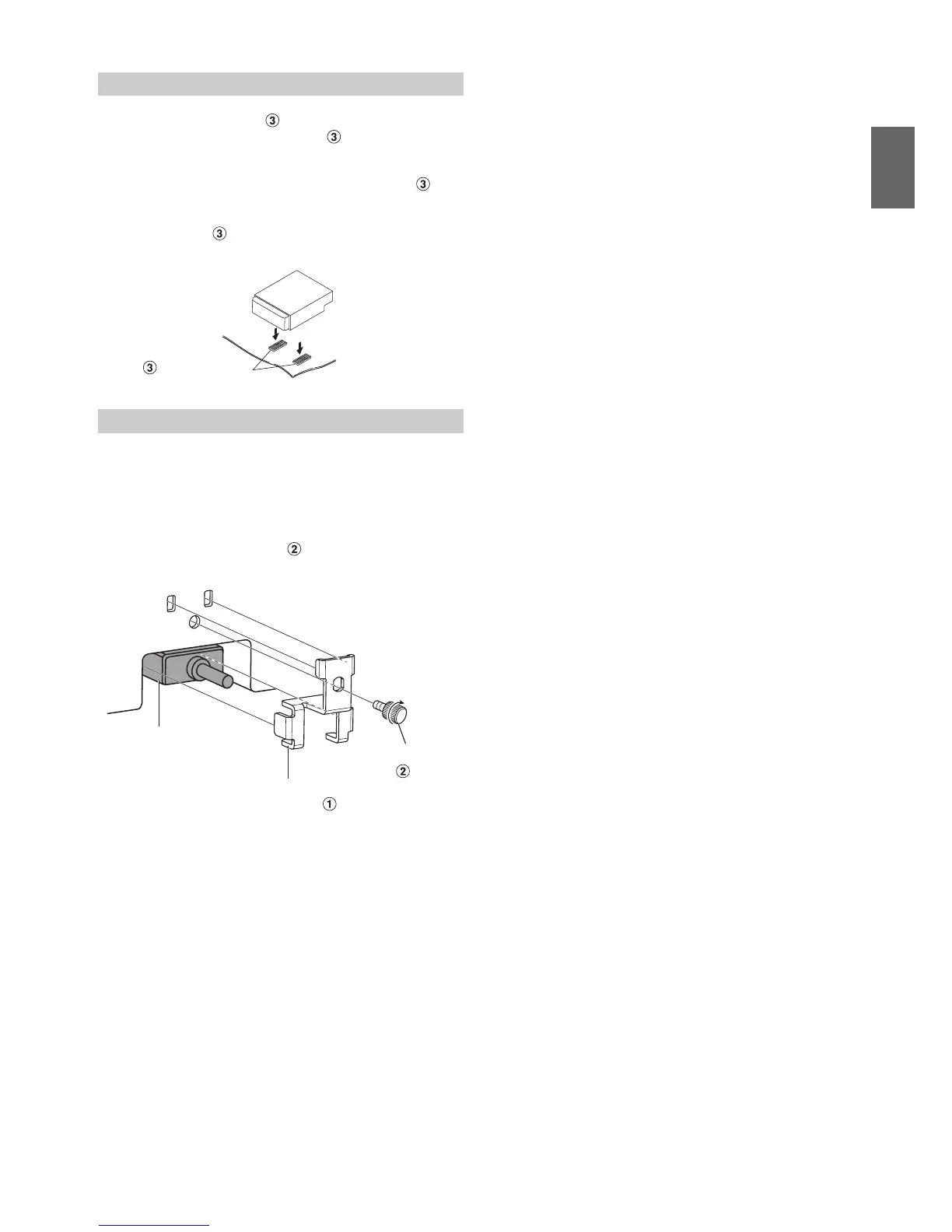
Place Velcro fastener .
Place two pieces of Velcro fastener to the mounting
location with the rough side facing toward the DVD unit.
2
Place the matching pieces of Velcro fastener
onto the pieces already on the mounting positions.
Remove the protective paper covering the adhesive on the
Velcro fastener . Press the unit onto the strips at the
mounting position.
When using HDMI connection cables, secure the cables to the HDMI
Terminals with the supplied HDMI Hold-down Bracket.
1
Insert the HDMI Hold-down Bracket into the grooves
(A).
2
Secure it with the screw ( ).
When mounting using Velcro fastener
Note on using HDMI Connection Cables
Velcro fastener
Floor
HDMI Hold-down
Bracket (included)
HDMI Hold-down
screw
HDMI Terminal
(A)
(A)









 To Next Page