EasyManua.ls Logo

Alpine DVE-5300 - Page 45

Alpine DVE-5300
56 pages
Print Icon
To Next Page IconTo Next Page
To Previous Page IconTo Previous Page
Loading...
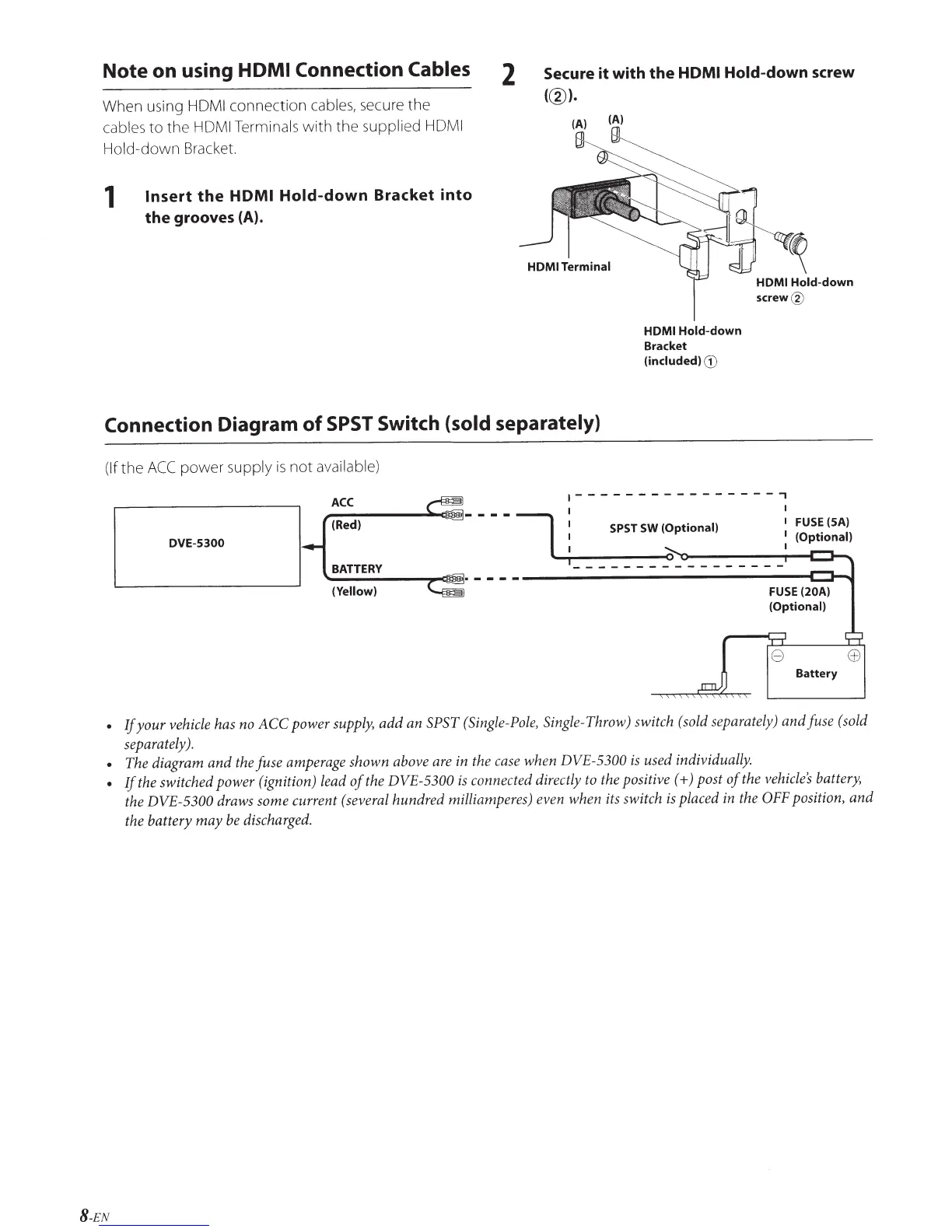
Note
on using
HOM
I Connection Cables
When using HDMI
connection
cables, secure
the
cables
to
the
HOM I Terminals
with
the
supplied
HOM I
Hold-down
Bracket.
1
Insert
the
HDMI
Hold-down
Bracket
into
the grooves
(A).
2
Secure it with the
HDMI
Hold-down screw
(@).
(A) (A)
HOM
I Terminal
HDMI
Hold-down
Bracket
(included)
G)
HOMI
Hold-down
screw@
Connection Diagram
of
SPST
Switch
{sold separately)
(If
the
ACC
power
supply
is
not
available)
ACC
.----------------,
(Red)
---- I
i-
--
:P:T
::
::~~~·~
-- --
-:
r~:~~~~:~J
DVE-5300
BATTERY
~--------~~·------------------------------------------------~~~
(Yellow)
FUSE
(20A)
(Optional)
If
your
vehicle
has
no
ACC power
supply,
add
an
SPST
(Single-Pole,
Single-
Throw) switch
(sold
separately) and fuse
(sold
separately).
The diagram and
the
fuse
amperage
shown
above
are
in
the
case
when DVE-5300
is
used individually.
If
the
switched power (ignition)
lead
of
the
DVE-5300
is
connected directly
to
the
positive (+)post
of
the
vehicle's
battery,
the
DVE-5300
draws
some current
(several
hundred milliamperes) even when
its
switch
is
placed
in
the
OFF
position, and
the battery may
be
discharged.
8-EN

Table of Contents

Related product manuals