11-EN
ALPINE KCE-300BT 68-08564Z70-A (EN)
Connections
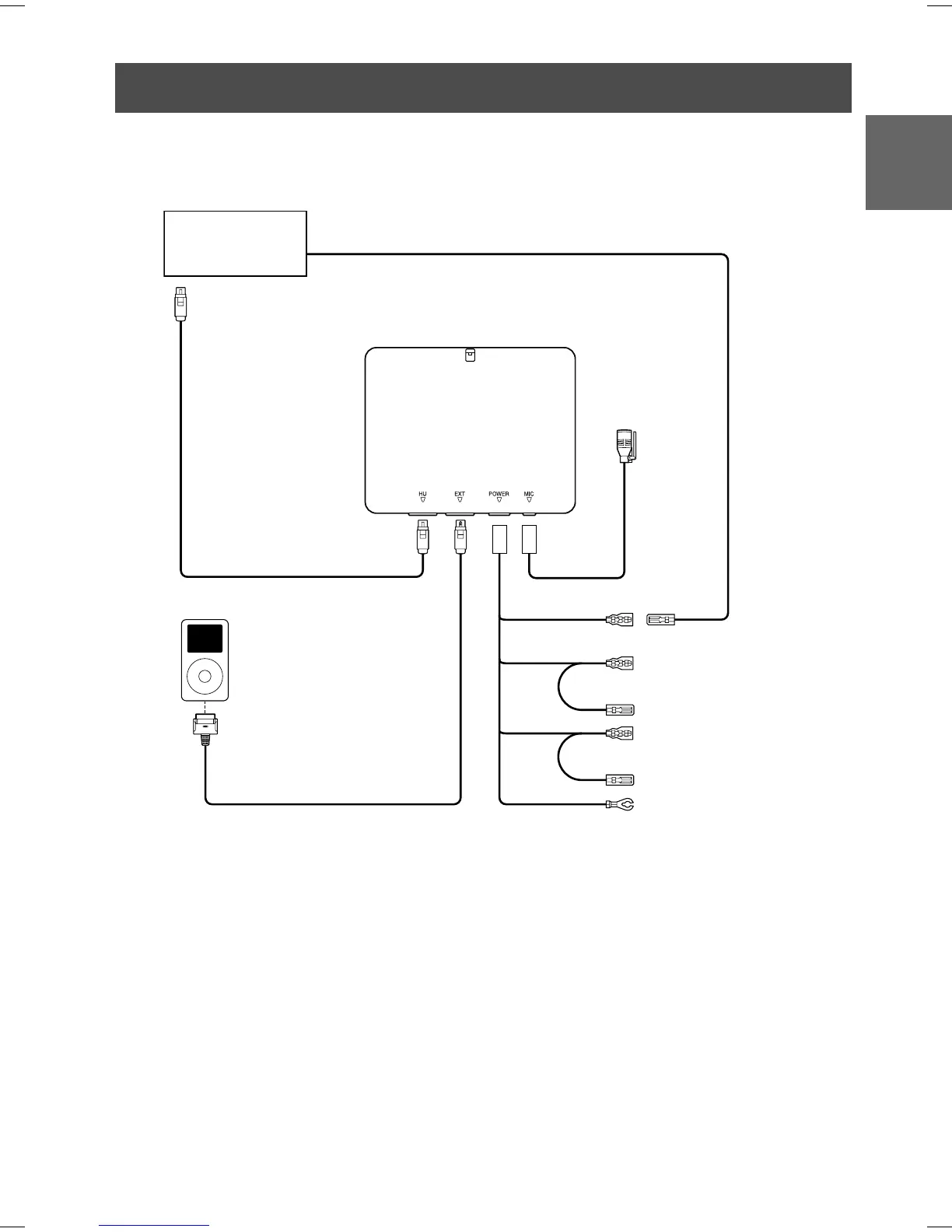
• Connect a Bluetooth compatible unit and an iPod
®
to the Bluetooth Box
iPod (Sold separately)
Bluetooth compatible
Unit (Sold separately)
1 To iPod Direct connector
2 10Pin DIN Cable (Included)
3 FULL SPEED
TM
Connection Cable (KCE-422i)
(Depending on the connected unit, this cable
may be supplied or sold separately.)
4 Microphone (Included)
5 Audio Interrupt Out lead (Pink/Black)
6 Audio Interrupt In lead (Pink/Black)
7 ACC (Ignition) lead (Red)
To the ACC Power lead.
8 Battery lead (Yellow)
Connect this lead to a terminal that constantly
provides power (to the positive (+) post of the
battery).
9 Ground lead (Black)
Connect to a metal part of chassics body with
screw.
(If the Bluetooth Box is
connected, you cannot use a
device connected to the INT
lead (voice interruption, etc.))
1
4
2
5
7
8
9
6
3



 To Next Page