24-EN
Wireless Headphone
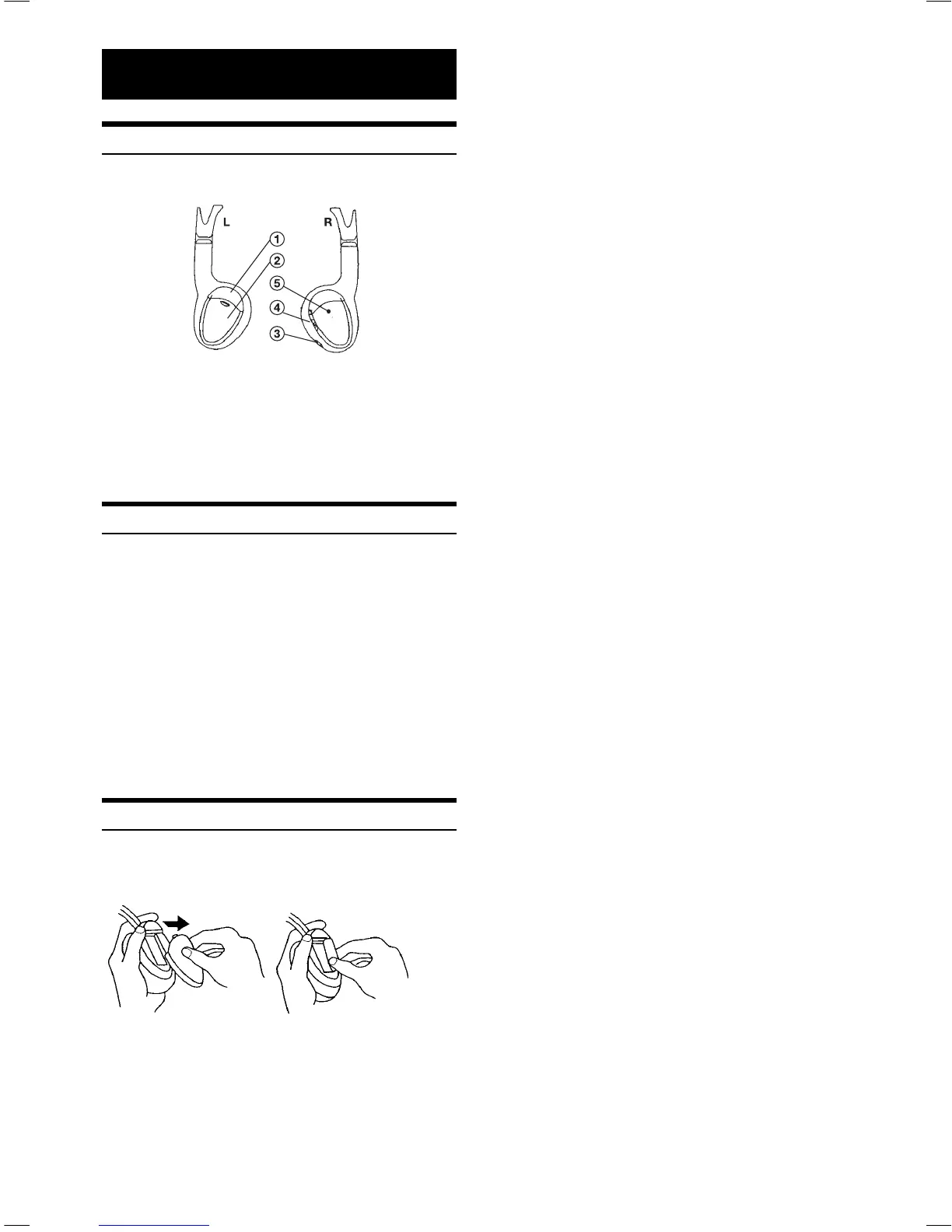
Headphone Receivers
1) Infrared Sensors; Receive signal from the
transmitter.
2) Battery Cover
3) Volume Control
4) Power Switch
5) Power Indicator LED
Operation
Read carefully to prevent damage to the headphone or
your ears:
WARNING: Before turning on the power, remove headphones and turn
the volume down as low as possible.
1) Be sure the batteries are properly installed in the
headphones.
2) Turn the headphones volume completely down
before placing it on your ears and turning on the
power.
3) Turn on the headphone power and adjust the
headphone volume to a comfortable level (You can
increase the audio source volume if needed).
Battery Installation
Place two AAA batteries into the battery compartment of the
headphone(s), making sure that the battery polarity is correct.
Book_PKG-2000P.indb 24Book_PKG-2000P.indb 24 4/8/06 2:55:22 AM4/8/06 2:55:22 AM













 To Next Page