26-EN
Connections
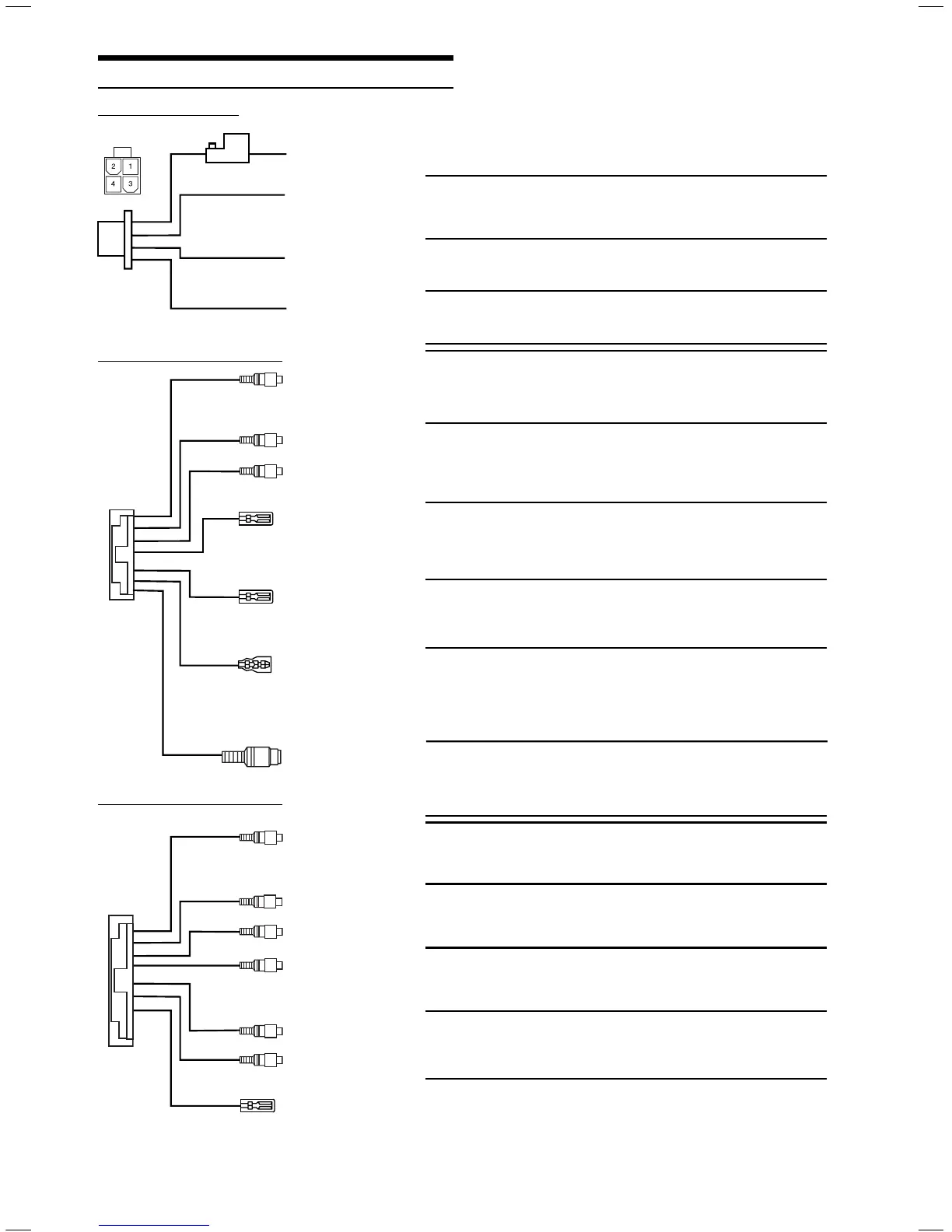
ALPINE's PKG-2000P needs the following power connections to
assure proper operation of the monitor.
1) BATT Yellow •
Battery Lead
Connect this lead to the positive (+) post of the vehicle’s battery.
2) ACC Red •
ACC
Connect this line to the vehicle’s ACC line.
(Switched 12V, ignition)
3) GND Black •
GND
Connect this line to the vehicle’s GND line.
4) DOOR Green •
Door
Connect this lead to the vehicle’s door
AUX IN 1 (VIDEO) Yellow •
Video Input Connector
This connector is used in combination with the video inputs
of other video products (AV head unit or TV Tuner)
AUX IN 1 (AUDIO L) White (L) •
Audio Input Connectors
Red (R)
These connectors are used in combination with a head
AUX IN 1 (AUDIO R)
unit or TV Tuner with audio output connectors.
POWER +12V Red •
Power Control
Connect this lead to any ALPINE video source product's ACC
line, which is red. It controls turning the power ON/OFF for the
ALPINE video products correspond to PKG-2000P power.
REMO OUT White/Brown •
Remote Out 1
(AUX 1)
Corresponds to AUX 1. To control ALPINE DVD player,
TV tuner or DVD-HU, connect to each REMOTE IN.
REMOTE IN White/Brown •
Remote In
To control ALPINE PKG-2000P, DVD player or TV tuner
from DVD-HU or LCD monitor in the front area of the vehicle,
connect this line to the ALPINE DVD-HU or LCD monitor
REMOTE OUT.
S-VIDEO Blue/Brown •
S-Video Input
You can not use Composite Video Input and S-Video
input at the same time. It may cause noise on the
screen. Refer to Video Signal setting (page 19)
AUX OUT (VIDEO) Yellow •
Video Output Connector
This connector is used in combination with the video inputs
of other video products (AV head unit or LCD monitor)
AUX OUT (AUDIO L) White (L) •
Audio Output Connectors
These connectors are used in combination with a head unit or
AUX OUT (AUDIO R)
Red (R) LCD monitor with audio input connectors.
AUX IN 2 (VIDEO) Yellow •
Video Input Connector
This connector is used in combination with the video inputs
of other video products (AV head unit or TV Tuner)
AUX IN 2 (AUDIO L) White (L) •
Audio Input Connectors
These connectors are used in combination with a head
AUX IN 2 (AUDIO R)
Red (R) unit or TV Tuner with audio output connectors.
REMO OUT (AUX 2) White/Brown •
Remote Out 2
Corresponds to AUX 2. To control ALPINE DVD player,
TV tuner or DVD-HU, connect to each REMOTE IN.
AV Connector 1 (AUX1)
AV Connector 2 (AUX2)
Power Connector
EN03 GettingStarted_r4.indd 26EN03 GettingStarted_r4.indd 26 5/16/06 6:39:45 PM5/16/06 6:39:45 PM




 To Next Page