EasyManua.ls Logo

ALTAI IX500 - Ports and Buttons; Ethernet, DC Power, and Reset Functions

ALTAI IX500
16 pages
Print Icon
To Next Page IconTo Next Page
To Previous Page IconTo Previous Page
Loading...
4
Altai Technologies Ltd. All rights reserved
Quick Setup Guide
Ethernet Port, DC Power Jack and Reset Button
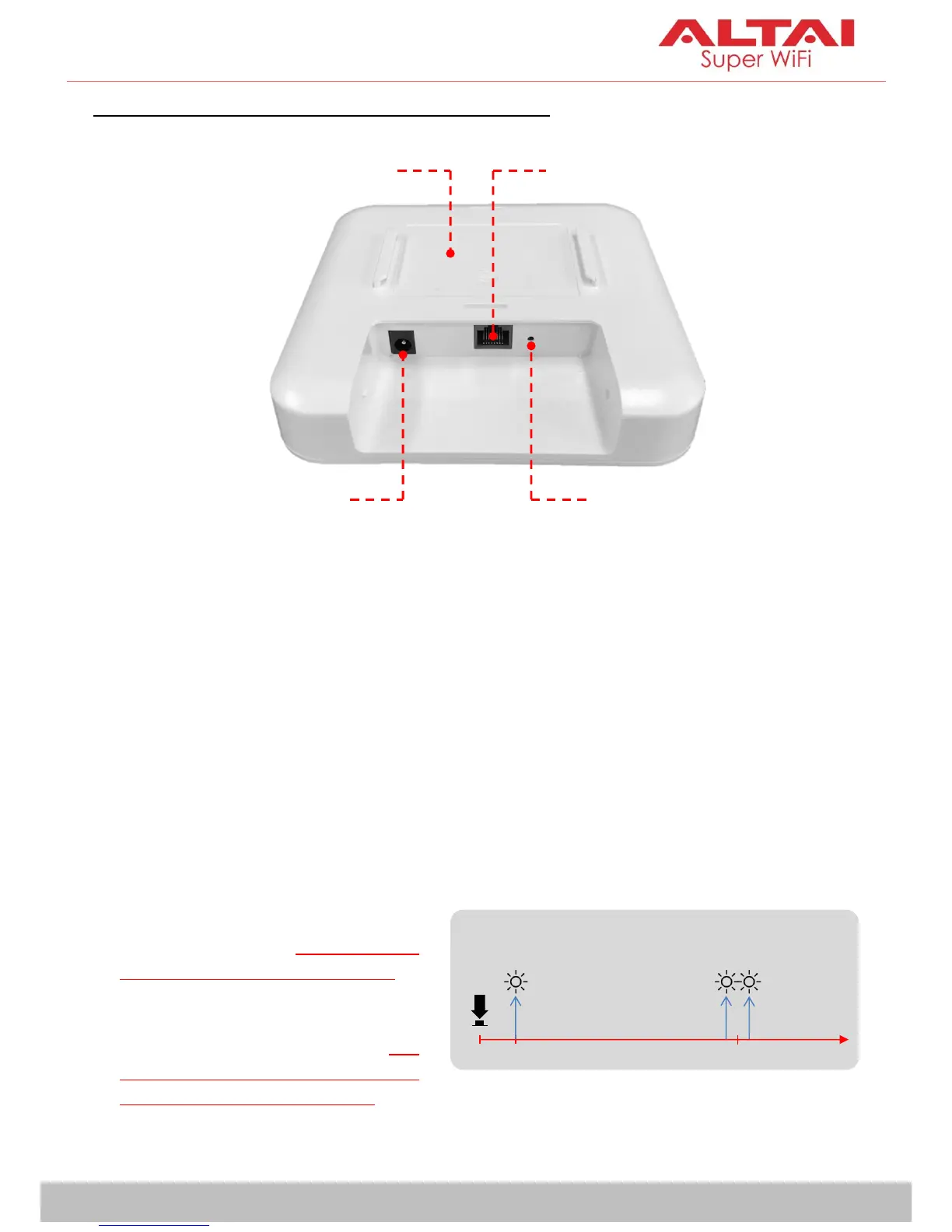
Ethernet Port:
It is used to connect to power source (see the Power Options in the later
section) and provides 10/100/1000 Mbps network interface for LAN
connection.
DC Power Jack:
It is used to connect to DC power source of 12VDC/1A as another power
option.
Reset Button:
Ethernet Port
Reset Button
DC Power
Jack
Mount
Base Slot
Red LED Indicator
0s
1-2s
5-8s
Factory Reset
Reboot
It serves two functions:
Reboot: Press and hold the
Reset Button for 2-3 seconds
until the red LED blinks once.
Factory Reset: Press and hold
the Reset Button for 5-8
seconds until the red LED
blinks twice consecutively.

Related product manuals