EasyManua.ls Logo

Altec Lansing 1707C - Signal Routing and Connectivity; Mute;Tone Generator Connections; LINK IN;LINK OUT Connections; PREAMP OUT;AMP IN Connections

Altec Lansing 1707C
27 pages
Print Icon
To Next Page IconTo Next Page
To Previous Page IconTo Previous Page
Loading...
when
signal
levels
are
high
enough
to
cause
significant
output
clipping.
A
dual
slope
V-I
limiter
protects
the
output
devices.
It
keeps
the
output
devices
operating
within
their
SOA
(safe
operating
area)
as
de-
fined
by
the
device
manufacturer.
A
special
integrated
circuit
function
block
monitors
the
heatsink
temperature,
power-
supply
voltage,
and
the
amplifier's
output.
When
it
detects
a
problem,
it
immediately
disengages
the
output
relay.
Output
Connections
Make
output
connections
to
the
seven-ter-
minal
barrier
strip
connector
located
on
the
lower-left
side
of
the
mainframe's
rear
panel.
The
1707C
main
output
connections
include
an
8
Q
direct
output
(24.5
vrms)
and
three
transformer
balanced
outputs;
4
Q
(17.4
vrms),
25
vrms
(8.3
Q),
and
70.7
vrms
(66.6
Q).
The
1715C
main
output
connections
include
a
4
Q
direct
output
(24.5
vrms)
and
a
25
vrms
(4.2
Q),
an
8
Q
(34.6
vrms),
and
a
70.7
vrms
(33.3
€2
)
balanced
transformer
output.
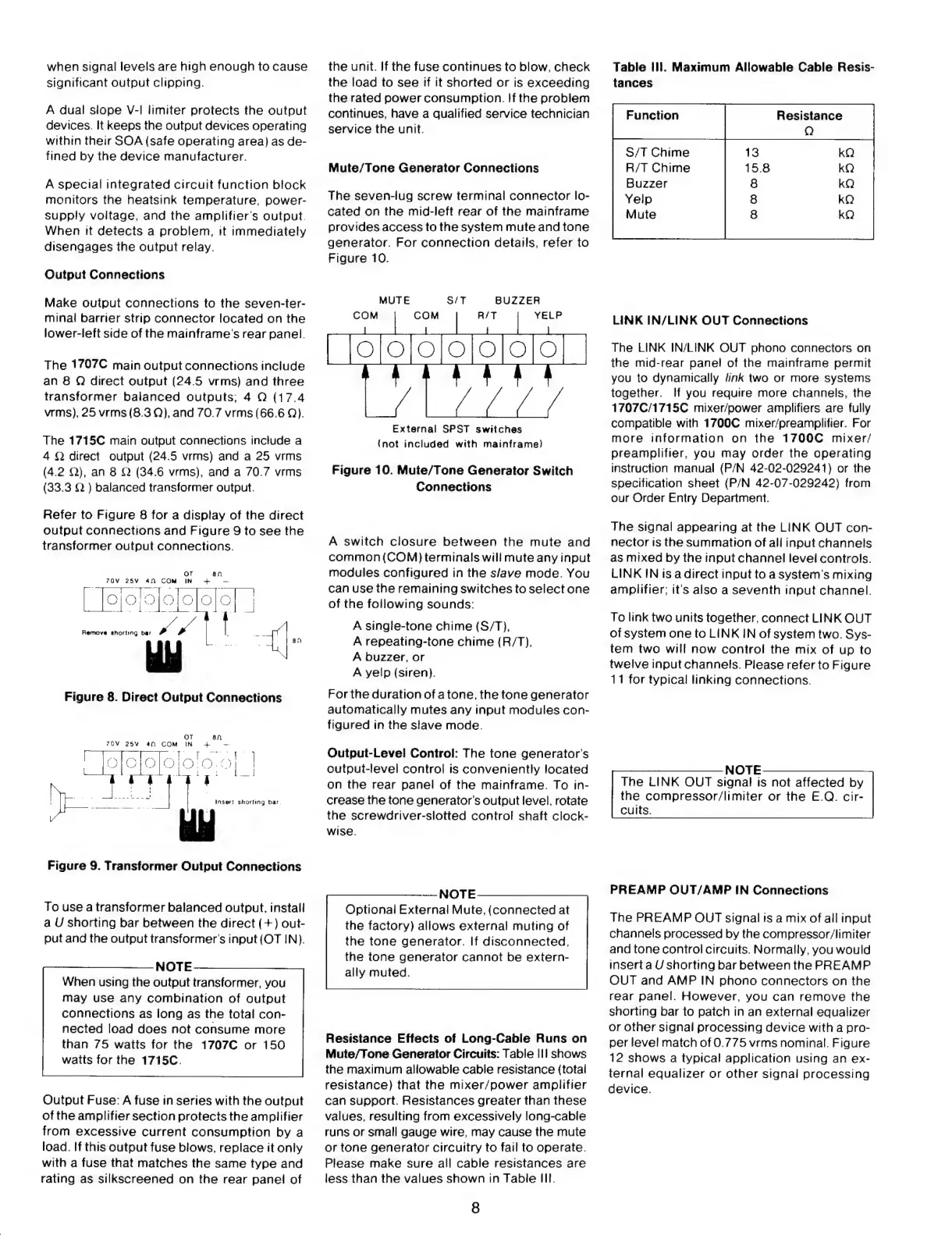
Refer
to
Figure
8
for
a
display
of
the
direct
output
connections
and
Figure
9
to
see
the
transformer
output
connections.
OT
an
TOV
25V
4n
COM
IN
+
-
lojorofolelo]o
oc
A
HT
t
JH
ql
Figure
8.
Direct
Output
Connections
Insert
shorting
bar.
Figure
9.
Transformer
Output
Connections
To
use
a
transformer
balanced
output,
install
a
U
shorting
bar
between
the
direct
(+)
out-
put
and
the
output
transformer's
input
(OT
IN).
NOTE
When
using
the
output
transformer,
you
may
use
any
combination
of
output
connections
as
long
as
the
total
con-
nected
load
does
not
consume
more
than
75
watts
for
the
1707C
or
150
watts
for
the
1715C.
Output
Fuse:
A
fuse
in
series
with
the
output
ofthe
amplifier
section
protects
the
amplifier
from
excessive
current
consumption
by
a
load.
If
this
output
fuse
blows,
replace
it
only
with
a
fuse
that
matches
the
same
type
and
rating
as
silkscreened
on
the
rear
panel
of
the
unit.
If
the
fuse
continues
to
blow,
check
the
load
to
see
if
it
shorted
or
is
exceeding
the
rated
power
consumption.
If
the
problem
continues,
have
a
qualified
service
technician
service
the
unit.
Mute/Tone
Generator
Connections
The
seven-lug
screw
terminal
connector
lo-
cated
on
the
mid-left
rear
of
the
mainframe
provides
access
to
the
system
mute
and
tone
generator.
For
connection
details,
refer
to
Figure
10.
S/T
BUZZER
External
SPST
switches
(not
included
with
mainframe}
Figure
10.
Mute/Tone
Generator
Switch
Connections
A
switch
closure
between
the
mute
and
common
(COM)
terminals
will
mute
any
input
modules
configured
in
the
s/ave
mode.
You
can
use
the
remaining
switches
to
select
one
of
the
following
sounds:
A
single-tone
chime
(S/T),
A
repeating-tone
chime
(R/T),
A
buzzer,
or
A
yelp
(siren).
Forthe
duration
of
atone,
the
tone
generator
automatically
mutes
any
input
modules
con-
figured
in
the
slave
mode.
Output-Level
Control:
The
tone
generator's
output-level
control
is
conveniently
located
on
the
rear
panel
of
the
mainframe.
To
in-
crease
the
tone
generator's
output
level,
rotate
the
screwdriver-slotted
control
shaft
clock-
wise.
NOTE
Optional
External
Mute,
(connected
at
the
factory)
allows
external
muting
of
the
tone
generator.
If
disconnected,
the
tone
generator
cannot
be
extern-
ally
muted.
Resistance
Effects
of
Long-Cable
Runs
on
Mute/Tone
Generator
Circuits:
Table
Ill
shows
the
maximum
allowable
cable
resistance
(total
resistance)
that
the
mixer/power
amplifier
can
support.
Resistances
greater
than
these
values,
resulting
from
excessively
long-cable
runs
or
small
gauge
wire,
may
cause
the
mute
or
tone
generator
circuitry
to
fail
to
operate.
Please
make
sure
all
cable
resistances
are
less
than
the
values
shown
in
Table
III.
8
Table
Ill.
Maximum
Allowable
Cable
Resis-
tances
Function
Resistance
S/T
Chime
R/T
Chime
Buzzer
Yelp
Mute
LINK
IN/LINK
OUT
Connections
The
LINK
IN/LINK
OUT
phono
connectors
on
the
mid-rear
panel
of
the
mainframe
permit
you
to
dynamically
link
two
or
more
systems
together.
If
you
require
more
channels,
the
1707C/1715C
mixer/power
amplifiers
are
fully
compatible
with
1700C
mixer/preamplifier.
For
more
information
on
the
1700C
mixer/
preamplifier,
you
may
order
the
operating
instruction
manual
(P/N
42-02-029241)
or
the
specification
sheet
(P/N
42-07-029242)
from
our
Order
Entry
Department.
The
signal
appearing
at
the
LINK
OUT
con-
nector
is
the
summation
of
all
input
channels
as
mixed
by
the
input
channel
level
controls.
LINK
IN
is
a
direct
input
to
a
system's
mixing
amplifier;
it's
also
a
seventh
input
channel.
To
link
two
units
together,
connect
LINK
OUT
of
system
one
to
LINK
IN
of
system
two.
Sys-
tem
two
will
now
control
the
mix
of
up
to
twelve
input
channels.
Please
refer
to
Figure
11
for
typical
linking
connections.
NOTE
The
LINK
OUT
signal
is
not
affected
by
the
compressor/limiter
or
the
E.Q.
cir-
cuits.
PREAMP
OUT/AMP
IN
Connections
The
PREAMP
OUT
signal
is
a
mix
of
all
input
channels
processed
by
the
compressor/limiter
and
tone
control
circuits.
Normally,
you
would
inserta
U
shorting
bar
between
the
PREAMP
OUT
and
AMP
IN
phono
connectors
on
the
rear
panel.
However,
vou
can
remove
the
shorting
bar
to
patch
in
an
external
equalizer
or
other
signal
processing
device
with
a
pro-
per
level
match
of
0.775
vrms
nominal.
Figure
12
shows
a
typical
application
using
an
ex-
ternal
equalizer
or
other
signal
processing
device.

Other manuals for Altec Lansing 1707C

Related product manuals