EasyManua.ls Logo

Altec Lansing 1707C - Front Panel Controls and Setup; Front-Panel Controls, Switches, and Indicators; Initial Setup of an Input Module; Initial Setup of an Output Module

Altec Lansing 1707C
27 pages
Print Icon
To Next Page IconTo Next Page
To Previous Page IconTo Previous Page
Loading...
FRONT/REAR-PANELS
CONTROLS,
SWITCHES,
INDICATORS,
AND
CONNECTORS
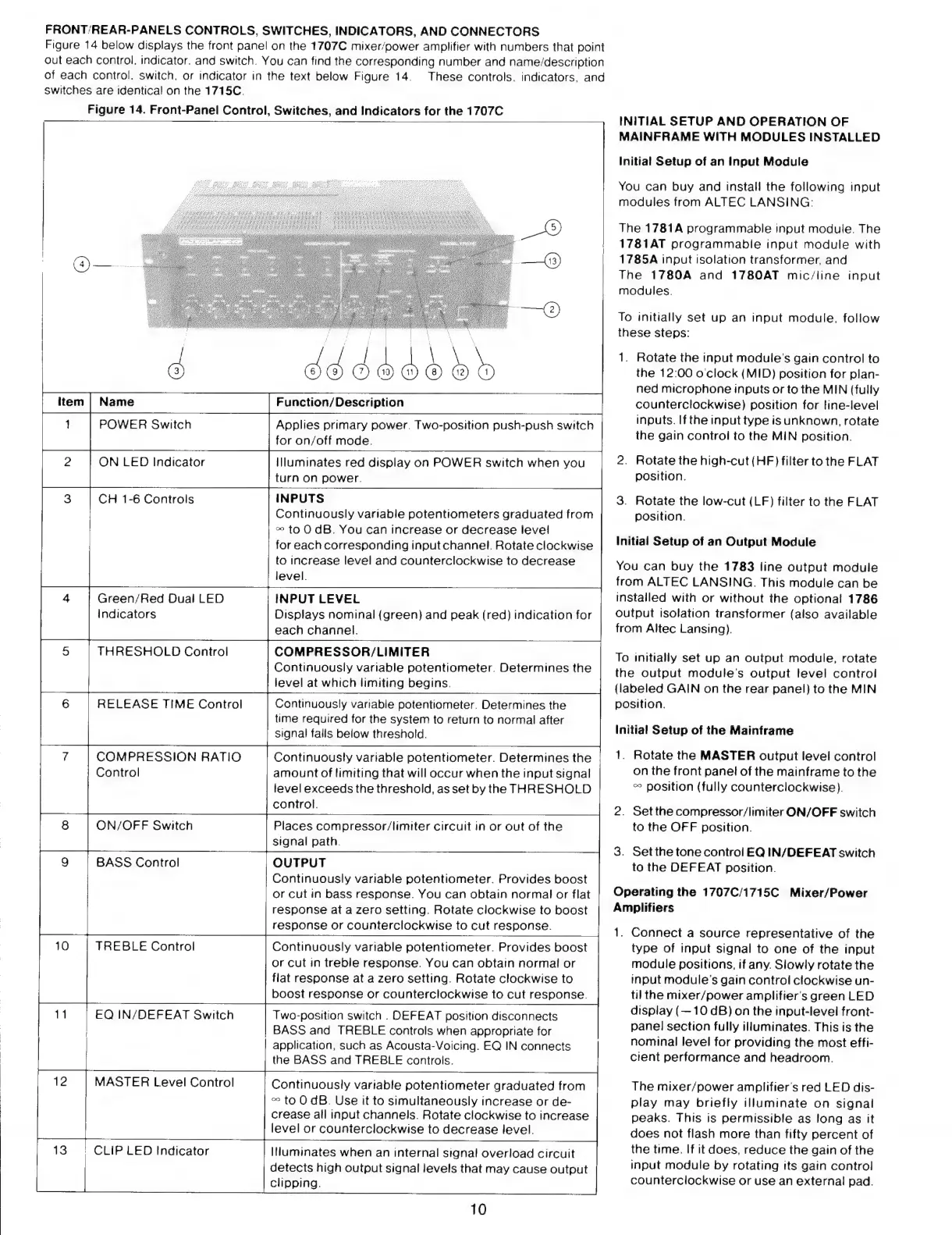
Figure
14
below
displays
the
front
panel
on
the
1707C
mixer/power
amplifier
with
numbers
that
point
out
each
control.
indicator.
and
switch.
You
can
find
the
corresponding
number
and
name/description
of
each
control.
switch,
or
indicator
in
the
text
below
Figure
14.
These
controls.
indicators,
and
switches
are
identical
on
the
1715C.
Figure
14.
Front-Panel
Control,
Switches,
and
Indicators
for
the
1707C
NT
item
Name
Function/Description
1
POWER
Switch
Applies
primary
power.
Two-positton
push-push
switch
for
on/off
mode.
illuminates
red
display
on
POWER
switch
when
you
turn
on
power.
INPUTS
Continuously
variable
potentiometers
graduated
from
æ
to
O
dB.
You
can
increase
or
decrease
level
for
each
corresponding
input
channel.
Rotate
clockwise
to
increase
level
and
counterclockwise
to
decrease
level.
INPUT
LEVEL
Displays
nominal
(green)
and
peak
(red)
indication
for
each
channel.
COMPRESSOR/LIMITER
Continuously
variable
potentiometer.
Determines
the
level
at
which
limiting
begins.
2
ON
LED
Indicator
CH
1-6
Controls
4
Green/Red
Dual
LED
indicators
5
THRESHOLD
Control
Continuously
variable
potentiometer.
Determines
the
time
required
for
the
system
to
return
to
normal
after
signal
falls
below
threshold.
6
RELEASE
TIME
Control
Continuously
variable
potentiometer.
Determines
the
amount
of
limiting
that
will
occur
when
the
input
signal
level
exceeds
the
threshold,
as
set
by
the
THRESHOLD
control.
COMPRESSION
RATIO
Control
Places
compressor/limiter
circuit
in
or
out
of
the
signal
path.
OUTPUT
Continuously
variable
potentiometer.
Provides
boost
or
cut
in
bass
response.
You
can
obtain
normal
or
flat
response
at
a
zero
setting.
Rotate
clockwise
to
boost
response
or
counterclockwise
to
cut
response.
ON/OFF
Switch
W
BASS
Control
Continuously
variable
potentiometer.
Provides
boost
or
cut
in
treble
response.
You
can
obtain
normal
or
flat
response
at
a
zero
setting.
Rotate
clockwise
to
boost
response
or
counterclockwise
to
cut
response.
TREBLE
Control
BASS
and
TREBLE
controls
when
appropriate
for
application,
such
as
Acousta-Voicing.
EQ
IN
connects
the
BASS
and
TREBLE
controls.
MASTER
Level
Control
Continuously
variable
potentiometer
graduated
from
^
to
O
dB.
Use
it
to
simultaneously
increase
or
de-
crease
all
input
channels.
Rotate
clockwise
to
increase
7
10
11
EQ
IN/DEFEAT
Switch
Two-position
switch
.
DEFEAT
position
disconnects
12
level
or
counterclockwise
to
decrease
level.
13
:
CLIP
LED
Indicator
Illuminates
when
an
internal
signal
overload
circuit
detects
high
output
signal
levels
that
may
cause
output
clipping.
10
INITIAL
SETUP
AND
OPERATION
OF
MAINFRAME
WITH
MODULES
INSTALLED
Initial
Setup
of
an
input
Module
You
can
buy
and
install
the
following
input
modules
from
ALTEC
LANSING:
The
1781A
programmable
input
module.
The
1781AT
programmable
input
module
with
1785A
input
isolation
transformer,
and
The
1780A
and
1780AT
mic/line
input
modules.
To
initially
set
up
an
input
module,
follow
these
steps:
1.
Rotate
the
input
module's
gain
control
to
the
12:00
o'clock
(MID)
position
for
plan-
ned
microphone
inputs
or
to
the
MIN
(fully
counterclockwise)
position
for
line-level
inputs.
Ifthe
input
type
is
unknown,
rotate
the
gain
control
to
the
MIN
position.
2.
Rotate
the
high-cut
(HF)
filter
to
the
FLAT
position.
3.
Rotate
the
low-cut
(LF)
filter
to
the
FLAT
position.
Initial
Setup
of
an
Output
Module
You
can
buy
the
1783
line
output
module
from
ALTEC
LANSING.
This
module
can
be
installed
with
or
without
the
optional
1786
output
isolation
transformer
(also
available
from
Altec
Lansing).
To
initially
set
up
an
output
module,
rotate
the
output
module's
output
level
control
(labeled
GAIN
on
the
rear
panel)
to
the
MIN
position.
Initial
Setup
of
the
Mainframe
1.
Rotate
the
MASTER
output
level
control
on
the
front
panel
of
the
mainframe
to
the
co
position
(fully
counterclockwise).
2.
Setthe
compressor/limiter
ON/OFF
switch
to
the
OFF
position.
3.
Setthetone
control
EQ
IN/DEFEAT
switch
to
the
DEFEAT
position.
Operating
the
1707C/1715C
Mixer/Power
Amplifiers
1.
Connect
a
source
representative
of
the
type
of
input
signal
to
one
of
the
input
module
positions,
if
any.
Slowly
rotate
the
input
module's
gain
control
clockwise
un-
til
the
mixer/power
amplifier's
green
LED
display
(—10
dB)
on
the
input-level
front-
panel
section
fully
illuminates.
This
is
the
nominal
level
for
providing
the
most
effi-
cient
performance
and
headroom.
The
mixer/power
amplifier's
red
LED
dis-
play
may
briefly
illuminate
on
signal
peaks.
This
is
permissible
as
long
as
it
does
not
flash
more
than
fifty
percent
of
the
time.
If
it
does,
reduce
the
gain
of
the
input
module
by
rotating
its
gain
control
counterclockwise
or
use
an
external
pad.

Other manuals for Altec Lansing 1707C

Related product manuals