EasyManua.ls Logo

Altec Lansing 1707C - Mixer;Power Amplifier Operation; Rear-Panel Control and Connectors; Operating the 1707 C;1715 C Mixer;Power Amplifiers

Altec Lansing 1707C
27 pages
Print Icon
To Next Page IconTo Next Page
To Previous Page IconTo Previous Page
Loading...
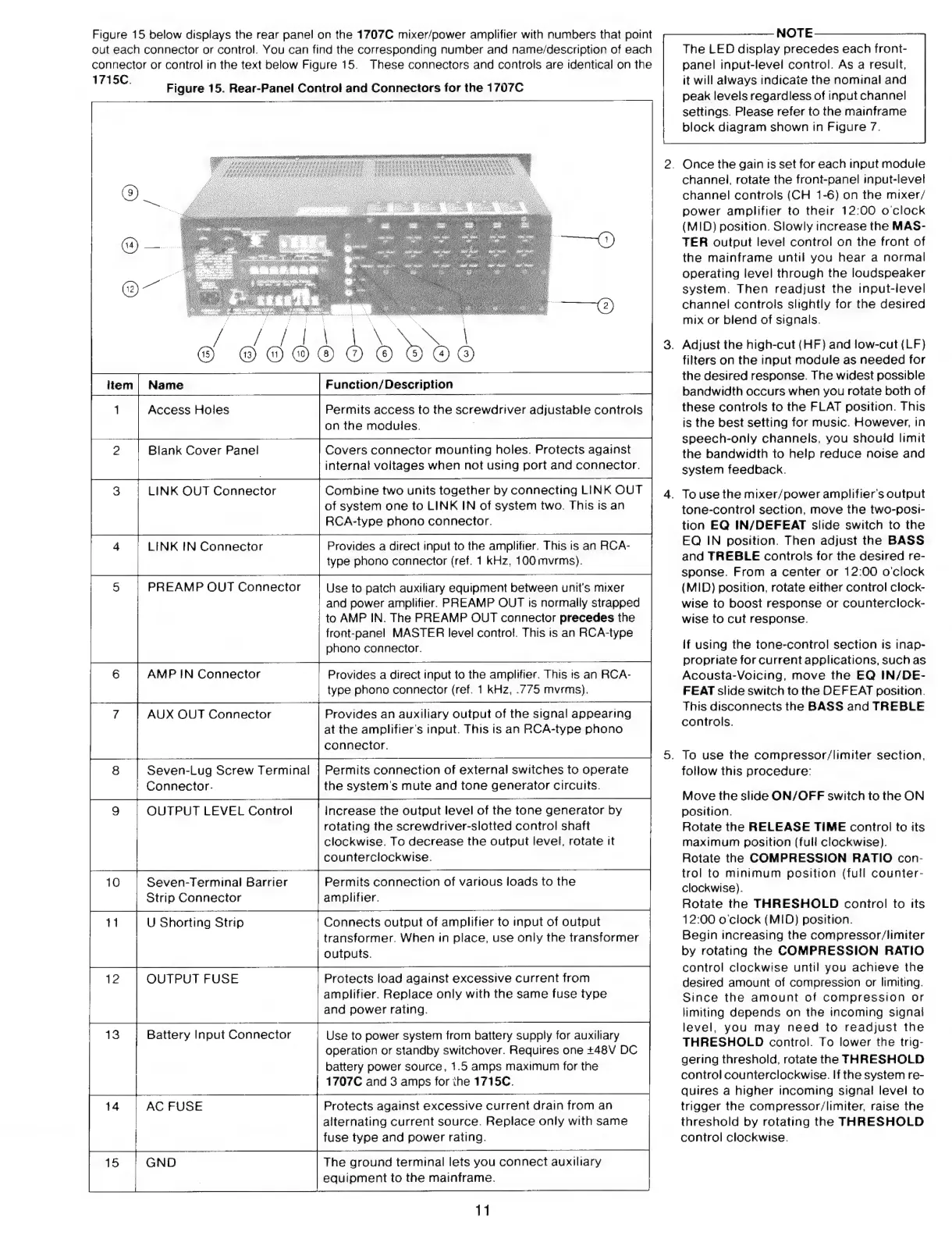
Figure
15
below
displays
the
rear
panel
on
the
1707C
mixer/power
amplifier
with
numbers
that
point
out
each
connector
or
control.
You
can
find
the
corresponding
number
and
name/description
of
each
connector
or
control
in
the
text
below
Figure
15.
These
connectors
and
controls
are
identical
on
the
1715C.
Figure
15.
Rear-Panel
Control
and
Connectors
for
the
1707C
|
[
|
c
dd
N
x
i
Permits
access
to
the
screwdriver
adjustable
controls
on
the
modules.
Access
Holes
Covers
connector
mounting
holes.
Protects
against
internal
voltages
when
not
using
port
and
connector.
Blank
Cover
Panel
Combine
two
units
together
by
connecting
LINK
OUT
of
system
one
to
LINK
IN
of
system
two.
This
is
an
RCA-type
phono
connector.
LINK
OUT
Connector
Provides
a
direct
input
to
the
amplifier.
This
is
an
RCA-
type
phono
connector
(ref.
1
kHz,
100
mvrms).
LINK
IN
Connector
PREAMP
OUT
Connector
Use
to
patch
auxiliary
equipment
between
unit's
mixer
and
power
amplifier.
PREAMP
OUT
is
normally
strapped
to
AMP
IN.
The
PREAMP
OUT
connector
precedes
the
front-panel
MASTER
level
control.
This
is
an
RCA-type
phono
connector.
AMP
IN
Connector
Provides
a
direct
input
to
the
amplifier.
This
is
an
RCA-
type
phono
connector
(ref.
1
kHz,
.775
mvrms).
Provides
an
auxiliary
output
of
the
signal
appearing
at
the
amplifier's
input.
This
is
an
RCA-type
phono
connector.
AUX
OUT
Connector
Permits
connection
of
external
switches
to
operate
the
system's
mute
and
tone
generator
circuits.
Seven-Lug
Screw
Terminal
Connector.
OUTPUT
LEVEL
Control
Increase
the
output
level
of
the
tone
generator
by
rotating
the
screwdriver-slotted
control
shaft
clockwise.
To
decrease
the
output
level,
rotate
it
counterclockwise.
Permits
connection
of
various
loads
to
the
amplifier.
Seven-Terminal
Barrier
Strip
Connector
U
Shorting
Strip
Connects
output
of
amplifier
to
input
of
output
transformer.
When
in
place,
use
only
the
transformer
outputs.
Protects
load
against
excessive
current
from
amplifier.
Replace
only
with
the
same
fuse
type
and
power
rating.
OUTPUT
FUSE
Battery
Input
Connector
Use
to
power
system
from
battery
supply
for
auxiliary
operation
or
standby
switchover.
Requires
one
+48V
DC
battery
power
source,
1.5
amps
maximum
for
the
1707C
and
3
amps
for
ihe
1715C.
Protects
against
excessive
current
drain
from
an
alternating
current
source.
Replace
only
with
same
fuse
type
and
power
rating.
14
AC
FUSE
The
ground
terminal
lets
you
connect
auxiliary
equipment
to
the
mainframe.
15
GND
11
NOTE
The
LED
display
precedes
each
front-
panel
input-level
control.
As
a
result,
it
will
always
indicate
the
nominal
and
peak
levels
regardless
of
input
channel
settings.
Please
refer
to
the
mainframe
block
diagram
shown
in
Figure
7.
Once
the
gain
is
set
for
each
input
module
channel,
rotate
the
front-panel
input-level
channel
controls
(CH
1-6)
on
the
mixer/
power
amplifier
to
their
12:00
o
clock
(MID)
position.
Slowly
increase
the
MAS-
TER
output
level
control
on
the
front
of
the
mainframe
until
you
hear
a
normal
operating
level
through
the
loudspeaker
system.
Then
readjust
the
input-level
channel
controls
slightly
for
the
destred
mix
or
blend
of
signals.
.
Adjust
the
high-cut
(HF)
and
low-cut
(LF)
filters
on
the
input
module
as
needed
for
the
desired
response.
The
widest
possible
bandwidth
occurs
when
you
rotate
both
of
these
controls
to
the
FLAT
position.
This
is
the
best
setting
for
music.
However,
in
speech-only
channels,
you
should
limit
the
bandwidth
to
help
reduce
noise
and
system
feedback.
.
To
use
the
mixer/power
amplifier's
output
tone-control
section,
move
the
two-posi-
tion
EQ
IN/DEFEAT
slide
switch
to
the
EQ
IN
position.
Then
adjust
the
BASS
and
TREBLE
controls
for
the
desired
re-
sponse.
From
a
center
or
12:00
o'clock
(MID)
position,
rotate
either
control
clock-
wise
to
boost
response
or
counterclock-
wise
to
cut
response.
If
using
the
tone-control
section
is
inap-
propriate
for
current
applications,
such
as
Acousta-Voicing,
move
the
EQ
IN/DE-
FEAT
slide
switch
to
the
DEFEAT
position.
This
disconnects
the
BASS
and
TREBLE
controls.
To
use
the
compressor/limiter
section,
follow
this
procedure:
Move
the
slide
ON/OFF
switch
to
the
ON
position.
Rotate
the
RELEASE
TIME
control
to
its
maximum
position
(full
clockwise).
Rotate
the
COMPRESSION
RATIO
con-
trol
to
minimum
position
(full
counter-
clockwise).
Rotate
the
THRESHOLD
control
to
its
12:00
o'clock
(MID)
position.
Begin
increasing
the
compressor/limiter
bv
rotating
the
COMPRESSION
RATIO
control
clockwise
until
vou
achieve
the
desired
amount
of
compression
or
limiting.
Since
the
amount
of
compression
or
limiting
depends
on
the
incoming
signal
level,
you
may
need
to
readjust
the
THRESHOLD
control.
To
lower
the
trig-
gering
threshold,
rotate
the
THRESHOLD
control
counterclockwise.
If
the
system
re-
quires
a
higher
incoming
signal
level
to
trigger
the
compressor/limiter,
raise
the
threshold
bv
rotating
the
THRESHOLD
control
clockwise.

Other manuals for Altec Lansing 1707C

Related product manuals