bass, treble, or rear sound. If any of these functions is selected and not
used for a few seconds, the control reverts back to Master Volume
control function.
Five level indicators around the rotary knob show the position of the
control. In the extreme counterclockwise position all LED's are off. As
the control is rotated clockwise the LED's illuminate one at a time until in
the maximum position, when all LED's are glowing.
If one of the functions buttons has been depressed (Bass, Treble or
Mode), the master level rotary control will adjust the level of the function
selected. The green function indicator associated with the function
selected will be illuminated. See Treble/Bass Selectors below.
Treble/Bass Selectors
Bass and Treble selectors are located on the System Controller. When
the Bass button is pushed, the Bass LED will turn on and the rotary knob
will change the level of bass on all Satellites, having the greatest effect
on the Subwoofer. The LEDs around the rotary knob will light one at a
time to indicate the level of bass boost or reduction. The center LED
indicates the default position. Pushing the Bass button again will
immediately exit this function. The default bass level is at the center
LED position. To reset the bass level to the default position, hold the
Bass button down for three seconds.
Pushing the Treble button will result in a similar pattern. When the
Treble button is pushed, the Treble LED will turn on and the rotary knob
will change the level of treble on all Satellites. The LEDs around the
rotary knob will light one at a time to indicate the level of treble boost or
reduction. The center LED indicates the default position. Pushing the
Treble button again will immediately exit this function. The default treble
level is at the center LED position. To reset the treble level to the
default position, hold the Treble button down for three seconds.
Mode Selector
The Mode Selector button is located on the System Controller. The
Mode Selector changes the operation of the system from one mode to
the next: Stereo, Stereo x2, and Gaming. Pressing the Mode button
cycles through the three modes. In Stereo mode, the Front Input plays
on the Front Satellites and the Subwoofer. In Stereo x2 mode (system
default) the Front Input plays on both the Front and the Rear Satellites
and the Subwoofer. In Gaming mode, the Front Input plays on the Front
Satellites, the Rear Input plays on the Rear Satellites, and the Subwoofer
plays from both the Front and the Rear Inputs.
Rear Volume Level Adjustments
To adjust the volume level of the Rear Satellites, in either the Stereo x2
or Gaming mode, hold down the Mode button for approximately 3
seconds. The left-most LED around the Master Volume Control (rotary
knob) will then begin flashing, indicating that the Master Volume control is
now programmed to adjust the level of the Rear Satellites. The LEDs
around the rotary knob will light one at a time to indicate the strength of
Rear speaker level. Pushing the mode button again will immediately exit
this function. If the control is not actively used for a short while, the
control reverts back to Master Volume control function.
Since there is no rear output in Stereo Mode, there is no rear volume
level adjustment in this mode. The default Rear Satellite speaker level is
at the center LED position.
The rotary knob reverts to Master Volume control function when a period
of 3 seconds of inactivity occurs after adjusting the Bass, Treble, or Rear
speaker levels.
System Reset to Factory Default Settings
To return to factory default settings, press both the Bass and Treble
buttons at the same time and hold them down for about 3 seconds.
This will reset the bass, treble, mode, volume and rear volume settings.
PLACEMENT OF SPEAKERS
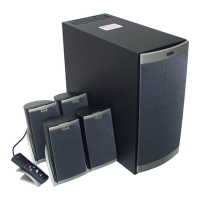
All stereo information is heard from the Satellite speakers. The
Subwoofer contains no stereo information and sound is non-directional.
As a result, the Subwoofer does not necessarily have to be placed in any
particular relationship to the Satellites. Placing the Subwoofer on the
floor close to the wall or corner of a room provides maximum bass
efficiency.
WARNING: The Subwoofer is not magnetically shielded. The
Subwoofer should NOT be placed near video display devices such as a
TV or computer monitor. The Subwoofer should NOT be placed near
computer hard drives. Position the Subwoofer at least 2 feet (0.6m)
away from computer hard drives, or any other media that uses magnetic
encoding.
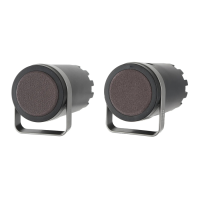
The Satellite speakers are magnetically shielded and can be placed close
to a video display (TV, computer monitor) without distorting the video
image. The Front Satellites can be close to the monitor or stretched out
as far as the speaker cords allow. The placement depends on where the
listener sits. The Rear Satellites can be placed slightly behind the
listener. Usually best stereo effect is obtained by placing speakers as far
apart as their wiring allows. Try using this same principle if the wall-
mount option is utilized for the Rear Satellites. Front Satellite and Rear
Satellites are usually placed at ear level or slightly above.
Sound effects may vary depending on how the recordings are made.
Therefore, it is not unusual to rearrange the speakers from time to time
until the listener finds which arrangement gives the best results.
HOW TO ENHANCE
PRESENTATIONS
WITH DIALOGUE
The 641 output jack (CONNECTIONS, Stereo and Stereo x2 Setup, step
4) is connected to a computer sound card. A CD player or other audio
source can be plugged into the unused Input. Mixing of the computer
audio output with another audio source can be accomplished by using
the volume control or On/Off switch on the second audio source. A
typical example may be as follows:
A lecturer may want to interject dialogue into a multimedia presentation.
If the lecturer has a wireless FM microphone system the output of the


 To Next Page
 Loading...