microphone receiver can be connected to the unused input on
the 641. When the lecturer wishes to make a comment, he either turns
on the microphone switch to speak or he can raise or lower the
microphone volume control to mix his voice with the computer
audio program. Any other audio device can operate in the same
manner.
Note: Microphone location in relation to the speakers is important.
Position the microphone so that the speakers are located between the
microphone and the audience, or so that the microphone is behind the
speakers. If the microphone is placed in front of the speakers,
feedback will result.
OTHER USES FOR THE
AUX (AUXILIARY) INPUT
You may elect to hook up your Stereo system or Stereo TV to the
auxiliary input so that your speakers may be used for these devices
when your primary audio device is not in use. You can also connect your
modem audio-out to the second input.
SPECIFICATIONS
Total System Power 400 watts
Frequency Response 27 Hz - 20 kHz
Signal to Noise Ratio @ 1 kHz input > 70 dB
Crossover Frequency 100 Hz
System THD (distortion) < 0.3 % THD @ -10
dB full scale input
voltage
Input Impedance 10k ohms
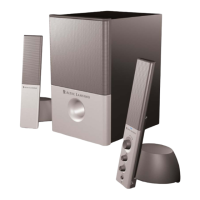
Satellite Amplified Speakers
Drivers (per Satellite) 1" tweeter (24 mm)
3" mid-range
(75 mm)
Subwoofer
Drivers Two 6.5" (165 mm)
Long Throw woofers
Power Requirements
USA/Canada/and applicable
Latin American countries 120v 60 Hz AC
Europe/United Kingdom;
applicable Asian countries;
Argentina, Chile and Uruguay 230v 50 Hz AC
ETL / cETL / CE / NOM / IRAM Approved




 To Next Page