Use of Controls
• Power On/Off.
Press the Up/Down volume controls
simultaneously to turn power on and off. A green power
indicator will glow to show power is on. See Figure 2. If
power to the ACS48 is turned on/off by a main power
switch, some “pop” or static sounds may be heard
through the speakers. To avoid this disturbance it is
recommended to turn power off on the ACS48 before
turning off the main power switch. When the main power
switch is turned on, the ACS48 will not turn on. Both
volume controls must be pressed simultaneously to turn
the ACS48 on.
• Volume Up/Down. Volume is
controlled electronically by the use
of two push-buttons located on the
top of the satellite. Arrows on the
push-buttons indicate volume
up/down. The left push-button with
the arrow pointing towards the front
lowers volume and the right push-
button raises volume. See Figure 2.
• Subwoofer Volume Control (Bass
Level). With the subwoofer in the
desired location, the volume control
is used to mix the level of the
subwoofer with the satellite speakers.
Mixing is usually done by playing a
wide variety of music and speech
and adjusting the control until a natural sound is obtained.
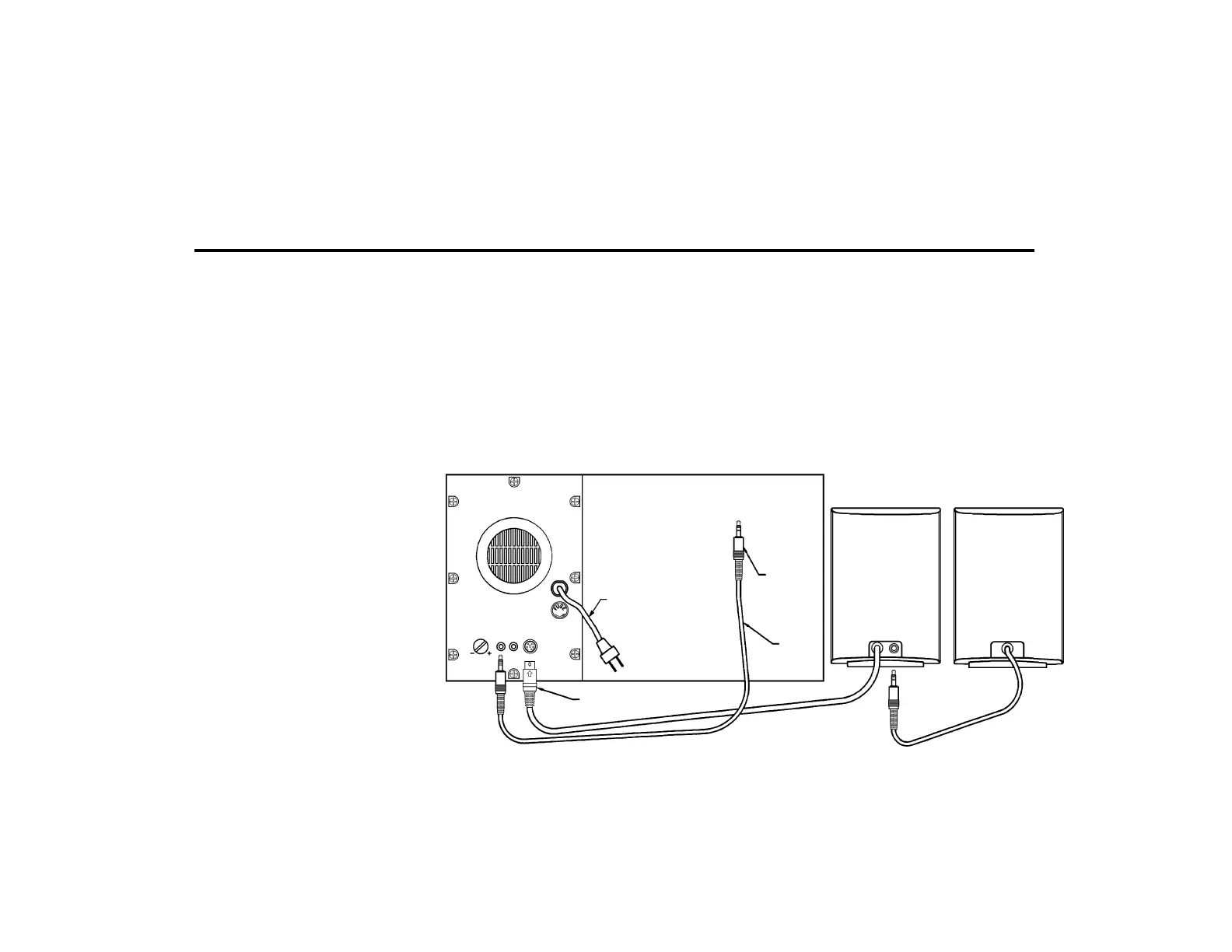
must face up. Do not put the AC power plug into the wall
(3.5mm)





 To Next Page