DE1-SOC COMPUTER SYSTEM WITH NIOS II For Quartus II 15.0
8 Altera Monitor Program Integration
As we mentioned earlier, the DE1-SoC Computer system, and the sample programs described in this document, are
made available as part of the Altera Monitor Program. Figures 39 to 42 show a series of windows that are used
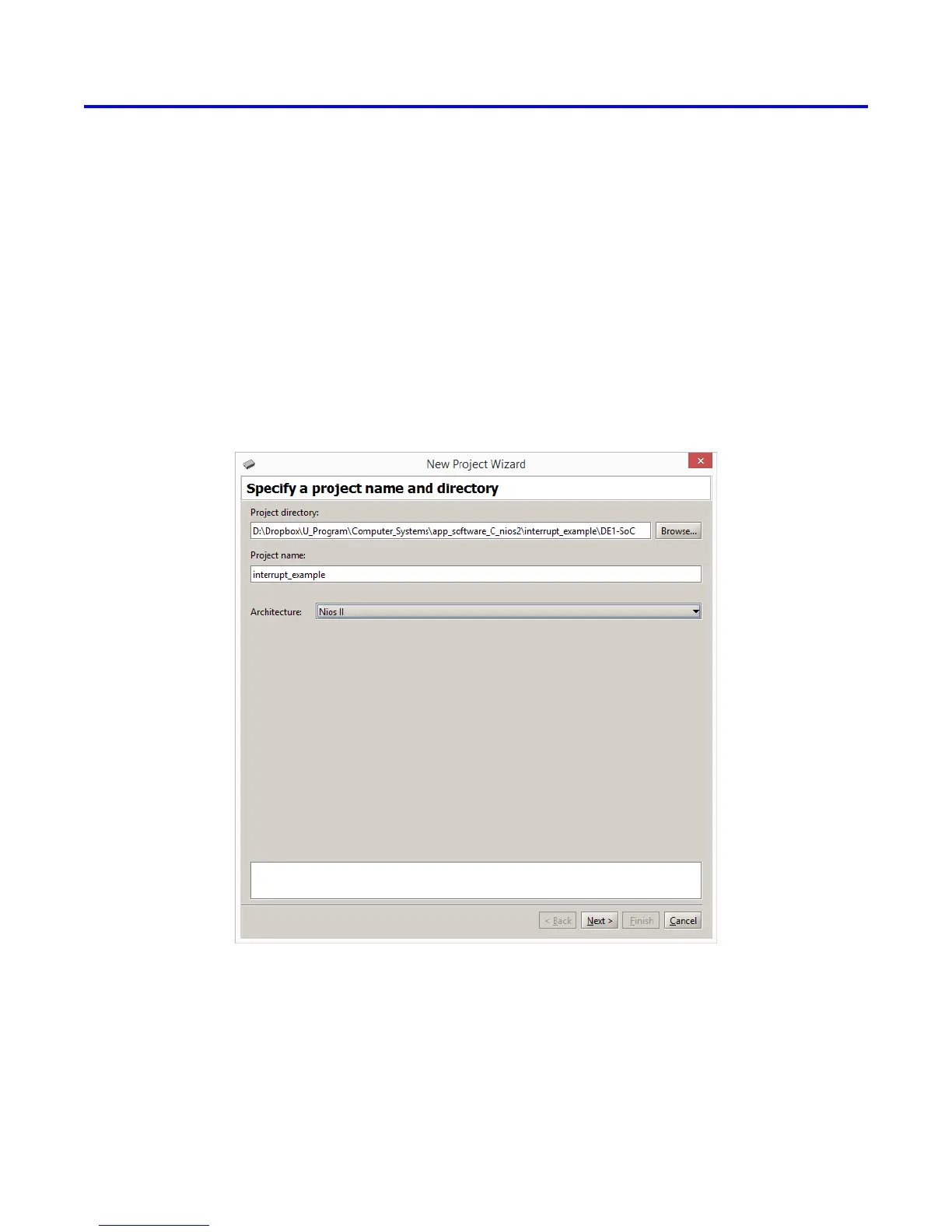
in the Monitor Program to create a new project. In the first screen, shown in Figure 39, the user specifies a file
system folder where the project will be stored, gives the project a name, and specifies the type of processor that is
being used. Pressing Next opens the window in Figure 40. Here, the user can select the DE1-SoC Computer as a
predesigned system. The Monitor Program then fills in the relevant information in the System details box, which
includes the files called Computer_System.sopcinfo and DE1_SoC_Computer.sof. The first of these files specifies
to the Monitor Program information about the components that are available in the DE1-SoC Computer, such as
the type of processor and memory components, and the address map. The second file is an FPGA programming
bitstream for the DE1-SoC Computer, which can downloaded by the Monitor Program into the DE1-SoC board.
Figure 39. Specifying the project folder and project name.
Altera Corporation - University Program
2015
43



 To Next Page