Restoring the original binary file
To restore the original contents of the Application Selector, perform the following steps:
Copy tPad_Selector project into a local directory of your choice. The tPad_Selector project is
placed in tPad_Demonstrations\tPad_Selector
Power on the tPad board, with the USB cable connected to the USB Blaster port
Download the tPad_Selector.sof to the board by using either JTAG or AS programming
Run the Nios II and choose tPad_Selector\Software as the workspace
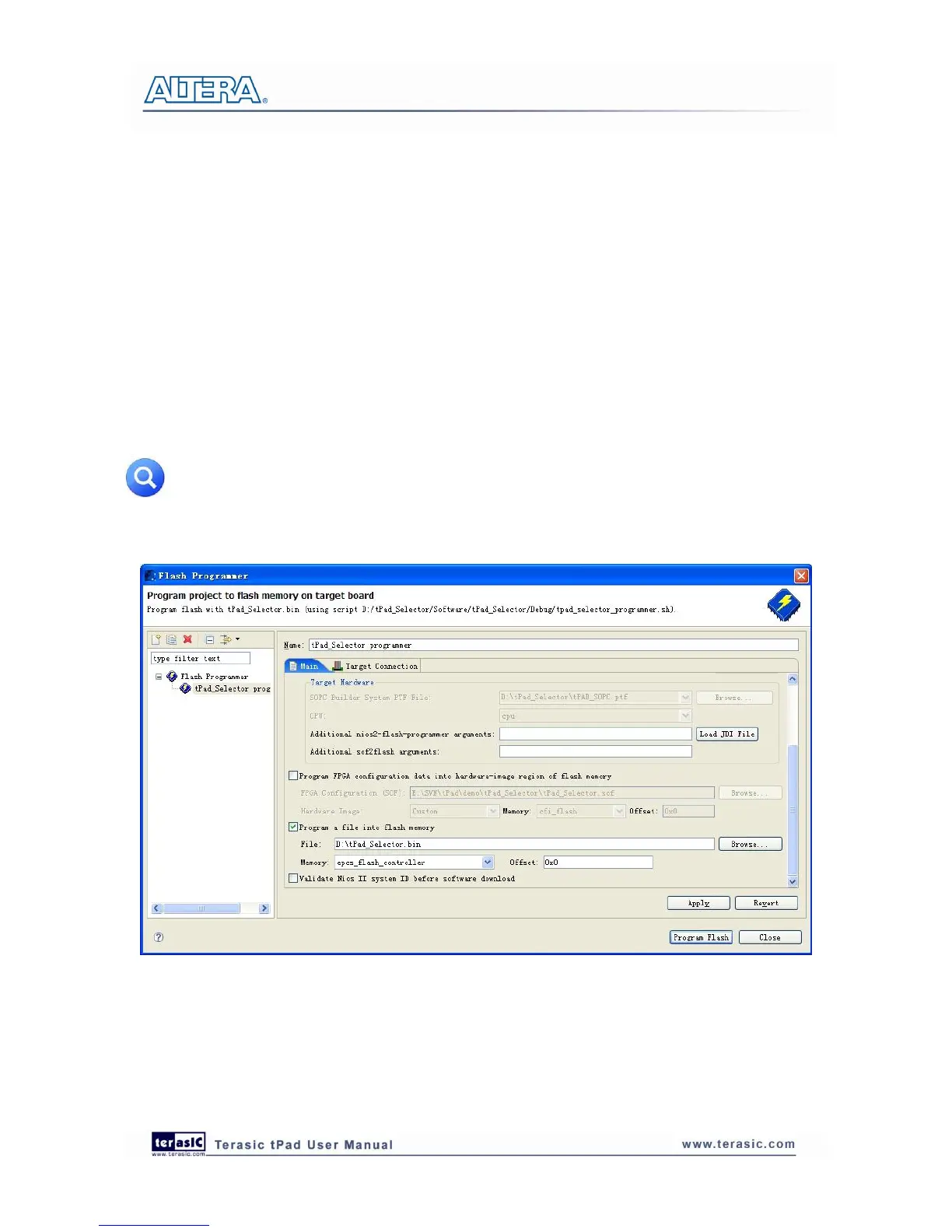
Choose Tools > Flash Programmer to open the flash programmer
Choose Program a file into memory, choose your tPad_Selector.bin file. See Figure 5-2
Click Program Flash to start program tPad_Selector.bin to EPCS in the board
When program finish, power on again
Note: You can also use „tPad_Selector_batch‟ to generate selector.bin and restore the
original binary file by executing the tPad_Selector.bat under the
tPad_Factory_Recovery\tPad_Selector_batch folder.
Figure 5-2 Programming Flash settings



 To Next Page