EasyManua.ls Logo

Alto-Shaam 600-LVD - User Manual

Alto-Shaam 600-LVD
20 pages
Print Icon
To Next Page IconTo Next Page
Loading...
#824 • 4/06
W164 N9221 Water Street P.O. Box 450 • Menomonee Falls, Wisconsin 53052-0450 USA
PHONE: 262.251.3800 • 800.558.8744 USA/CANADA FAX: 262.251.7067 • 800.329.8744 U.S.A. ONLY
WEBSITE: www.alto-shaam.com
PRINTED IN U.S .A .
®
Hot Food Display
Cabinet, Electric
Model:
600-LVD
• INSTALLATION
OPERATION
• MAINTENANCE
Question and Answer IconNeed help?

Do you have a question about the Alto-Shaam 600-LVD and is the answer not in the manual?

Overview

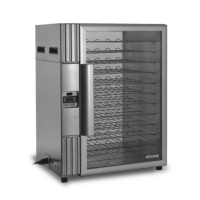
The Alto-Shaam Model 600-LVD is an electric hot food display cabinet designed for commercial establishments to maintain hot food at safe serving temperatures. This appliance utilizes a special, low-heat-density heating cable and the "Halo Heat" concept to provide an evenly applied heat source, controlled by a thermostat. This method helps preserve the natural flavor and moisture content of food for several hours without the need for added water, water vapor, or steam, preventing moisture loss due to evaporation or dehydration.

Technical Specifications:

  • Model: 600-LVD
  • Dimensions (Outside):
    • Width: 24-1/2" (622mm)
    • Depth: 20-5/8" (524mm)
    • Height (Front): 31-1/2" (800mm)
    • Height (Rear, with pass-through): 40" (1016mm) or 60" (1524mm) for pass-through models.
    • Shelf Spacing: 2-5/16" (59mm) between shelves.
  • Electrical (120V):
    • Voltage: 120V
    • Phase: 1
    • Cycle/Hz: 60
    • Amps: 14.2
    • kW: 1.7
    • Plug Type: NEMA 5-20P (20A-125V)
  • Electrical (230V):
    • Voltage: 230V
    • Phase: 1
    • Cycle/Hz: 50/60
    • Amps: 9.8
    • kW: 2.3
    • Plug Type: CEE 7/7 (220-230V)
  • Net Weight: 120 lb. (54 kg)
  • Capacity: Twelve 16" (406mm) pizzas maximum, with a maximum weight of 2 lbs. (0.9 kg) per pizza.
  • Temperature Range: Minimum set-point temperature is 90°F (32°C), maximum set-point temperature is 200°F (93°C).

Usage Features:

  • Electronic Control with L.E.D. Display: The unit features a three-digit Light Emitting Diode (L.E.D.) display that shows the chamber's internal temperature, programming, and diagnostic information.
  • ON/OFF Rocker Switch: Clearly marked with international "I" for On and "O" for Off.
  • UP/DOWN Arrow Rocker Button: Used to increase or decrease the set-point temperature.
  • SET Button: Displays the current set-point temperature for five seconds with a single push. Holding the SET button activates the programming mode to set a new temperature. A blinking L.E.D.1 indicator confirms programming mode, and the chamber temperature L.E.D. flashes three times to confirm a new set-point.
  • Heat Indicator L.E.D.: Illuminates when the unit is calling for heat and extinguishes when the warming chamber reaches the set-point temperature.
  • Preheating: Always preheat the unit at 200°F (93°C) for 30 minutes before loading with hot food.
  • Loading Guidelines: Only hot foods should be placed into the cabinet. A food thermometer should be used to ensure all food has reached an internal temperature range of 140° to 160°F (60° to 71°C) before loading. The cabinet should not be filled closer than 2" from the sensor. Doors must be securely closed after loading. The control can be reset to 160°F (71°C), but the final setting depends on food type and quantity. Periodic checks of internal food temperature are recommended.
  • Holding Temperature Range: Suggested guidelines are provided for various food types (meat, poultry, fish/seafood, baked goods, miscellaneous) with specific Fahrenheit and Celsius ranges.
  • Level Surface Installation: The unit must be installed on a level surface to ensure proper function and allow access for cleaning and maintenance.
  • Clearance Requirements: 3 inches (76mm) at the back, 2 inches (51mm) at the top, and 2 inches (51mm) at both sides.
  • NSF Compliance: For stationary counter-mounted equipment, it must be secured flush to the counter and sealed with NSF approved sealant or equipped with 4" (102mm) legs for unobstructed space. The unit comes with 1-1/2" (38mm) rubber legs.

Maintenance Features:

  • Daily Cleaning: The unit should be thoroughly cleaned after each use.
    • Turn off power and disconnect from the power source. Allow to cool.
    • Remove and store unused products under refrigeration.
    • Remove all detachable items (wire shelves, side racks, drip pan) and clean them separately.
    • Clean the interior with a damp cloth or sponge and a mild commercial detergent. Rinse and wipe dry.
    • For heavily soiled areas, spray with a water-soluble degreaser, let stand for 10 minutes, then remove soil with a plastic scouring pad.
    • Clean control panel, door vents, handles, and gaskets.
    • Wipe exterior with a cleaner recommended for stainless steel surfaces, wiping with the grain.
    • Clean glass with a window cleaner.
  • Stainless Steel Care:
    • Avoid abrasive cleaning compounds, chloride-based cleaners, or cleaners containing quaternary salts. Never use hydrochloric acid (muriatic acid).
    • Use non-abrasive cleaning products designed for stainless steel.
    • Use soft, clean cloths or non-abrasive scouring pads (scrubbing with the grain of the metal).
    • Never use wire brushes, metal scouring pads, or scrapers.
    • Promptly remove spilled foods and thoroughly rinse surfaces after cleaning.
  • Safety Precautions for Cleaning:
    • Always disconnect the unit from the power source before cleaning or servicing.
    • NEVER steam clean, hose down, or flood the interior or exterior with water or liquid solution of any kind. Do not use a water jet. Flooding the appliance will void the warranty and can cause severe damage or electrical hazard.
  • Troubleshooting Guide: The manual includes a troubleshooting guide for common error codes (e.g., "OOO" for open-circuited sensor, "CCC" for short-circuited sensor) and operational issues (e.g., unit not operating, no display, incorrect temperature readout). It provides possible causes and required actions, emphasizing that these guides are for qualified technicians only.
  • Electronic Control Accuracy Check: Instructions are provided to verify the temperature inside the warming cabinet using a quality thermal indicator if the digital display reading is suspected to be inaccurate. This involves emptying the cabinet, ensuring the sensor is clean, suspending the thermal indicator in the center, and allowing at least one hour for temperature stabilization without opening the doors.
  • Service Hotline: A 24/7 service hotline (1-800-558-8744) is available for assistance.

Alto-Shaam 600-LVD Specifications

General IconGeneral
BrandAlto-Shaam
Model600-LVD
CategoryOven
LanguageEnglish

Related product manuals