MA-716A
3. Connection
3-3
(2) Connecting the Communication Cable
Connect the communication cable to the communication connector on the rear
of the MM-122A.
For details, see the operation manual for the MM-122A.
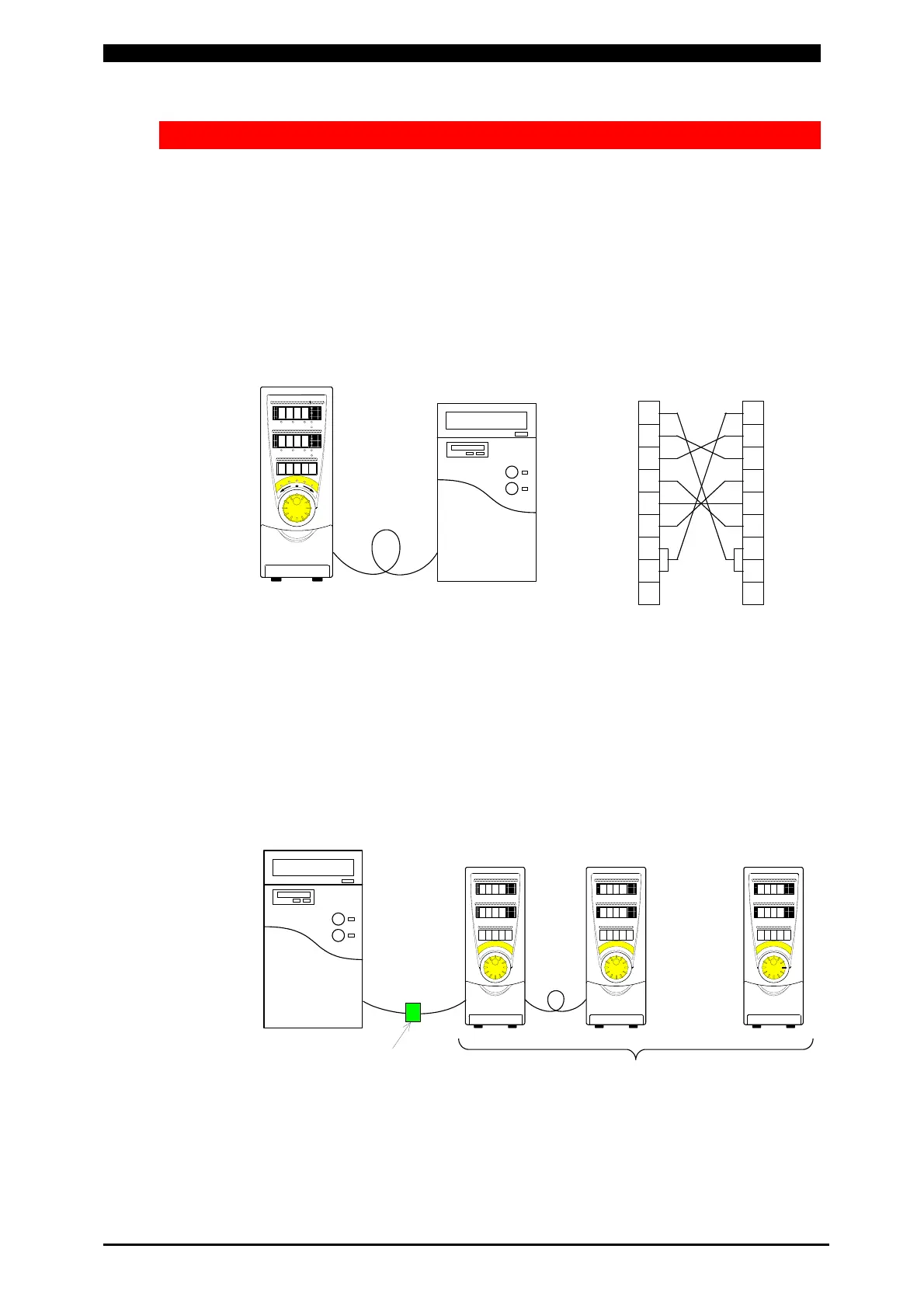
① RS-232C
One MM-122A is connected even when the communication method of the
MM-122A is set to “232Sy” for the setting change or “232Fr” for the
measured-value reading.
② RS-485
Up to thirty-one MM-122As can be connected when the communication
method of the MM-122A is set to “485Sy” for the setting change. When
“485Fr” is set for the measured-value reading, only one MM-122A is
connected.
Host computerMM-122A
RS-232C
1
RXD 2
TXD 3
4
5
6
7
8
9
1CD
2 RXD
3 TXD
4 DTR
5 GND
6 DSR
7 RTS
8 CTS
9
MM-122A side
Pin No.
Host computer
side Pin No.
D-Sub 9-pin
Male
D-Sub 9-pin
Female
MM-122A
ID No.1
Host computer
RS-232C/RS-485
conversion adapter
・・・・・・
31 devices max.
MM-122A
ID No.2
MM-122A
ID No.31



 To Next Page