PIX-75 www.amano.com/time • 1-800-253-9836 1-9
Step 3 - Changing the Print Format (P4)
1. With the cover removed, press the PROGRAM button to begin button
program mode and P1 TIME will appear.
2. Press the + button to change the current programming mode
until the display shows
P4 PRint FORMAT.
3. Press the ENTER button once and the clock will flash the
current print format. The default setting = FORMAT-1.
4. Press the + or – button to increase or decrease the print format value to
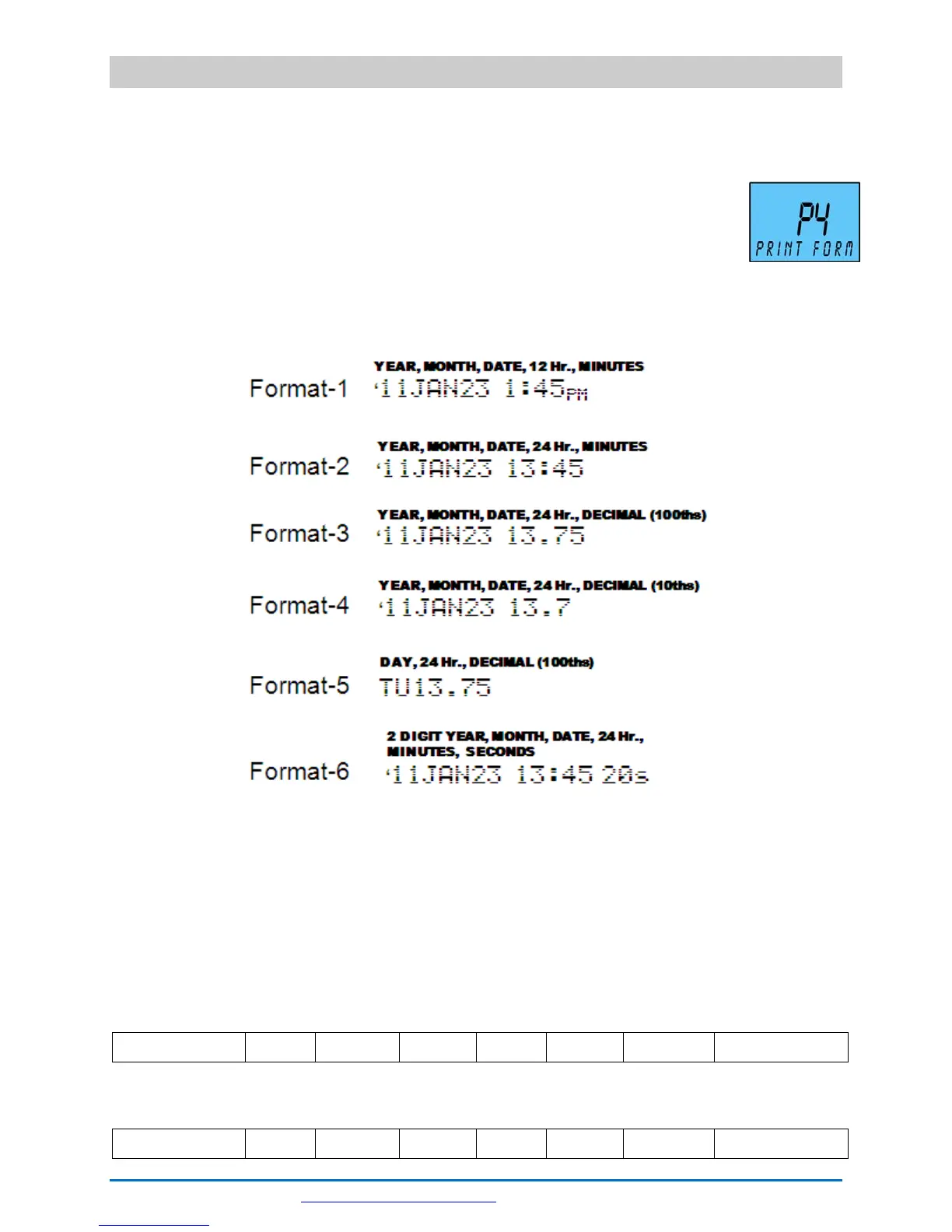
1, 2, 3, 4, 5, or 6. See the following for examples of Print Format:
5. Press the ENTER button once to accept the current value.
6. Replace the cover for normal operation.
There are six (6) print formats pre-configured to select [Format 1 thru
Format 6]. Each print format has its own pre-configured print content. See
the previous illustration or the following:
Format 1 [default]
2 Digit Year Space Month Space Date Space 12 Hour 60
th
Minutes
Format 2
2 Digit Year Space Month Space Date Space 24 Hour 60
th
Minutes



 To Next Page